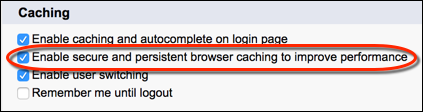
If you use many components in your Experience Builder site, you can improve your site’s performance with browser caching. Performance is about the same for the first page load, but subsequent page loads are faster. The cache is encrypted and secure.
Required Editions
| Available in: both Salesforce Classic and Lightning Experience |
| Available in: Enterprise, Performance, Unlimited, and Developer Editions |
| User Permissions Needed | |
|---|---|
| To customize or publish an Experience Cloud site: |
|
The Enable secure and persistent browser caching to improve performance setting enables browser caching of your site’s Lightning components. It’s enabled by default.

Note To cache your site’s Visualforce pages on your end users’ web
browsers, disable the site-level setting: Cache public Visualforce
pages. For more information on caching your site’s Visualforce pages, see
Configure Site Caching in Salesforce Help.
To verify that the Enable secure and persistent browser caching to improve performance setting is enabled:
From Setup, in the Quick Find box, enter Session Settings, and
then select Session Settings.