---
schema_version: "1"
id: 7175d8f8811bff58797cc65695305fd8b7a3318ef3cb303eb33342f6e56396f1
title: Improve Experience Cloud Site Performance with Browser Caching
collection: admin
version: current
locale: en-us
portal_url: https://docs.salesforce.com/admin/current/en-us/experience/264-0-0/community_builder_cache.md
canonical_url: https://help.salesforce.com/s/articleView?id=experience.community_builder_cache.htm&release=264.0.0&type=5
source_site: help.salesforce.com
content_type: documentation
content_hash: 3c4945c693eefc0ef3ec8c53632488ba8f29e24a82bfea673f7ab0fe805066be
description: If you use many components in your Experience Builder site, you can improve your site’s performance with browser caching. Performance is about the same for the first page load, but subsequent page loads are faster. The cache is encrypted and secure.
products:
- Experiences
release: "264"
---
# Improve Experience Cloud Site Performance with Browser Caching
If you use many components in your Experience Builder site, you can improve your site’s performance with browser caching. Performance is about the same for the first page load, but subsequent page loads are faster. The cache is encrypted and secure.
### Required Editions
Available in: both Salesforce Classic and Lightning Experience
Available in: Enterprise, Performance, Unlimited, and Developer Editions
User Permissions
Needed
To customize or publish an Experience Cloud site:
Create and Set Up Experiences AND View Setup and Configuration AND be a member
of the site
OR
View Setup and Configuration AND be a member of the site AND have appropriate
role-based site access
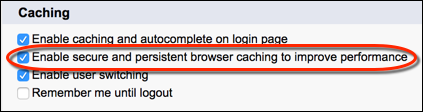
The **Enable secure and persistent browser caching to improve performance** setting enables browser caching of your site’s Lightning components. It’s enabled by default.

Note To cache your site’s Visualforce pages on your end users’ web browsers, disable the site-level setting: **Cache public Visualforce pages**. For more information on caching your site’s Visualforce pages, see Configure Site Caching in Salesforce Help.
To verify that the **Enable secure and persistent browser caching to improve performance** setting is enabled:
From Setup, in the Quick Find box, enter Session Settings, and then select **Session Settings**.
#### See Also
- [Configure Site Caching](https://help.salesforce.com/s/articleView?id=platform.sites_caching.htm&type=5&language=en_US)