
Pin your most critical information to the top of a feed. In group and topics feeds, an authorized user can pin up to three posts. A pinned post stays in place until an authorized user unpins it. After you enable post pinning through Chatter Settings, you can assign the Pin Posts in Feeds permission through a permission set or a user profile.
Required Editions
| Available in Lightning Experience in: Essentials, Group, Professional, Enterprise, Performance, Unlimited, Developer, and Contact Manager Editions |
| User Permissions Needed | |
|---|---|
| To assign post pinning permission to a user: | Enable Chatter |
When all permissions are in place, the Pin option appears on a feed item’s overflow menu in group and topics feeds. The Pin option isn’t available in the feed item’s detail view.
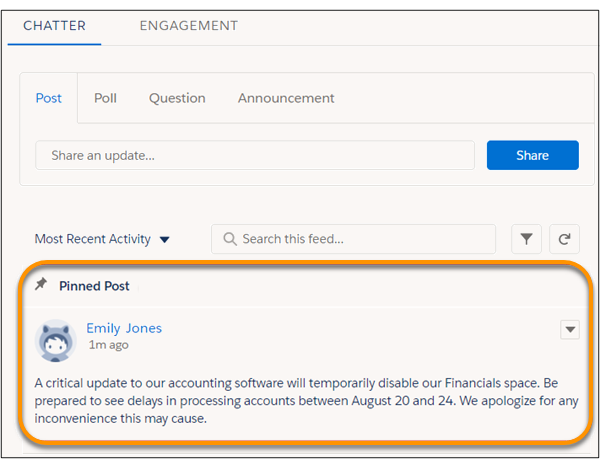
When you pin a post, it appears twice in the feed: where it was posted and in its pinned position at the top of the feed. You can pin only the posts that were added directly to the feed. You can’t pin posts that were added through an @mention.
Pinned posts are similar to announcements, with these differences.
- Announcements are available only to group feeds. Post pinning is available to group and topics feeds.
- Announcements follow a linear timeline: you post it and you let it expire. Pinned posts are more flexible: you can pin posts from the past or the present.
- An announcement expires on a set date. A pinned post stays pinned until an authorized user unpins it.
- Only group owners and managers and users with the Modify All Data permission can post and delete group announcements. Admins can choose who is authorized to pin posts.
- You can post only one announcement per group feed. Authorized users can pin up to three posts to the top of a feed.
- You can add style to a pinned post with the rich text editor.