---
schema_version: "1"
id: 71227722eef4c1e6018139eefea526f6e82d2476733f46208a4bfa0500ef1803
title: Assign Pin Post Permission
collection: admin
version: current
locale: en-us
portal_url: https://docs.salesforce.com/admin/current/en-us/experience/264-0-0/collab_admin_pin_post.md
canonical_url: https://help.salesforce.com/s/articleView?id=experience.collab_admin_pin_post.htm&release=264.0.0&type=5
source_site: help.salesforce.com
content_type: documentation
content_hash: a8df51801950e8316449ff68feabe3b9d04ed3c88c752f5f4abb8446cd79e21a
description: Pin your most critical information to the top of a feed. In group and topics feeds, an authorized user can pin up to three posts. A pinned post stays in place until an authorized user unpins it. After you enable post pinning through Chatter Settings, you can assign the Pin Posts in Feeds permission through a permission set or a user profile.
products:
- Experiences
release: "264"
---
# Assign Pin Post Permission
Pin your most critical information to the top of a feed. In group and topics feeds, an authorized user can pin up to three posts. A pinned post stays in place until an authorized user unpins it. After you enable post pinning through Chatter Settings, you can assign the Pin Posts in Feeds permission through a permission set or a user profile.
### Required Editions
Available in Lightning Experience in: Essentials, Group, Professional, Enterprise, Performance, Unlimited, Developer, and Contact Manager Editions
User Permissions
Needed
To assign post pinning permission to a user:
Enable Chatter
When all permissions are in place, the **Pin** option appears on a feed item’s overflow menu in group and topics feeds. The **Pin** option isn’t available in the feed item’s detail view.
Start by enabling post pinning for your org. Go to **Setup** | **Chatter Settings**, and select **Allow post pinning**.
After post pinning is enabled, admins, group owners, and group managers can pin posts. Admins can also assign the Pin Posts in Feeds permission to users through user profiles or permission sets.
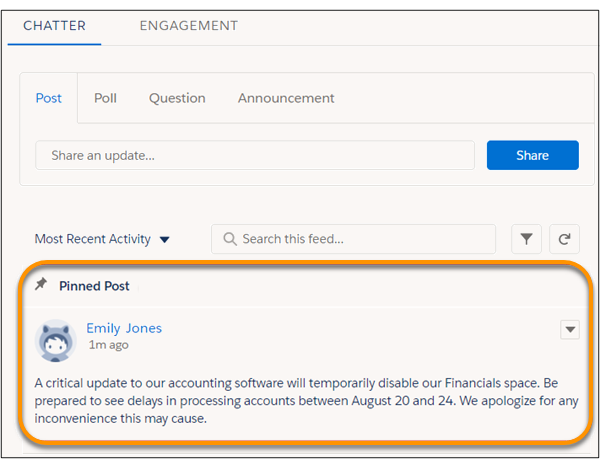
When you pin a post, it appears twice in the feed: where it was posted and in its pinned position at the top of the feed. You can pin only the posts that were added directly to the feed. You can’t pin posts that were added through an @mention.
Pinned posts are similar to announcements, with these differences.
- Announcements are available only to group feeds. Post pinning is available to group and topics feeds.
- Announcements follow a linear timeline: you post it and you let it expire. Pinned posts are more flexible: you can pin posts from the past or the present.
- An announcement expires on a set date. A pinned post stays pinned until an authorized user unpins it.
- Only group owners and managers and users with the Modify All Data permission can post and delete group announcements. Admins can choose who is authorized to pin posts.
- You can post only one announcement per group feed. Authorized users can pin up to three posts to the top of a feed.
- You can add style to a pinned post with the rich text editor.
#### See Also
- [Pin Posts in an Experience Cloud Site](https://help.salesforce.com/s/articleView?id=experience.networks_chatter_pin_post.htm&type=5&language=en_US)