To reduce clutter and avoid reaching your org's limit for key qualifiers, remove and
delete unnecessary key qualifiers from the system. To delete a key qualifier, first
remove it from all the data lake object (DLO) fields that it’s associated with and then delete it.
You can also just remove a key qualifier from a DLO field but not delete it from the system.
Removing a key qualifier from a DLO field can potentially affect the accuracy of calculated
insights, segments, activations, and API queries.
Required Editions
| User Permissions Needed |
| To remove and delete key qualifiers: |
Permission set:
|
- Identify the DLO fields associated with a key qualifier.
Before you remove or delete a key qualifier, remove it from its associated DLO
fields. Identify all the DLO fields that share the key qualifier.
- In Data Cloud, go to the Data Lake Objects tab.
- Click the name of a DLO.
- Click the dropdown next to any DLO field and select View Key
Qualifiers.
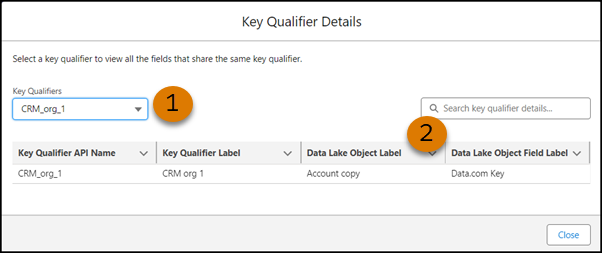
- In the Key Qualifier Details window, select the key qualifier that you want to delete (1)
and note the DLO and DLO fields that are associated with it
(2).
- Remove the key qualifier from the DLO fields.
Before you can delete a key qualifier, remove it. You can also just remove it
without deleting it.
- On the Data Lake Objects tab, click the DLO that contains the field that you want to
remove the key qualifier from.
- Next to the DLO field that you want to remove the key qualifier from, click the dropdown,
and select Remove Key Qualifier.
- After you confirm the removal, the key qualifier is no longer associated with the DLO
field.
If you’re only removing a key qualifier and not deleting it, you’re
done.
- Delete the key qualifier.
- On the Data Lake Objects tab, click a DLO.
- Click the dropdown next to any DLO field, and select
Add
Key Qualifier.
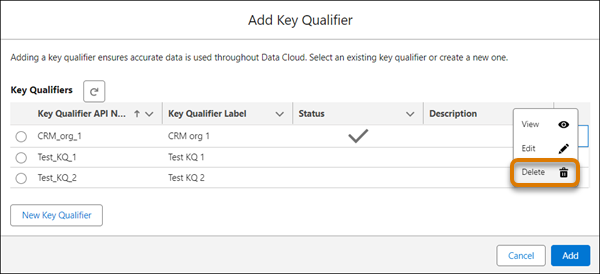
- In the Add Key Qualifier window, select the key qualifier that you want to delete, click
the dropdown next to it, and select Delete.
- When prompted, confirm that you want to delete the key qualifier.