---
schema_version: "1"
id: 7b1ee94904a738e32eabb11e5d177562576332e649439ec991fdea056c122c13
title: Remove or Delete a Key Qualifier
collection: admin
version: current
locale: en-us
portal_url: https://docs.salesforce.com/admin/current/en-us/data/264-0-0/c360_a_remove_and_delete_key_qualifier.md
canonical_url: https://help.salesforce.com/s/articleView?id=data.c360_a_remove_and_delete_key_qualifier.htm&release=264.0.0&type=5
source_site: help.salesforce.com
content_type: documentation
content_hash: 3bff9ba479330eceb8c187df16992570d3d7d067a73099a050a86b8eb4a82ea0
description: To reduce clutter and avoid reaching your org's limit for key qualifiers, remove and delete unnecessary key qualifiers from the system. To delete a key qualifier, first remove it from all the data lake object (DLO) fields that it’s associated with and then delete it. You can also just remove a key qualifier from a DLO field but not delete it from the system. Removing a key qualifier from a DLO field can potentially affect the accuracy of calculated insights, segments, activations, and API queries.
products:
- Data 360
release: "264"
---
# Remove or Delete a Key Qualifier
To reduce clutter and avoid reaching your org's limit for key qualifiers, remove and delete unnecessary key qualifiers from the system. To delete a key qualifier, first remove it from all the data lake object (DLO) fields that it’s associated with and then delete it. You can also just remove a key qualifier from a DLO field but not delete it from the system. Removing a key qualifier from a DLO field can potentially affect the accuracy of calculated insights, segments, activations, and API queries.
### Required Editions

Note To remove key qualifiers from a companion org, remove them from the home org and wait at least 10 minutes for the companion org to sync with the home org.
1. Identify the DLO fields associated with a key qualifier.
Before you remove or delete a key qualifier, remove it from its associated DLO fields. Identify all the DLO fields that share the key qualifier.
1. In Data Cloud, go to the Data Lake Objects tab.
2. Click the name of a DLO.
3. Click the dropdown next to any DLO field and select **View Key Qualifiers**.
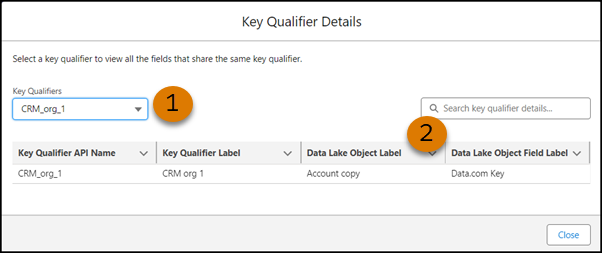
4. In the Key Qualifier Details window, select the key qualifier that you want to delete (1) and note the DLO and DLO fields that are associated with it (2).
2. Remove the key qualifier from the DLO fields.
Before you can delete a key qualifier, remove it. You can also just remove it without deleting it.
1. On the Data Lake Objects tab, click the DLO that contains the field that you want to remove the key qualifier from.
2. Next to the DLO field that you want to remove the key qualifier from, click the dropdown, and select **Remove Key Qualifier**.
3. After you confirm the removal, the key qualifier is no longer associated with the DLO field.
If you’re only removing a key qualifier and not deleting it, you’re done.
3. Delete the key qualifier.
1. On the Data Lake Objects tab, click a DLO.
2. Click the dropdown next to any DLO field, and select **Add Key Qualifier**.
3. In the Add Key Qualifier window, select the key qualifier that you want to delete, click the dropdown next to it, and select **Delete**.
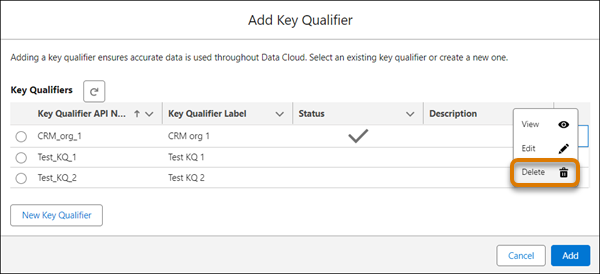
1. When prompted, confirm that you want to delete the key qualifier.
#### See Also
- [Configure a Key Qualifier Field](https://help.salesforce.com/s/articleView?id=data.c360_a_add_or_view_key_qualifier.htm&release=264.0.0&type=5 "After creating a data stream, add key qualifiers to your data lake object (DLO) fields to create fully qualified keys (FQK). Configure key qualifiers for all DLO fields that contain either a primary or foreign key. You can add up to 20 active key qualifiers. A key qualifier is active when it's used for a DLO field. Data 360 automatically adds and removes key qualifiers to and from data model object (DMO) fields. You can't edit these system fields.")
- _Salesforce Help_: Configure a Key Qualifier Field