After defining your segment in Data 360, you can publish it to your
activation targets whenever you want or based on a schedule when the segment was created. The
standard publish schedule is 12 or 24 hours. You can also change the segment schedule by editing
its properties. When you’ve reached the segment publish concurrency limit, Data 360 defers the publish of other segments. This deferral continues until the
number of simultaneously running segments falls below the limit. This means that a segment
scheduled at a specific time sometimes doesn’t start publishing at its scheduled time.
Required Editions
| Permission Sets Needed |
| To publish a segment: |
One of these permission sets:
- Data Cloud Architect
- Data Cloud Activation Manager
- Data Cloud Activation Specialist
|
- In Data 360, go to Segments.
- Select your segment from the list.
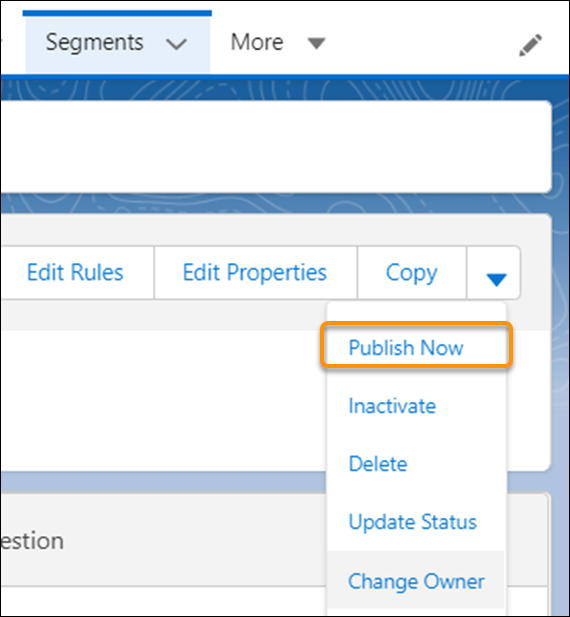
- On the segment details page, to have the activation target pick up the segment, click the
dropdown menu and select Publish Now.
The amount of time it takes to publish the segment depends on your volume and activation
target. To see when the segment was published, check the Publish History page. To schedule
publishing, edit the segment’s properties.
- Increase Segment Refresh from Data 360 to the Activation Targets
Increase the frequency of segment refresh and shorten publishing time for activations from Data 360 to the activation targets using Rapid Publish. When you create a segment, choose Rapid Publish to run on a daily schedule at a 1-hour or 4-hour interval.
- Segment Types and Statuses
Learn more about the values provided about each segment. View details in the Segments section of Data 360, or in Publish History for a specific segment. Depending on how you create the segment, the type can be UI (created via the Segment Builder) or DBT (created via the API).