---
schema_version: "1"
id: 1a627e20fa02b0471bbb4b79a0a0aa8df00c0ec891556122160848ff5bf3f2fe
title: Publish a Segment in Data 360
collection: admin
version: current
locale: en-us
portal_url: https://docs.salesforce.com/admin/current/en-us/data/264-0-0/c360_a_publish_segment.md
canonical_url: https://help.salesforce.com/s/articleView?id=data.c360_a_publish_segment.htm&release=264.0.0&type=5
source_site: help.salesforce.com
content_type: documentation
content_hash: d72b3a0d06e6d2e7627cb9f417a27c42d4ae9cabccbcbf5e5a2a6a39da166de2
description: After defining your segment in Data 360, you can publish it to your activation targets whenever you want or based on a schedule when the segment was created. The standard publish schedule is 12 or 24 hours. You can also change the segment schedule by editing its properties. When you’ve reached the segment publish concurrency limit, Data 360 defers the publish of other segments. This deferral continues until the number of simultaneously running segments falls below the limit. This means that a segment scheduled at a specific time sometimes doesn’t start publishing at its scheduled time.
products:
- Data 360
release: "264"
---
# Publish a Segment in Data 360
After defining your segment in Data 360, you can publish it to your activation targets whenever you want or based on a schedule when the segment was created. The standard publish schedule is 12 or 24 hours. You can also change the segment schedule by editing its properties. When you’ve reached the segment publish concurrency limit, Data 360 defers the publish of other segments. This deferral continues until the number of simultaneously running segments falls below the limit. This means that a segment scheduled at a specific time sometimes doesn’t start publishing at its scheduled time.
### Required Editions
1. In Data 360, go to **Segments**.
2. Select your segment from the list.
3. On the segment details page, to have the activation target pick up the segment, click the dropdown menu and select **Publish Now**.
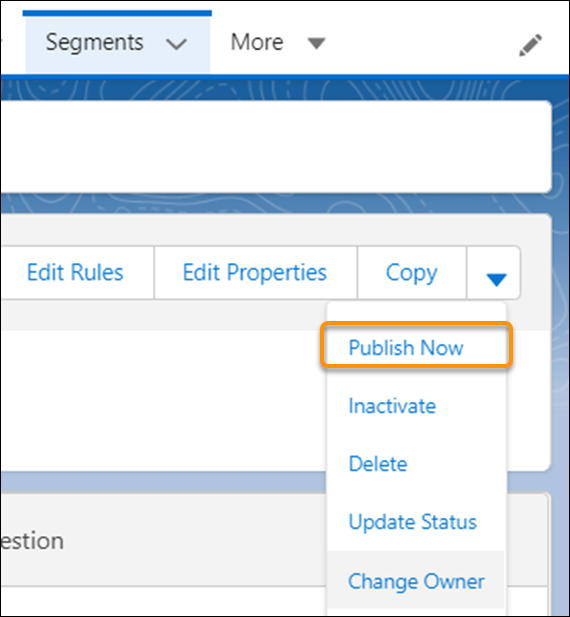
The amount of time it takes to publish the segment depends on your volume and activation target. To see when the segment was published, check the Publish History page. To schedule publishing, edit the segment’s properties.
- **[Increase Segment Refresh from Data 360 to the Activation Targets](https://help.salesforce.com/s/articleView?id=data.c360_a_rapid_segment_publish.htm&release=264.0.0&type=5)**
Increase the frequency of segment refresh and shorten publishing time for activations from Data 360 to the activation targets using Rapid Publish. When you create a segment, choose Rapid Publish to run on a daily schedule at a 1-hour or 4-hour interval.
- **[Segment Types and Statuses](https://help.salesforce.com/s/articleView?id=data.c360_a_segment_types_statuses.htm&release=264.0.0&type=5)**
Learn more about the values provided about each segment. View details in the Segments section of Data 360, or in Publish History for a specific segment. Depending on how you create the segment, the type can be UI (created via the Segment Builder) or DBT (created via the API).
#### See Also
- [_Salesforce Help_: Activation Targets](https://help.salesforce.com/s/articleView?id=data.c360_a_activation_targets.htm&release=264.0.0&type=5 "Depending on your use case, data can be activated to various targets, from file storage, external activation, or to other data model objects (DMOs) in Data 360. Once you know where you want to act on the segmented data from Data 360, create activation targets for each platform.")
- [_Salesforce Help_: Edit a Segment](https://help.salesforce.com/s/articleView?id=data.c360_a_edit_segment.htm&release=264.0.0&type=5 "After you create a segment in Data 360, you can edit its rules or properties to provide updates or change the purpose. Changing the segment name doesn’t change the segment API name.")
- [_Salesforce Help_: Data 360 Limits and Guidelines](https://help.salesforce.com/s/articleView?id=data.c360_a_limits_and_guidelines.htm&release=264.0.0&type=5 "Guidelines define best practice recommendations to optimize your adoption of Data 360 for best performance. Limits are boundaries beyond which features are unavailable, performance is throttled, or usage billing charges are applied. Since Data 360 is built to scale, some limits can be adjusted to meet your business needs. Work with your account executive to find a solution that meets your goals.")
- [_Salesforce Help_: Customer Data Platform Billable Usage Calculations](https://help.salesforce.com/s/articleView?id=data.c360_a_billing.htm&release=264.0.0&type=5 "Previously named Customer Data Platform orgs are billed based on contracted entitlements. Understanding which usage is included for billing helps you make data management decisions.")