
Ingest, harmonize, unify, and analyze streaming and batch data with Data 360. Then use that data to unlock meaningful and intelligent experiences across Customer 360 applications and beyond.

As of October 14, 2025, Data Cloud has been rebranded to Data 360. During this transition, you may see references to Data Cloud in our application and documentation. While the name is new, the functionality and content remains unchanged.
How Does It Work?
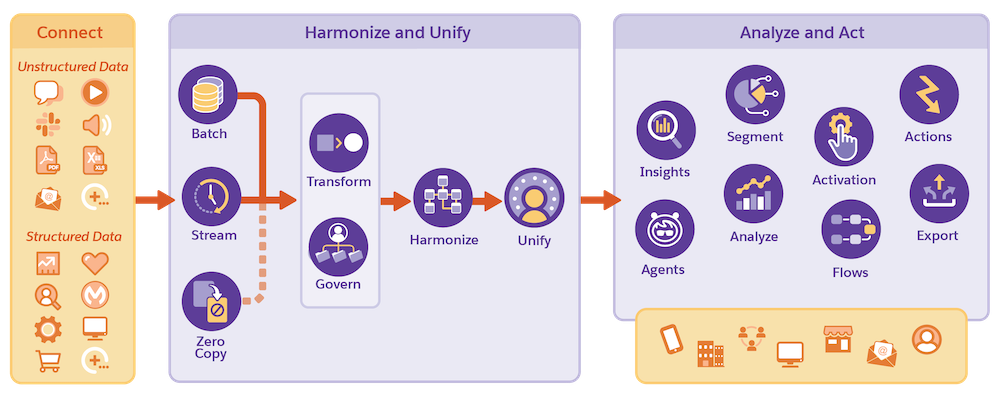
- Connect all your data sources whether your data is unstructured or structured data.
- Ingest batch or streaming data.
- Connect data using zero copy data federation.
- Prepare your data through transformation and data governance features.
- Harmonize your data to a standard data model.
- Unify data with identity resolution rulesets.
- Query and analyze data using insights.
- Use AI to predict behavior.
- Segment your data and activate to use in various channels to create personalized experiences.
- Analyze your data using supported analytic tools.
- Output data to multiple sources to act on data based on your business needs.
- Ground your data for use with Agentforce.
- Continue to review, measure, and optimize data.

Data 360 is for all users and offers functionality across roles.
| User | Description | Learn More |
|---|---|---|
| Admins | Grow your admin career with Data 360. | Trailhead: Administer Data 360 |
| Analysts | Expand the capabilities of Data 360 using Tableau or Tableau Next. | |
| Builders | Build applications and features using Data 360. | ISVforce Guide: Use Managed Packages to Develop Your AppExchange Solution |
| Business Users | Ingest data into Data 360 for a variety of use cases, regardless of role or industry. | |
| Data Architects | Map and model data for your company. | |
| Developers | Use APIs and SDKs to interact with Data 360. | Salesforce Developers: Data 360 Developer Center |
| Marketers | Segment audiences to create cross-channel campaigns to reach your customers. | Trailhead: Segmentation in Data 360 |
| Partners | Implement Data 360 for your customers. | Salesforce Partners: Partner Learning Camp |

Customize Your Data 360 Experience
Data 360 is built to scale, allowing you to bundle features as needed. Some Data 360 features are offered as add-on licenses, and others have usage limitations, though many limits can be adjusted to meet your business needs. Learn about current Data Cloud Limits and Guidelines and then work with your account executive to find a solution that meets your goals.
Data 360 Starter
You have the base functionality and features of Data 360.
- Start planning for Data 360: Get Started Using Data 360
- Learn more about data usage that impact pricing: Data Usage in Data 360
- Add user permissions to your users: User Roles and Permission Sets in Data 360
Data 360 with Tableau or Tableau Next
You have all the functionality of Data 360, along with the power of robust analytics with Tableau or Tableau Next.
- Learn about Data 360 and Tableau.
- Learn about Data 360 and Tableau Next.
Marketing Use Cases for Data 360
You have all the functionality of Data 360 and with the addition of Segmentation and Activation, you can create meaningful audience segments and use those segments to create personalized customer communications and journeys.
- After you have your data ingested and unified, get started building segments: Create and Activate Segments
Industry Use Cases for Data 360
Use the power of Data 360 to solve various business needs with our industry-specific solutions.
- Connect and integrate client data to give financial institutions a unified view of their client. Learn more about Data Cloud for Financial Services Cloud.
- Aggregate health data and calculate scores for Unified Health Scoring in Health Cloud. Learn more about connecting Data 360 and Health Cloud: Integrate Data Cloud with Unified Health Scoring

- Better Together: Data and AI
AI solutions grounded in trusted, accurate, and relevant data are the most helpful agents. Data 360 helps you consolidate disparate data sources into unified profiles of customers or accounts, which supercharge AI and Agentforce. - A Solid Data Foundation: Data 360 and Informatica IDMC
Salesforce offers foundational data management capabilities with Data 360 and Informatica’s Intelligent Data Management Cloud (IDMC). IDMC offers advanced data quality, lineage, governance, and Master Data Management (MDM) capabilities. Data 360 connects, harmonizes, and unifies data into unified profiles to provide a secure and trusted data foundation. You can use Data 360 and IDMC in parallel or individually at different stages in your project. - Data Builds the Foundation for Marketing
Data 360 works together with Marketing Cloud Next to help marketers build and optimize marketing campaigns with personalization, AI, and data-driven insights. - Data to Decisions: Data 360 and Tableau Next
Tableau Next, Tableau Semantics, and Data 360 work together as a connected ecosystem to unlock the value of your data. With all three natively built into Salesforce and integrated with Agentforce, any team can discover analytical insights to make strategic decisions quickly. - About Data 360 Releases
Data 360 releases new features on a monthly basis, often outside of the Salesforce three major releases. Updates are generally compatible unless special advance notifications are provided. - Data 360 Glossary of Terms
Learn the definition of terms associated with Data 360. - Data 360 Resources
In addition to help content, find links to videos, Trailhead, Developer, and other content available to help learn and implement Data 360. - Data 360 Thought Leadership Content
Find links to blogs, white papers, and community groups related to Data 360. - Data 360 and Cross-Cloud Implementation Guides
Use printable PDF guides to set up, administer, and configure Data 360 features and applications. PDF guides are updated regularly, so check the date of any downloaded and saved guides before beginning your implementation. - Data 360 Cross-Product Solutions
Review various cross-product use cases and solutions for Data 360.