
You can edit the Data Cloud Salesforce Connector permission set to allow ingestions of objects and fields into Data 360.
Required Editions
| Available in: All Editions supported by Data 360. See Data 360 edition availability. |
| User Permissions Needed | |
|---|---|
| To update object settings |
System admin profile OR Data Cloud Architect permission set |
Watch this video or follow the steps to enable permissions.
- Log in to the Salesforce org containing the objects and fields that you want to ingest into Data 360.
-
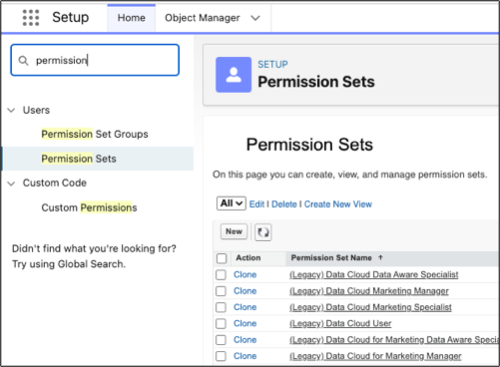
From Setup, in the Quick Find box, enter Permission, and then select
Permission Sets.
-
Select the Data Cloud Salesforce Connector permission set.
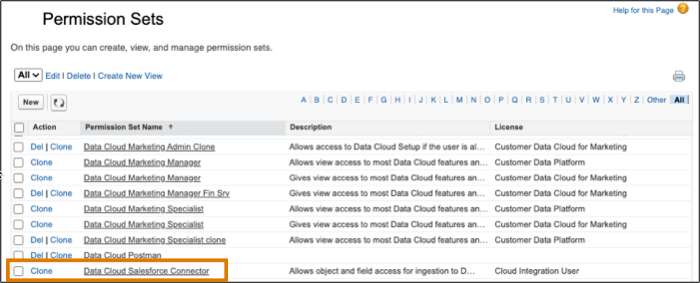 The permission set is available after you connect your CRM org to Data 360.
 -
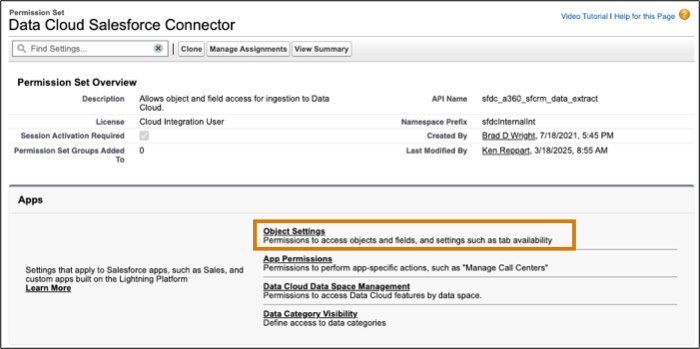
From Apps, select Object Settings.
- Select the object that you want to ingest into Data 360.
-
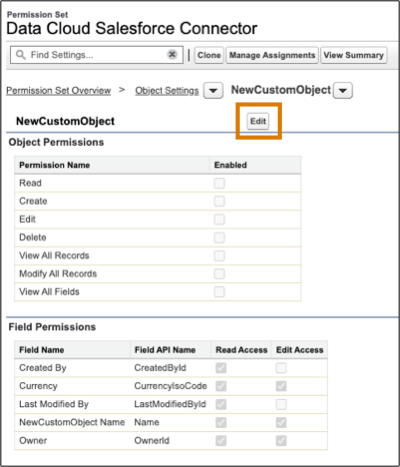
Click Edit to change the permissions.
-
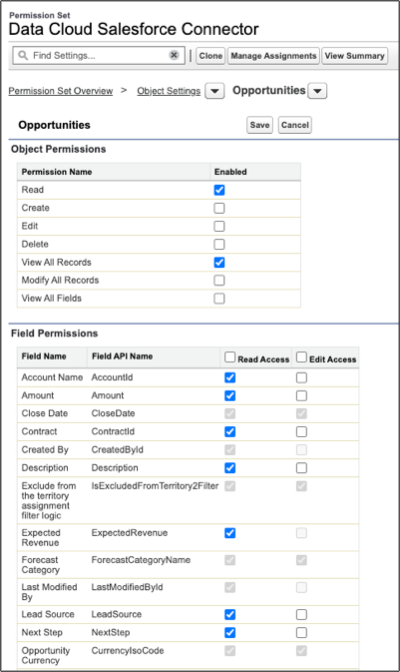
Enable permissions.
- For objects, enable: Read, View All Records.
- Optionally, you can enable permissions on specific fields.
By default, all fields associated with the objects that the user has object permissions for in the Data Cloud Salesforce Connector permission set have read access. -
- Click Save.