---
schema_version: "1"
id: d1b23dd116f99dab59551b5d47c689e4d0ee0c1718346f10c93fe2f48306ba5b
title: Enable Object and Field Permissions for CRM Connections
collection: admin
version: current
locale: en-us
portal_url: https://docs.salesforce.com/admin/current/en-us/data/264-0-0/c360_a_crm_enable_object_and_field_permissions.md
canonical_url: https://help.salesforce.com/s/articleView?id=data.c360_a_crm_enable_object_and_field_permissions.htm&release=264.0.0&type=5
source_site: help.salesforce.com
content_type: documentation
content_hash: 49b62bd3995a8265d3ac15eb23f50eba2a0194f383035cee19d4ab53102f0a41
description: You can edit the Data Cloud Salesforce Connector permission set to allow ingestions of objects and fields into Data 360.
products:
  - Data 360
release: "264"
---
# Enable Object and Field Permissions for CRM Connections

You can edit the Data Cloud Salesforce Connector permission set to allow ingestions of objects and fields into Data 360.

### Required Editions

<table class="slds-table slds-table_bordered slds-max-medium-table_stacked slds-m-bottom_small edition"><colgroup><col></colgroup><tbody><tr class=""><td class="slds-cell-wrap" style="vertical-align:top;">Available in: <strong>All Editions</strong> supported by Data 360. See <a href="https://help.salesforce.com/s/articleView?id=data.c360_a_dc_editions.htm&amp;language=en_US" target="_blank">Data 360 edition availability</a>.</td></tr></tbody></table>

<table class="slds-table slds-table_bordered slds-max-medium-table_stacked slds-m-bottom_small permission">
        <colgroup>
          <col style="width:50%">
          <col style="width:50%">
        </colgroup>
        <thead class="slds-text-title_caps ">
          <tr class="">
            <th scope="colgroup" class="slds-cell-wrap" colspan="2" style="text-align:left;vertical-align:top;" id="d196326e61">User Permissions Needed</th>
          </tr>
        </thead>
        <tbody>
          <tr class="">
            <td data-label="User Permissions Needed" class="slds-cell-wrap" style="vertical-align:top;" headers="d196326e61 ">To update object settings</td>

            <td class="slds-cell-wrap" style="vertical-align:top;" headers="d196326e61 ">
              <p>System admin profile OR </p>
              <p style="margin-bottom:0;">Data Cloud Architect permission set</p>
            </td>

          </tr>
        </tbody>
      </table>

Watch this video or follow the steps to enable permissions.

1. Log in to the Salesforce org containing the objects and fields that you want to ingest into Data 360.
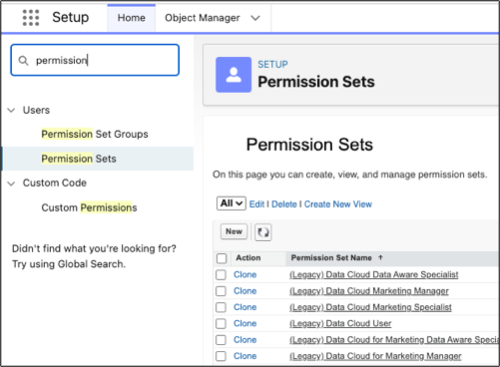
2. From Setup, in the Quick Find box, enter Permission, and then select **Permission Sets**.
    
    ![Setup for CRM permissions.](https://sf-zdocs-cdn-prod.zoominsoftware.com/tdta-data-data_cloud-264-0-0-production-enus/f3569962-3c9b-4f83-9d0c-b6a574e785da/data_cloud/images/c360_a_crm_permissions_setup.png)
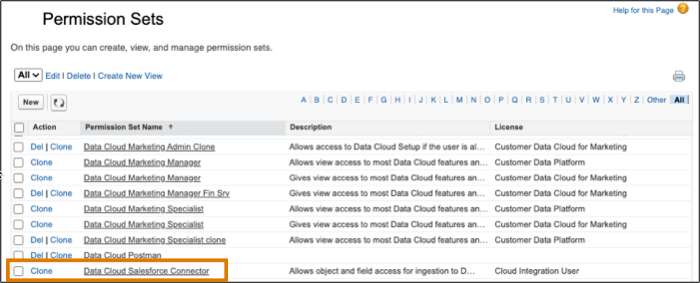
3. Select the **Data Cloud Salesforce Connector** permission set.
    
    ![Data Cloud permission set selection.](https://sf-zdocs-cdn-prod.zoominsoftware.com/tdta-data-data_cloud-264-0-0-production-enus/f3569962-3c9b-4f83-9d0c-b6a574e785da/data_cloud/images/c360_a_crm_permissions_dc.png)
    
    The permission set is available after you connect your CRM org to Data 360.
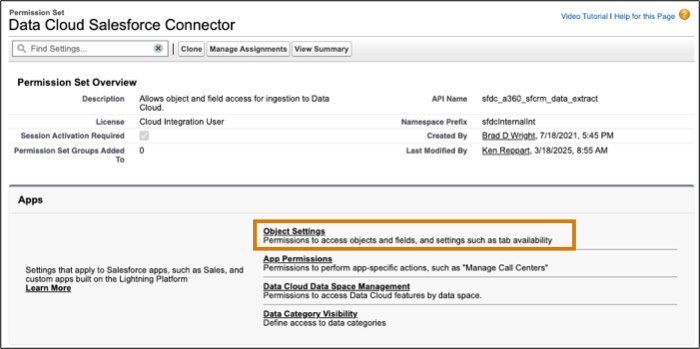
4. From Apps, select **Object Settings**.
    
    ![CRM permissions object settings.](https://sf-zdocs-cdn-prod.zoominsoftware.com/tdta-data-data_cloud-264-0-0-production-enus/f3569962-3c9b-4f83-9d0c-b6a574e785da/data_cloud/images/c360_a_crm_permissions_dc_object.png)
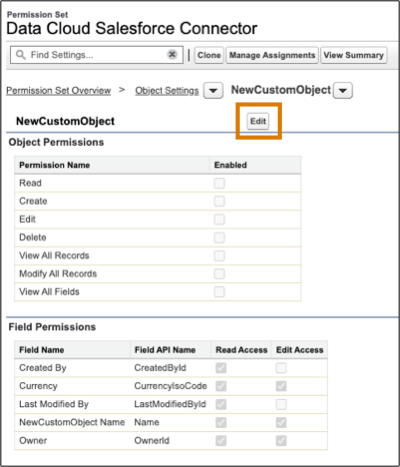
5. Select the object that you want to ingest into Data 360.
6. Click **Edit** to change the permissions.
    
    ![Edit the object permissions.](https://sf-zdocs-cdn-prod.zoominsoftware.com/tdta-data-data_cloud-264-0-0-production-enus/f3569962-3c9b-4f83-9d0c-b6a574e785da/data_cloud/images/c360_a_crm_permissions_edit.png)
7. Enable permissions.
    
    - For objects, enable: Read, View All Records.
    - Optionally, you can enable permissions on specific fields.
    
    By default, all fields associated with the objects that the user has object permissions for in the Data Cloud Salesforce Connector permission set have read access.
8. ![Enable objects and fields permissions.](https://sf-zdocs-cdn-prod.zoominsoftware.com/tdta-data-data_cloud-264-0-0-production-enus/f3569962-3c9b-4f83-9d0c-b6a574e785da/data_cloud/images/c360_a_crm_permissions_save.png)
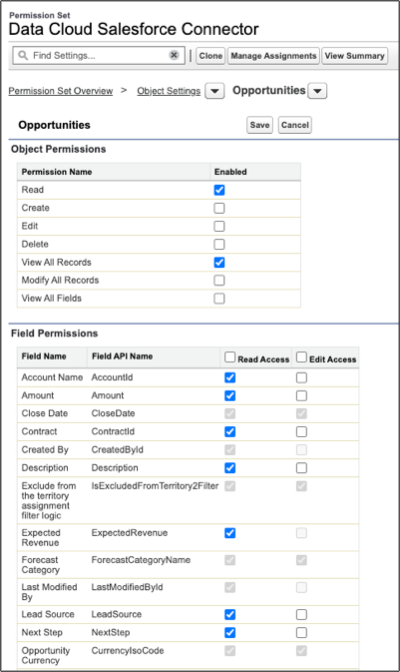
9. Click **Save**.

Repeat these steps for all objects that you want to ingest into Data 360.