
The Shopper Agent for B2C Commerce provides conversational shopping experiences on your B2C Commerce storefronts.The agent uses Agentic Commerce Search to help shoppers discover products, and the Agentforce Commerce Client to deliver real-time, chat-based conversations between the agent and your shoppers.
Which Salesforce Commerce Product Do I Have?
Before you create a Shopper Agent, set up Agentic Commerce Search. This feature powers product discovery actions, including search and product questions. Cart and checkout capabilities don't require Agentic Commerce Search.

Important To configure Agentic Commerce Search for your site, contact your Commerce
Account Executive.
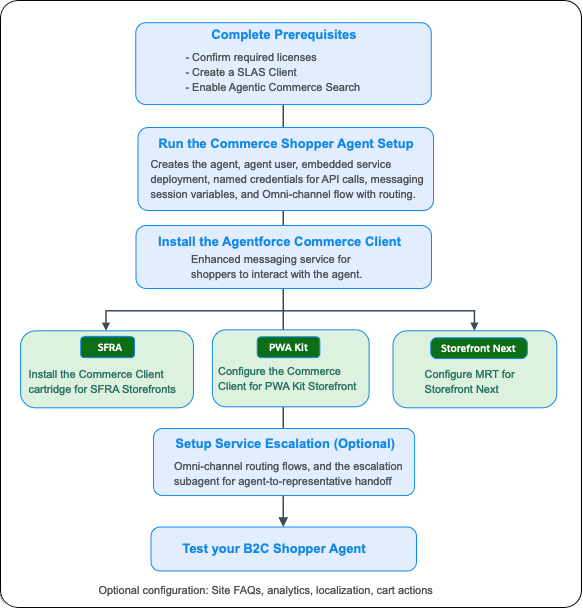
The flowchart is an overview of the setup tasks for the Shopper Agent and Agentforce Commerce Client.
- B2C Shopper Agent Setup Considerations
Before setting up a Shopper Agent for B2C Commerce, consider supported functionality, usage, limitations and allowances, limits, and other issues. - Shopper Agent Setup Overview
This flowchart is an overview of the setup tasks for the B2C Shopper Agent. - Shopper Agent Setup for SFRA Storefronts
After you create a B2C shopper agent, and install the Agentforce Commerce Client, finish configuring the SFRA storefront settings for the Shopper Agent. - Shopper Agent Setup for Storefront Next or PWA Kit Storefronts
For the Shopper Agent to work with B2C Commerce Storefront Next or PWA Kit storefronts, set up Managed Runtime (MRT), which provides the infrastructure for your storefront. Set the correct environment variables in Managed Runtime for your deployed bundle. - Escalate Issues from the Shopper Agent to a Representative (Optional)
When a shopper has an issue that the agent can't resolve, the agent can pass the conversation to a service representative. Configure presence statuses, Omni-Channel flows, and the escalation subagent so that the handoff keeps the conversation and its context intact. - Configure FAQs using Agentforce Data Libraries
To configure Site FAQs, use an Agentforce data library that contains files about your site. The B2C Shopper Agent can use multiple data libraries that contain files and knowledge articles. - Test Your B2C Commerce Shopper Agent
Test your B2C Shopper Agent to make sure that it's configured correctly before you activate it. In Agentforce Builder, preview a typical shopper interaction, so you can review details of the agent's interactions and processes. - Subagents for the B2C Shopper Agent
The subagents assigned to the B2C Shopper Agent define the capabilities of the agent. Each subagent manages one stage of the shopping journey, including product discovery, cart, order confirmation, FAQs, and safety checks.