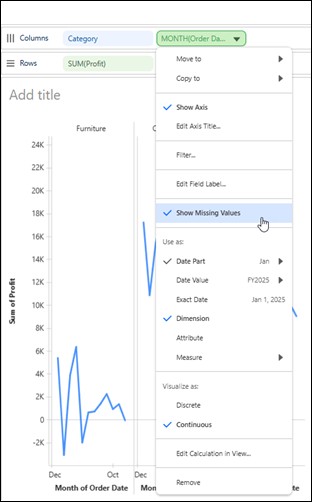
Identify gaps in your Tableau Next visualization by displaying dates or bins with no
corresponding values. Or hide them for a cleaner view when the gaps aren’t relevant to your
analysis.
Required Editions
| User Permissions Needed |
| To show or hide missing values in Tableau Next: |
Tableau Unmetered Platform Analyst or Tableau Next Platform Analyst permission set |
For example, show months with no recorded sales to identify periods without sales
activity.
-
Open the visualization in the Viz Builder.
-
On the Rows or Columns shelf, open the date or bin field’s context menu.
-
To hide dates or bins with no corresponding values, deselect Show Missing
Values. To display them, select Show Missing Values.