---
schema_version: "1"
id: b7c439dc5f9677152cd8c006610295007a14d2cdbdfa1366ceb668dae7226630
title: Show or Hide Missing Values in a Visualization
collection: admin
version: current
locale: en-us
portal_url: https://docs.salesforce.com/admin/current/en-us/analytics/264-0-0/tua_viz_show_hide_missing_values.md
canonical_url: https://help.salesforce.com/s/articleView?id=analytics.tua_viz_show_hide_missing_values.htm&release=264.0.0&type=5
source_site: help.salesforce.com
content_type: documentation
content_hash: 2e95fed06d8c87b31c3e206baf1707d14b46d2a38764b88db01d86145b23300e
description: Identify gaps in your Tableau Next visualization by displaying dates or bins with no corresponding values. Or hide them for a cleaner view when the gaps aren’t relevant to your analysis.
products:
- Tableau Next
release: "264"
---
# Show or Hide Missing Values in a Visualization
Identify gaps in your Tableau Next visualization by displaying dates or bins with no corresponding values. Or hide them for a cleaner view when the gaps aren’t relevant to your analysis.
### Required Editions
Tableau Unmetered Platform Analyst or Tableau Next Platform Analyst permission set
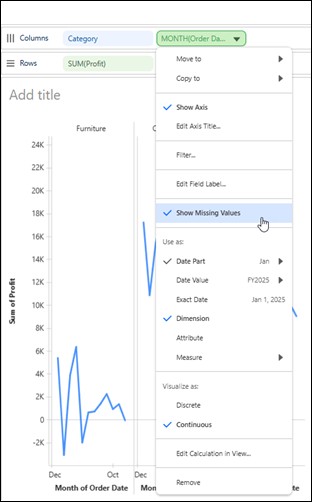
For example, show months with no recorded sales to identify periods without sales activity.
1. Open the visualization in the Viz Builder.
2. On the Rows or Columns shelf, open the date or bin field’s context menu.
3. To hide dates or bins with no corresponding values, deselect **Show Missing Values**. To display them, select **Show Missing Values**.