Conflicting NarrativesSlower DecisionsBlind SpotsReactive Posture
| View supported editions. |
| Conflicting Narratives | Disparate data sources create conflicting versions of the truth and cause internal misalignment. |
| Slower Decisions | Leaders waste valuable time manually reconciling dozens of dashboards before taking strategic action. |
| Blind Spots | Siloed views obscure high-risk signals by removing them from the context of the total customer relationship. |
| Reactive Posture | Data fragmentation forces companies to react to churn rather than predict and prevent it. |
 Unified Customer Signals Unified Customer Signals | Break down functional silos to consolidate cross-cloud insights into one intelligence stream. |
| Balanced Weighted Intelligence | Quantify strategic priorities through logic tailored to your business, moving beyond arbitrary averages. |
| Transparent Score Construction | Eliminate the closed box with full visibility into every composite score and underlying weight. |
| KPI Relationships & Impact Pathways | Preserve metric dependencies to reveal the structural drivers and top movers behind score changes. |
| Personalized Executive Focus | Surface role-based insights that highlight the segments, risks, and KPIs that matter most to your specific role. |
| View supported editions. |
| View supported editions. |
| User Permissions Needed | |
|---|---|
| To explore metrics and insights: | Tableau Unmetered Consumer or Tableau Next Consumer or Tableau Unmetered Self-Service Consumer or Tableau Next Self-Service Consumer permission set |
| View supported editions. |
| Available in Salesforce Classic and Lightning Experience. |
| Available with CRM Analytics, which is available for an extra cost in Enterprise, Performance, and Unlimited Editions. Also available in Developer Edition. |
| User Permissions Needed | |
|---|---|
| To use CRM Analytics templated apps: | Use CRM Analytics Templated Apps |
| To use Sales Analytics: | Access Sales Cloud Analytics Templates and Apps |
| To create and manage CRM Analytics apps: | Manage CRM Analytics Templated Apps |
| Edit CRM Analytics Dataflows | |
| Available in Salesforce Classic and Lightning Experience. |
| Available with CRM Analytics, which is available for an extra cost in Enterprise, Performance, and Unlimited Editions. Also available in Developer Edition. |
| View supported editions. |
| View supported editions. |
| Attribute Name | Type | Description | Example Value |
|---|---|---|---|
|
Id |
Lookup |
Unique identifier for the record |
1mQxx00000003sLEAQ |
| IsDeleted | Checkbox |
Indicates if the record has been deleted |
false |
| Name | Text (255) | Auto-generated unique name for the activity event record | X0dbf0d48_f5ab_4349_ad90_3c064ebd8b72 |
| CreatedDate | Date/Time | Date and time when the record was created | 2026-04-23T10:30:25.000+0000 |
| CreatedById | Lookup (User) | ID of the user who created the record | 005xx000001X7p3AAC |
| LastModifiedDate | Date/Time | Date and time when the record was last modified | 2026-04-23T10:30:25.000+0000 |
| LastModifiedById | Lookup (User) | ID of the user who last modified the record | 005xx000001X7p3AAC |
| SystemModstamp | Date/Time | System-generated timestamp of the last update | 2026-04-23T10:30:25.000+0000 |
| OperationName | Text (40) | Name of the operation performed by the user | createDashboard |
| ServiceName | Text (40) | Name of the service where the activity occurred | TableauNext |
| User | Text (40) | ID of the user who performed the activity | 005xx000001X7p3 |
| OrganizationType | Picklist | Type of Salesforce org | PRODUCTION |
| EventTimestamp | Date/Time | Timestamp of when the event actually occurred | 2026-04-23T10:30:25.000+0000 |
| AssetAttributes | Long Text Area (32000) | JSON | {"embeddingContext":"studio","assetId":"0Trxx0000004CQmCAM","assetApiName":"dashboardName","assetName":"sed","templateSource":"","statusMessage":"","assetType":"DASHBOARD","status":"Success"} |
| Available in Salesforce Classic and Lightning Experience. |
| Available with CRM Analytics, which is available for an extra cost in Enterprise, Performance, and Unlimited Editions. Also available in Developer Edition. |
| User Permissions Needed | |
|---|---|
| To use CRM Analytics templated apps: | Use CRM Analytics Templated Apps |
| To use Field Service Analytics: | Access Service Cloud Analytics Templates and Apps |
| To create and manage CRM Analytics apps: | Manage CRM Analytics Templated Apps |
| View supported editions. |
| Tableau Next Functional Area | Available Unmetered Service or Feature |
|---|---|
| Intelligent Apps Installation | Automated Salesforce setup and app installation for most Tableau Next Apps for Salesforce. |
| Batch Data Transforms |
In the home org only: Transform operations on Data 360 data used by Tableau Next, initiated from Data 360 or Tableau Next. Within their contexts, users can connect and preview data tables. Note: Batch Data Transforms are unmetered for all users in an unmetered org. |
| Tableau Next Authoring |
Semantic queries: This covers semantic queries generated through pre-built apps or cloud-built Lightning Web Components, for example, Marketing Cloud via Connect API. Semantic layer authoring: Analysts can run queries as part of authoring semantic models within Data 360 or Tableau Next. Developer experiences: Developers can use the Tableau Next Embedding SDK and semantic queries via the Tableau Next REST Connect API. Data Lens: Users can open a Data Lens within Tableau Next and explore it with queries run within their contexts. Query services: Direct-access query services within Home, Data Cloud One, or Personal Org. Users can run dashboards, metrics, insights, and data lens queries on objects in a home or production org. Note: Uploading CSV or Excel files to a Tableau Next workspace isn’t unmetered. |
| Analytics Content from Tableau Next |
Pre-Built Tableau Next Assets: Users can view dashboards, visualizations, metrics, and insights for analytics embedded in Salesforce Clouds. Custom Tableau Next Assets: Analysts can create and edit dashboards, visualizations, and metrics in Tableau Next. Assets created in Tableau Next can be viewed and consumed anywhere in Salesforce or externally. Business User Home: Explore metrics, insights, and Insight Summary in the Tableau Next business user Home. Metrics and Insight service generate queries in user context, both within Tableau Next or anywhere in Salesforce via Tab. In-the-Flow of Work: Explore dashboards, visualizations, metrics, insights, and Insight Summary in the Tableau Next business user Home, and in Salesforce, Slack, Microsoft Teams, or any web page. Mobile: Access insights, metrics, and dashboards in the Salesforce1 Mobile App. PDS integration: Tableau Next users can query published data sources (PDS) in Tableau Cloud. Note: Unmetered use of embedded assets is available when the user has the unmetered permission. |
| Tableau Agent in Tableau Next |
Tableau Next users can work with the Analytics and Visualization template with these pre-configured subagents: Data Analysis: Converse with the agent about your data. Data Alert Management: Set proactive alerts to get notified when thresholds are met. Data Pro - Preparation and Modeling: Get assistance with Tableau Semantics, including semantic model optimization, semantic descriptions, related fields, calculated fields, etc. |
| Actionability | Take action from Tableau Next assets with Lightning Flows via use of semantic queries in Lightning Flow Builder. |
| Available in Salesforce Classic and Lightning Experience. |
| Available with CRM Analytics, which is available for an extra cost in Enterprise, Performance, and Unlimited Editions. Also available in Developer Edition. |
| View supported editions. |
| Available in: Available in Salesforce Classic and Lightning Experience. |
| Available with CRM Analytics, which is available for an extra cost in Enterprise, Performance, and Unlimited Editions. Also available in Developer Edition. |
| Available in: Salesforce Classic and Lightning Experience |
| Available in: Essentials, Group, Professional, Enterprise, Performance, Unlimited, and Developer Editions |
| Available in: Enhanced Folder Sharing |
| Available in: both Salesforce Classic and Lightning Experience |
|
Available in: all editions except Database.com Report folders not available in: Contact Manager, Essentials, Group, and Personal Editions |
| Access Level | Permissions Needed to Access Read-Only Folders | Permissions Needed to Access Read/Write Folders |
|---|---|---|
| Read | Run Reports | Run Reports |
| Write New |
All of the following:
|
Both of the following:
|
| Modify/Delete |
All of the following:
|
All of the following:
|
| Access Level | Permissions Needed to Access Read-Only Folders | Permissions Needed to Access Read/Write Folders |
|---|---|---|
| Read |
Both of the following:
|
Both of the following:
|
| Write New |
All of the following:
|
All of the following:
|
| Modify/Delete |
All of the following:
|
All of the following:
|
| Access Level | Permissions Needed to Access Read-Only Folders | Permissions Needed to Access Read/Write Folders |
|---|---|---|
| Read | Run Reports | Run Reports |
| Write New |
All of the following:
|
Both of the following:
|
| Modify/Delete |
All of the following:
|
All of the following:
|
| Available in: both Salesforce Classic and Lightning Experience |
|
Available in: all editions except Database.com Report folders not available in: Contact Manager, Essentials, Group, and Personal Editions |
| Access Level | Permissions to Access Read-Only Folders | Permissions to Access Read/Write Folders |
|---|---|---|
| Read |
Any of the following:
|
Any of the following:
|
| Write New | “Manage Public Reports” | “Create and Customize Reports” |
| Modify/Delete | “Manage Public Reports” | “Manage Public Reports” |
| Access Level | Permissions to Access Read-Only Folders | Permissions to Access Read/Write Folders |
|---|---|---|
| Read |
Any of the following:
|
“View All Data” |
| Write New | “Manage Public Reports” | “Manage Public Reports” |
| Modify/Delete | “Manage Public Reports” | “Manage Public Reports” |
| Access Level | Permissions to Access Read-Only Folders | Permissions to Access Read/Write Folders |
|---|---|---|
| Read |
Any of the following:
|
Any of the following:
|
| Write New | “Manage Public Reports” | “Create and Customize Reports” (for shared users) |
| Modify/Delete | “Manage Public Reports” | “Manage Public Reports” |
| View supported editions. |
| Available in: Developer edition and for an extra cost in Enterprise, Performance, and Unlimited editions. |
| Section | Description |
|---|---|
( 1.) 
|
To see more details about the account opportunities and orders, navigate left or right. |
| ( 2.) | To see the percent of quotes in draft, hover over the bar graph. |
| ( 3.) #Draft Quotes | Quotes that have been accepted and are ready to submit. To see the list of quotes, including the days to quote and effective quote total, hover over the number. |
| ( 4.) |
The chart shows the number of quotes in the following states:
|
| ( 5.) | To see the percent of orders in draft, hover over the bar graph. |
| ( 6.) # Ready to submit orders | To see the order number and amounts, hover over the number. |
| ( 7.) |
The chart shows the number of orders in the following states:
|
| Available in Salesforce Classic and Lightning Experience. |
| Available with CRM Analytics, which is available for an extra cost in Enterprise, Performance, and Unlimited Editions. Also available in Developer Edition. |
| User Permissions Needed | |
|---|---|
| To view embedded Analytics dashboards: | Analytics Growth permission set license with Use Analytics permission OR Analytics for Communities permission set license with View Analytics on Experience Cloud pages permission |
| Notation | Description | Notes |
|---|---|---|
| datasets | CRM Analytics dataset | Where to find it: On the CRM Analytics home page, select Edit on the dataset. The System Name is in the left panel of the edit page for the dataset. (If your org has namespaces, include the namespace prefix and two underscores before the dataset system name.) |
| fields | Dimension or Measure in the CRM Analytics dataset | Where to find it: Click the Explore icon to open the widget. Then select Show SAQL from the Options menu. For dimension names, look for “group by” statements. For measure names, look for statements with functions such as “sum” or “stddev.” |
| values | Field in the Salesforce object, or a specific value | Where to find it: In Setup, find the object you want, and select Fields. Use the Field Name (also known as the API Name). For custom fields, use the name with “__c” at the end. |
| selection | With the selection option, the dashboard is shown with all its data, and the specified dimension values are highlighted | The selection option can be used alone or with the filter option. Selection takes dimension values only. To use this option, the dashboard must include a list, date, or toggle widget that groups by the specified dimension. If a selection specifies a value that doesn't exist, or the dashboard doesn’t include a list, date, or toggle widget that groups by the specified dimension, then the selection input is ignored and the dashboard appears with all its data and no selection. |
| filter | With the filter option, the dashboard is shown with only filtered data | The filter option can be used alone or with the selection option. Filter takes dimension or measure values. |
| operator | Use with the filter option |
Supported operators for dimensions: in, not in, matches Supported operators for measures: ==; !=; >= ; > ; <= ; < |
| View supported editions. |
| User Permissions Needed | |
|---|---|
| To create batch data transforms |
Permission set:
|
| Available in: both Lightning Experience and Salesforce Classic |
| Available in: Enterprise, Performance, Unlimited, and Developer Editions |
| Available in: Enhanced Folder Sharing |
| User Permissions Needed | |
|---|---|
| To create, edit, and delete reports: |
|
| Available in: Salesforce Classic and Lightning Experience |
| Available in: Enterprise, Performance, Unlimited, and Developer Editions |
| Available in: Enhanced Folder Sharing |
| User Permissions Needed | |
|---|---|
| To add, edit, or delete a bucket column in private reports: |
|
| To add, edit, or delete a bucket column in public and private reports: |
|
| Numeric | A numeric bucket helps you sort data that can be described in terms of numbers.
Numeric buckets include columns with field types like currency
(Amount), number (Number of Employees), and
percent (Probability), but not necessarily mixed alphanumeric
field types like auto number. Alphanumeric values don’t reside on
the number line, which means they can’t get numerically evaluated, which prevents them
from getting bucketed in a numeric bucket. Alphanumeric values can be included in text
buckets. Each numeric bucket includes a range and a name. To gain insight into your deals, use bucketing to group by deal size instead of looking at individual deals. For example, create 3 buckets based on deal size: Small, Medium, and Large. Small holds deals worth $1,000 or less. Medium holds deals worth between $1,000 and $25,000 dollars. Large holds deals worth more than $25,000. |
|---|---|
| Picklist |
A picklist bucket contains items that can be selected from a list. To get a generalized view of your accounts, bucket them by industry. Create buckets with industry names like Manufacturing, Technology, and Media. Then, add accounts into the bucket that best represents their operation. |
| Text |
At first glance, text buckets seem to have the same options as picklist buckets. Values of the text column appear as though they were values in a picklist, and you can add them into buckets in much the same way. Unlike picklist fields, text fields feature the Enter Values button. If you know which value you want to bucket, you can use the Enter Values function to quickly bucket it without searching. Entering values is useful if your report has a large number (such as millions) of values and searching for a value is slow. You can also use this method to enter and bucket values that appear in the report later. |
| View supported editions. |
| User Permissions Needed | |
|---|---|
| To add calculated fields: | Tableau Unmetered Platform Analyst or Tableau Next Platform Analyst permission set |
| Available in: Salesforce Classic and Lightning Experience |
| Available in: Essentials, Group, Professional, Enterprise, Performance, Unlimited, and Developer Editions |
| Available in: Enhanced Folder Sharing |
| User Permissions Needed | |
|---|---|
| To create, edit, and delete reports: |
|
| Available with CRM Analytics, which is available for an extra cost in Enterprise, Performance, and Unlimited Editions. Also available in Developer Edition. Requires a CRM Analytics Growth or CRM Analytics Plus license. |
| Permission Sets Needed | |
|---|---|
| To create and manage the app: | Manage CRM Analytics Templated Apps |
| To use CRM Analytics template apps: | Use CRM Analytics Templated Apps |
| Available in: Salesforce Classic |
| Available in: Group (View Only), Professional, Enterprise, Performance, Unlimited, and Developer Editions |
| User Permissions Needed | |
|---|---|
| To create dashboards: | Run Reports AND Create and Customize Dashboards |
| To edit and delete dashboards that you created: | Run Reports AND Create and Customize Dashboards |
| To edit and delete dashboards that you created in public folders: | Edit My Dashboards |
| To edit and delete dashboards that you didn’t create in public folders: | Manage Dashboards in Public Folders |
| To create, edit, and delete dynamic dashboards: | Manage Dynamic Dashboards |

|
Use a chart when you want to show data graphically. You can choose from a variety of chart types. |

|
Use a gauge when you have a single value that you want to show within a range of custom values |

|
Use a metric when you have one key value to display.
|

|
Use a table to show a set of report data in column form. |
| Visualforce Page |
Use a Visualforce page when you want to create a custom component or show information not available in another component type. Visualforce pages are available only in Salesforce Classic and aren’t available when third-party cookies are disabled. See Visualforce Limitations in Salesforce Classic When Third-Party Cookies are Blocked. |
| Custom S-Control |
Custom s-controls can contain any type of content that you can display in a browser. Examples: a Java applet, an Active-X control, an Excel file, or a custom HTML Web form. Custom S-Controls are only available in Salesforce Classic. |
| Available in: both Salesforce Classic and Lightning Experience |
| Available in: Essentials, Group (View Only), Professional, Enterprise, Performance, Unlimited, and Developer Editions |
| User Permissions Needed | |
|---|---|
| To add filters to dashboards that you created: | Run Reports AND Create and Customize Dashboards |
| To add filters to dashboards that you created in public folders: | Edit My Dashboards OR Manage Dashboards in Public Folders |
| To add filters to dashboards that you didn’t create: | Manage Dashboards in Public Folders |
| To add filters to dynamic dashboards: | Manage Dynamic Dashboards |
| Available in Salesforce Classic and Lightning Experience. |
| Available with CRM Analytics, which is available for an extra cost in Enterprise, Performance, and Unlimited Editions. Also available in Developer Edition. |
| User Permissions Needed | |
|---|---|
| To create a recipe: | Edit CRM Analytics Dataflows OR Edit Dataset Recipes |
| Available in Salesforce Classic and Lightning Experience. |
| Available with CRM Analytics, which is available for an extra cost in Enterprise, Performance, and Unlimited Editions. Also available in Developer Edition. |
| User Permissions Needed | |
|---|---|
| To create a recipe: | Edit CRM Analytics Dataflows OR Edit Dataset Recipes |
| Available in: Lightning Experience |
| Available in: Enterprise, Performance, Unlimited, and Developer Editions |
| User Permissions Needed | |
|---|---|
| To access the Experience Builder and add the Lightning Dashboard component to an LWR site | Create and Set Up Experiences |
| To view the Lightning dashboard on the published LWR site | Run Reports and Customize Application |
| Available in: Lightning Experience |
| Available in: Enterprise, Performance, Unlimited, and Developer Editions |
| User Permissions Needed | |
|---|---|
| To access Experience Builder and add the Lightning Report component to an LWR site | Create and Set Up Experiences |
| To view the report on the published LWR site | Run Reports and Customize Application |
| View supported editions. |
| User Permissions Needed | |
|---|---|
| To add a metric to a semantic model: | Tableau Unmetered Platform Analyst or Tableau Next Platform Analyst permission set |
| View supported editions. |
| User Permissions Needed | |
|---|---|
| To edit Tableau Next dashboards: | Tableau Unmetered Platform Analyst or Tableau Next Platform Analyst permission set |
| View supported editions. |
| User Permissions Needed | |
|---|---|
| To edit Tableau Next visualizations: | Tableau Unmetered Platform Analyst or Tableau Next Platform Analyst permission set |
| View supported editions. |
| User Permissions Needed | |
|---|---|
| To create and edit Tableau Next metrics and access Tableau Next components in Lightning App Builder: | Tableau Next Analyst permission set |
| OR | |
| To create and edit Tableau Next metrics: | Tableau Next Analyst permission set |
| To access Lightning App Builder to embed metrics: | Customize Application user permission |
| Available in: All editions supported by Data 360. See Data 360 edition availability. |
| User Permissions Needed | |
|---|---|
| To add or edit a Predictive Insight: |
Permission set:
AND Semantic Models object |
| Available in: Salesforce Classic and Lightning Experience |
| Available in: Essentials, Group, Professional, Enterprise, Performance, Unlimited, and Developer Editions |
| Available in: Enhanced Folder Sharing |
| User Permissions Needed | |
|---|---|
| To create, edit, and delete reports: |
|
| Available in: Lightning Experience |
| Available in: Professional, Enterprise, Performance, Unlimited, and Developer Editions |
| Available in: Lightning Experience |
| Available in: Essentials, Professional, Enterprise, Performance, Unlimited, and Developer Editions |
| User Permissions Needed | |
|---|---|
| To add a report to a dashboard: | Create and Customize Dashboards |
| To add a report to a dynamic dashboard: | Manage Dynamic Dashboards |
| Available in: both Lightning Experience and Salesforce Classic |
| Available in: Enterprise, Performance, Unlimited, and Developer Editions |
| Available in: Enhanced Folder Sharing |
| User Permissions Needed | |
|---|---|
| To create, edit, and delete joined reports: |
|
| View supported editions. |
| User Permissions Needed | |
|---|---|
| To edit Tableau Next visualizations: | Tableau Unmetered Platform Analyst or Tableau Next Platform Analyst permission set |
| View supported editions. |
| User Permissions Needed | |
|---|---|
| To edit Tableau Next dashboards and run and manage flows: | Tableau Unmetered Platform Analyst or Tableau Next Platform Analyst permission set |
| Available in: Salesforce Classic and Lightning Experience |
| Available in: Essentials, Group, Professional, Enterprise, Performance, Unlimited, and Developer Editions |
| Available in: Enhanced Folder Sharing |
| User Permissions Needed | |
|---|---|
| To create, edit, and delete summary formula columns in private reports: |
|
| To create, edit, and delete summary formula columns in public and private reports: |
|
| Available in: both Lightning Experience and Salesforce Classic |
| Available in: Enterprise, Performance, Unlimited, and Developer Editions |
| Available in: Enhanced Folder Sharing |
| User Permissions Needed | |
|---|---|
| To create, edit, and delete joined reports: |
|
| View supported editions. |
| User Permissions Needed | |
|---|---|
| To access Tableau Next components in Lightning App Builder: | Tableau Unmetered Admin or Tableau Next Admin permission set |
| View supported editions. |
| User Permissions Needed | |
|---|---|
| To access Tableau Next components in Lightning App Builder: | Tableau Unmetered Admin or Tableau Next Admin permission set |
| View supported editions. |
| User Permissions Needed | |
|---|---|
| To access Tableau Next components in Lightning App Builder: | Tableau Unmetered Admin or Tableau Next Admin permission set |
| View supported editions. |
| User Permissions Needed | |
|---|---|
| To edit Tableau Next visualizations: | Tableau Unmetered Platform Analyst or Tableau Next Platform Analyst permission set |
| Available in: Lightning Experience |
| Available in: Data 360 in Developer, Enterprise, Performance, and Unlimited Editions |
| View supported editions. |
| User Permissions Needed | |
|---|---|
| To upload data into Tableau Next: | Tableau Unmetered Platform Analyst or Tableau Next Platform Analyst permission set |
| User Permissions Needed | |
|---|---|
| To add images to CRM Analytics dashboards: | Create CRM Analytics Applications |
| Create and Edit CRM Analytics Dashboards | |
| View supported editions. |
| User Permissions Needed | |
|---|---|
| To edit Tableau Next dashboards: | Tableau Unmetered Platform Analyst or Tableau Next Platform Analyst permission set |
| View supported editions. |
| User Permissions Needed | |
|---|---|
| To edit Tableau Next dashboards: | Tableau Unmetered Platform Analyst or Tableau Next Platform Analyst permission set |
| Available in: Tableau Next |
| Available in: Enterprise, Performance, and Unlimited Editions |
| User Permissions Needed | |
|---|---|
| To verify queries and confirm their status in Q&A Calibration: | Tableau Admin OR Data Analyst |
| To create and deploy the data kit: | Salesforce Admin OR Tableau Admin |
| Available in: Salesforce Classic |
| Available in: Group (View Only), Professional, Enterprise, Performance, Unlimited, and Developer Editions |
| User Permissions Needed | |
|---|---|
| To create dashboards: | Run Reports AND Create and Customize Dashboards |
| To edit and delete dashboards that you created: | Run Reports AND Create and Customize Dashboards |
| To edit and delete dashboards that you created in public folders: | Edit My Dashboards |
| To edit and delete dashboards that you didn’t create in public folders: | Manage Dashboards in Public Folders |
| To create, edit, and delete dynamic dashboards: | Manage Dynamic Dashboards |
| Available in Salesforce Classic and Lightning Experience. |
| Available with CRM Analytics, which is available for an extra cost in Enterprise, Performance, and Unlimited Editions. Also available in Developer Edition. |
| User Permissions Needed | |
|---|---|
| To create a connection: | Edit CRM Analytics Dataflows |
| Available in: All editions supported by Data 360. See Data 360 edition availability. |
| User Permissions Needed | |
|---|---|
| To add a business preference: |
Permission set:
AND Semantic Models object |
| Available in: Lightning Experience |
| Available in: Essentials, Group, Enterprise, Professional, Unlimited, and Developer Editions. |
| Also available with CRM Analytics, which is available for an extra cost in Performance, Enterprise, Unlimited, and Developer Editions. |
| User Permissions Needed | |
|---|---|
| To add a collection to a Lightning page: | Use CRM Analytics |
| Available in: Lightning Experience |
| Available in: Essentials, Group, Professional, Enterprise, Performance, Unlimited, and Developer Editions |
| User Permissions Needed | |
|---|---|
| To export reports: | Export Reports |
| Available in Salesforce Classic and Lightning Experience. |
| Available with CRM Analytics, which is available for an extra cost in Enterprise, Performance, and Unlimited Editions. Also available in Developer Edition. |
| User Permissions Needed | |
|---|---|
| To view visualizations: | Use CRM Analytics |
| User Permissions Needed | |
|---|---|
| To customize dashboard widgets: | Create and Edit Analytics Dashboards |
| Available in: Lightning Experience |
| Available in: Essentials, Professional, Enterprise, Performance, Unlimited, and Developer Editions |
| User Permissions Needed | |
|---|---|
| To add custom Lightning Web Components in dashboards | Run Reports AND Create and Customize Dashboards |
| View supported editions. |
| User Permissions Needed | |
|---|---|
| To edit Tableau Next dashboards: | Tableau Unmetered Platform Analyst or Tableau Next Platform Analyst permission set |
| Available in: Lightning Experience |
| Available in: Data 360 in Developer, Enterprise, Performance, and Unlimited Editions |
| User Permissions Needed | |
|---|---|
| To create, edit, and delete reports in private folders: | Create and Customize Reports |
| To create, edit, and delete reports in public and private folders: | Report Builder (Lightning Experience) |
| View supported editions. |
| User Permissions Needed | |
|---|---|
| To edit Tableau Next dashboards: | Tableau Unmetered Platform Analyst or Tableau Next Platform Analyst permission set |
| Available in: All editions supported by Data 360. See Data 360 edition availability. |
| Available in: both Salesforce Classic and Lightning Experience |
| Available in: Essentials, Group, Professional, Enterprise, Performance, Unlimited, and Developer Editions |
| User Permissions Needed | |
|---|---|
| To create, edit, and delete reports: |
Create and Customize Reports AND Report Builder |
| To create custom list views: | Read on the type of record included in the list |
| To create, edit, or delete public list views: | Manage Public List Views |
| Operator | Definition |
|---|---|
AND |
Finds records that match both values.
|
OR |
Finds records that match either value.
For example, Filter 1 is |
NOT |
Finds records that exclude values. For example, Filter 1 is |
| Available in: All editions supported by Data 360. See Data 360 edition availability. |
| User Permissions Needed | |
|---|---|
| To add a filter to a field: |
Permission set:
AND Semantic Models object |
| View supported editions. |
| User Permissions Needed | |
|---|---|
| To apply filters to Tableau Next visualizations: | Tableau Unmetered Platform Analyst or Tableau Next Platform Analyst permission set |
| Available in Salesforce Classic and Lightning Experience. |
| Available with CRM Analytics, which is available for an extra cost in Enterprise, Performance, and Unlimited Editions. Also available in Developer Edition. |
| Available in: Lightning Experience |
| Available in: Essentials, Group, Enterprise, Professional, Unlimited, and Developer Editions. |
| Also available with CRM Analytics, which is available for an extra cost in Performance, Enterprise, Unlimited, and Developer Editions. |
| User Permissions Needed | |
|---|---|
| To manage a collection: |
|
| To manage a collection with CRM Analytics items: | Use CRM Analytics |
| View supported editions. |
| User Permissions Needed | |
|---|---|
| To edit Tableau Next dashboards: | Tableau Unmetered Platform Analyst or Tableau Next Platform Analyst permission set |
| Available in Salesforce Classic and Lightning Experience. |
| Available with CRM Analytics, which is available for an extra cost in Enterprise, Performance, and Unlimited Editions. Also available in Developer Edition. |
| View supported editions. |
| User Permissions Needed | |
|---|---|
| To add or remove metric followers: | Tableau Unmetered Consumer or Tableau Next Consumer or Tableau Unmetered Self-Service Consumer or Tableau Next Self-Service Consumer permission set |
| User Permissions Needed | |
|---|---|
| To create a recipe: | Edit CRM Analytics Dataflows OR Edit Dataset Recipes |
| Available in Salesforce Classic and Lightning Experience. |
| Available with CRM Analytics, which is available for an extra cost in Enterprise, Performance, and Unlimited Editions. Also available in Developer Edition. |
| User Permissions Needed | |
|---|---|
| To create a recipe: | Edit CRM Analytics Dataflows OR Edit Dataset Recipes |
| View supported editions. |
| User Permissions Needed | |
|---|---|
| To create semantic models in Tableau Next: | Tableau Unmetered Platform Analyst or Tableau Next Platform Analyst permission set |
| View supported editions. |
| User Permissions Needed | |
|---|---|
| To edit Tableau Next dashboards: | Tableau Unmetered Platform Analyst or Tableau Next Platform Analyst permission set |
| View supported editions. |
| User Permissions Needed | |
|---|---|
| To share metrics in Slack: | Tableau Unmetered Consumer or Tableau Next Consumer or Tableau Unmetered Self-Service Consumer or Tableau Next Self-Service Consumer permission set |
| Available in Salesforce Classic and Lightning Experience. |
| Available with CRM Analytics, which is available for an extra cost in Enterprise, Performance, and Unlimited Editions. Also available in Developer Edition. |
| Available in Salesforce Classic and Lightning Experience. |
| Available with CRM Analytics, which is available for an extra cost in Enterprise, Performance, and Unlimited Editions. Also available in Developer Edition. |
| View supported editions. |
| Available in: Lightning Experience. |
| Available in: Enterprise, Performance, Unlimited, and Developer Editions with Einstein 1 Sales Edition and Einstein 1 Service Edition. |
| View supported editions. |
| Issue | Approach | See Also |
|---|---|---|
| Extreme Values and Outliers | Einstein Discovery algorithms are sensitive to outliers because those values affect averages (means) and standard deviations in statistical significance calculations. If you find unusual values or outliers, confirm whether these data points are relevant and real. Often unusual values are errors. If the extreme data points are accurate, predictable, and reoccurring, do not remove them unless those points are unimportant. You can reduce outlier influence by using transformations or converting the numeric variable to a categorical value with binning. | |
| Missing Values |
The most common repair for missing values is imputing a likely or expected value using a mean or computed value from a distribution. If you use a mean value, you could reduce your standard deviation. Thus, the distribution imputation approach is more reliable. Another approach is to remove records with missing values. Don’t get too ambitious with filtering out missing values. Sometimes the pattern is in the missing data. Also, if you delete too many records, you undermine the real-world aspects in your analysis. Einstein Discovery orients its analysis around a particular outcome. If the value of the targeted outcome is missing from a particular row, then Einstein Discovery excludes that row from analysis. |
|
| Incorrect Values | Predictive algorithms assume that the input information is correct. If only a few rows have incorrect values, decide what to do. Remove those rows from the analysis, or replace the incorrect values with more correct or average values. If there are numerous inaccurate values, determine why the inaccuracies happened and whether it’s possible to repair them. Sometimes it’s better to remove a highly error-prone variable than include it in the analysis. | |
| Standardize Categorical Values | For category values, ensure consistent category names. Remove spelling variations (such as plurals or abbreviations). Fix typos and other errors. Use labels that are meaningful, recognizable, and easy to interpret. | |
| Skewed Data | For continuous variables, review the distributions, central tendency, and spread of the variable. These variables are measured using various statistical visualization methods. Confirm that continuous variables are normally distributed. If not, try to reduce skewness for optimal prediction. For categorical variables, use a frequency table, along with a bar chart, to understand distributions of each category. If variable values are skewed, Einstein Discovery could produce biased models. When a skewed distribution must be corrected, transform the variable using a function, such as the Box-Cox transformation. After applying the fix, a normal distribution for the variable is achieved. The newly prepared, transformed variable performs much better for predictive modeling purposes. | |
| High-Cardinality Fields | High-cardinality fields are categorical attributes that contain many distinct values. Examples include names, ZIP codes, or account numbers. Although these variables can be highly informative, high-cardinality attributes are rarely used in predictive modeling. Including these attributes vastly increases the dimensionality of the dataset, which can make it difficult for most algorithms to build accurate prediction models. | |
| Binary Outcomes and Boolean Variables | If a variable has a binary outcome (only two possible values), and those values are represented by numbers (for example, 1 and 0), then convert those numeric values to text values (for example, "TRUE" and "FALSE" or "NOTCHURNED" and "CHURNED"). For solutions that implement the classification use case (binary outcomes), Einstein Discovery requires the outcome values to be represented as text values. For other variables in the dataset, converting these values to text can improve the interpretability of the charts and explanations in the resulting insights. | |
| Ordinal Variables | Ordinal variables are problematic for predictive models. Ordinal data consists of numerical scores on an arbitrary scale that is designed to show ranking in a set of data points. For example, Low, Medium, and High are ordinal. Predictive algorithms assume that the variable is an interval or ratio variable and therefore be misled or confused by the scale. Ordinal variables are treated as categorical. If you have ordinal values, transform them into continuous or categorical values. | |
| Duplicate, Redundant, or Highly Correlated Variables | Minimize duplicate, redundant, or other highly correlated variables that carry the same information. Einstein Discovery algorithms perform better without these kinds of collinear variables. Collinearity occurs when two or more predictor variables are highly correlated. As a result, one can be linearly predicted from the others with a substantial degree of accuracy. To avoid collinearity, do not include multiple variables that are highly correlated or data that is from the same reporting hierarchy. For example, customers who live in the city of Tampa also live in the state of Florida. To identify high correlation between two continuous variables, review scatter plots. The pattern of a scatter plot indicates the relationship between variables. The relationship can be linear or nonlinear. To find the strength of the relationship, compute correlation. Correlation varies between –1 and +1. |
| View supported editions. |
| User Permissions Needed | |
|---|---|
| To edit Tableau Next dashboards: | Tableau Unmetered Platform Analyst or Tableau Next Platform Analyst permission set |
|
Property |
Description |
|---|---|
| Search | Locates a dashboard asset. |
|
Maximum Dashboard Width |
Sets the largest width that a dashboard can have. |
|
Minimum Dashboard Width |
Sets the smallest width before a horizontal scroll bar appears. |
|
Dashboard Preview Width |
Previews the dashboard at preset widths so you can check how it looks on narrower screens. |
|
Grid Background Color |
Sets the background color of the dashboard grid. |
|
Gutter Color |
Sets the color between widgets in a dashboard. |
|
Widget Background Color |
Sets a widget's background color. |
|
Widget Border Color |
Sets the border color around a widget. |
|
Border |
Adds an outline that surrounds dashboard assets. |
|
Border Width |
Sets the thickness of the border around dashboard assets. |
|
Border Radius |
Sets how much curve is applied to the corners of dashboard assets. |
|
Apply to all widgets |
Applies format settings to widgets. |
| Available in: Salesforce Classic |
| Available in: Essentials, Group, Professional, Enterprise, Performance, Unlimited, and Developer Editions |
|
Available in: Lightning Experience Available in: Enterprise and Unlimited Editions of Manufacturing Cloud |
| Available in Salesforce Classic and Lightning Experience. |
| Available with CRM Analytics, which is available for an extra cost in Enterprise, Performance, and Unlimited Editions. Also available in Developer Edition. |
| User Permissions Needed | |
|---|---|
| To manage and create a recipe: | Edit CRM Analytics Dataflows OR Edit Dataset Recipes |
| User Permissions Needed | |
|---|---|
| To manage and create a recipe: | Edit CRM Analytics Dataflows OR Edit Dataset Recipes |
| Without Hierarchical Aggregation | With Hierarchical Aggregation | ||||
|---|---|---|---|---|---|
| Record ID | Parent ID | Amount | Record ID | Amount | |
| A01 | 100 | A01 | 600 | ||
| A02 | A01 | 200 | A02 | 200 | |
| A03 | A01 | 300 | A03 | 300 | |
| A04 | 400 | A04 | 400 | ||
| Without Hierarchical Aggregation | With Hierarchical Aggregation | ||||
|---|---|---|---|---|---|
| Record ID | Parent ID | Amount | Record ID | Amount | |
| A01 | 100 | A01 | 1200 | ||
| A02 | A01 | 200 | A02 | 800 | |
| A03 | A01 | 300 | A03 | 300 | |
| A04 | A05 | 400 | A04 | 400 | |
| A06 | A02 | 600 | A05 | 400 | |
| A07 | 700 | A06 | 600 | ||
| A07 | 700 | ||||
| Without Hierarchical Aggregation | With Hierarchical Aggregation | |||||
|---|---|---|---|---|---|---|
| Record ID | Parent ID | Amount | Percentage | Record ID | Amount | |
| A01 | 100 | A01 | 1375 | |||
| A02 | A01 | 200 | 1.00 | A02 | 350 | |
| A03 | A01 | 300 | 0.50 | A03 | 1850 | |
| A03 | A10 | 300 | 0.50 | A04 | 1290 | |
| A04 | A05 | 400 | 1.00 | A05 | 1290 | |
| A06 | A02 | 600 | 0.25 | A06 | 600 | |
| A06 | A03 | 600 | 0.75 | A07 | 700 | |
| A07 | 700 | A08 | 890 | |||
| A08 | A04 | 800 | 1.00 | A09 | 900 | |
| A09 | A08 | 900 | 0.10 | A10 | 1925 | |
| A10 | A11 | 1100 | ||||
| A11 | A03 | 1.00 | ||||
| User Permissions Needed | |
|---|---|
| To manage and create a recipe: | Edit CRM Analytics Dataflows OR Edit Dataset Recipes |
| View supported editions. |
| Product | Subagent | Data Used | Generative AI Model Used |
|---|---|---|---|
| Tableau Next with the Analytics and Visualization template | Data Analysis |
Customer Data: Actual data, numeric and textual values |
GPT |
| Tableau Next with the Semantic Modeling template | Semantic Model Management |
Customer Data: None Sample Data: Randomly selected values used to give examples to an LLM of the types of possible answers, relevant only for textual values. For example, City = NY, LA, TLV |
GPT |
| Tableau Next with the Analytics and Visualization template | Data Alert Management |
Customer Data: Actual data, numeric and textual values Sample Data: Randomly selected values used to give examples to an LLM of the types of possible answers, relevant only for textual values. For example, City = NY, LA, TLV |
GPT |
| Tableau Next with the Analytics Authoring (Beta) template |
Analytics Authoring (Beta) Data 360 Exploration External Data Exploration Semantic Data Discovery Analytics Asset Management |
Customer Data: Actual data, numeric and textual values | Anthropic; configurable in the Agent Definition Settings for the Default Model. |
| View supported editions. |
| Available in: Lightning Experience |
| Available in: Essentials, Group, Professional, Enterprise, Performance, Unlimited, and Developer Editions |
| User Permissions Needed | |
|---|---|
| To view company information: | View Setup and Configuration |
| To activate, create, edit, or preview a theme: | Customize Application |
| View supported editions |
| Element | Details |
|---|---|
| Formula |
The Churn Risk Index (CRI) is inverted or subtracted because a high score indicates negative health, unlike the other composite scores. |
| Measure |
|
| Calculation Logic |
|
| Normalization and Thresholds |
|
| Weighting Strategy | By default, all 9 composite scores are weighted equally to make sure that financial KPIs don’t overshadow operational or sentiment signals. |
| Setting | Description |
|---|---|
| Connection Name | Required. Use a name that lets you easily distinguish between different connections. |
| Developer Name | Required. The API name is used in your recipes to reference data extracted through this connection. The name can't include spaces. After you create the connection, you can’t change the developer name. |
| Description | Required. The description for the connection. |
| Authentication Type | Required. The authentication type. Valid values include Root, for standard authentication,
and IAM, for AWS Identity Access Management (IAM) authentication. |
| AWS Access Key | Required. The access key associated with your AWS root account. You can find it on your AWS Management console in the Security Credentials Access Keys section. |
| AWS Secret Key | Required. The secret key associated with your AWS root account. You can find it on your AWS Management console in the Security Credentials Access Keys section. |
| AWS Role ARN | Required for IAM authentication. The ARN of the IAM role. You can find it on the IAM Role Setup in AWS. |
| AWS Region |
Required. The region name where your Amazon Athena data is hosted. Valid values are:
|
| Database | Required. The name of the Amazon Athena database. |
| S3 Staging Directory | Required. The folder in S3 where you want to store the results of queries. |
| Datasource | Required. Then name of the Amazon Athena data source to connect to. |
| Workgroup | Required for IAM authentication. The name of the Amazon workgroup connected to the IAM role. |
| Setting | Description |
|---|---|
| Connection Name | Identifies the connections. Use a convention that lets you easily distinguish between different connections. |
| Developer Name | API name for the connection. This name can’t include spaces. The API name is used in your recipes to reference data extracted through this connection. You can’t change the developer name after you create the connection. |
| Description | Description of the connection for internal use. |
| Database | Name of the database that you’re connecting to. |
| JDBC Connection URL |
URL schema for the database. The port isn’t optional. If no port is specified, the default port is used. Enter in the format: <prefix>.<hostname>.<cluster>.rds.amazonaws.com:<port> For example: |
| Username | User name to connect to the database. |
|
Schema This setting is available for MariaDB and MySQL connections. |
Schema name for the database. Required if the JDBC connection URL doesn’t provide enough context. Otherwise, this setting is optional.
|
| Password | Password to connect to the database. |
| Setting | Description |
|---|---|
| Connection Name | Identifies the connections. Use a convention that lets you easily distinguish between different connections. |
| Developer Name | API name for the connection. This name can’t include spaces. The API name is used in your recipes to reference data extracted through this connection. You can’t change the developer name after you create the connection. |
| Description | Description |
| Username | User name for your Amazon Redshift account. |
| Number Of Nodes in Cluster | The number of nodes in the Amazon Redshift cluster. |
| Schema | Your Amazon Redshift schema name. Only objects that exist within this schema are available for sync. |
| Cluster Node Type | Node type of the Amazon Redshift cluster. |
| JDBC URL |
Your Amazon Redshift connection URL. Enter in the format: jdbc:redshift://<cluster>.<hostname>.<region>.redshift.amazonaws.com:<port>/<database> For help finding your URL, see Amazon Web Services’ Obtain the JDBC URL. Use the exact URL specified in the cluster database properties. For example: Serverless JDBC URLs are also supported. For example: |
| Password | Password for your Amazon Redshift account. |
| S3 Bucket Name | The name of your Amazon S3 bucket. Optional. |
| Goal | Action |
|---|---|
| Extract data from multiple buckets into CRM Analytics. |
Because each connection is associated with a single bucket, create a separate connection for each bucket. For example, to extract data from the Quarterly_Financial_Data and Call_Logs buckets, create two connections, one for Quarterly_Financial_Data and another for Call_Logs. For each connection, set the appropriate bucket name in the Folder Path connection property. |
| Extract specific folders, but not all subfolders, from a parent folder. |
Create a connection for the parent folder, and then use the connection to connect to specific subfolders. For example, to extract call logs from Q1_2018 and Q2_2018 folders, create one connection with folder path Call_Logs/2018_Call_Logs. Then create connected objects for Q1_2018 and Q2_2018. |
| Extract data from a subset of the CSV files under a folder. |
Move the subset of files into a subfolder, create the connection on the parent folder, and then use the connection to connect to the subfolder. For example, to extract data from call_logs_2018_11.csv and call_logs_2018_12.csv, move these CSV files under a new subfolder under Q4_2018. Next, create a connection with folder path Call_Logs/2018_Call_Logs/Q4_2018. Finally, create a connected object based on the new subfolder. |
| Connection Setting | Description |
|---|---|
| Connection Name | Required. Identifies the connection. Use a convention that lets you easily distinguish between different connections. |
| Developer Name | Required. The API name for the connection. The developer name can’t include spaces, and you can’t change it after you create the connection. |
| Description | Required. The description for the connection. |
| Authentication Type |
Required. The authentication type. Valid values include For standard authentication, use |
| Secret Key | Required. Your Amazon secret access key. |
| Region Name | Required. The region of your S3 service. The default region is US East(N. Virginia). For the list of region names, see the AWS service endpoints documentation. |
| Folder Path | Required. The path to the folder that you want to connect to. The path must start with the bucket name and can’t include the name of the subfolder whose data you want to sync. |
| Access Key | Required. Your Amazon S3 bucket access key ID. |
| AWS Role ARN | Required for IAM authentication. The ARN of the IAM role. You can find it on the IAM Role Setup in AWS. |
| Available in: All editions supported by Data 360. See Data 360 edition availability. |
| User Permissions Needed | |
|---|---|
| To create and manage the Analytics Design Toolkit app: | Manage CRM Analytics Templated Apps |
| To use the Analytics Design Toolkit app: | Use CRM Analytics Templated Apps |
|
Available in: Lightning Experience Available in: Enterprise and Unlimited Editions of Automotive Cloud |
| Available in: Developer Edition and for an extra cost in Enterprise, Performance, and Unlimited Editions |
| Available in: Developer Edition and for an extra cost in Enterprise, Performance, and Unlimited Editions |
| Available in: Developer, Enterprise, Performance, and Unlimited editions where B2B Communications Cloud is enabled |
| Permission Sets Needed | |
|---|---|
| To create and manage the app: | FSC Analytics Admin, CRM Analytics Plus Admin |
| To use the app: | FSC Analytics User, CRM Analytics Plus User |
|
Available in: Lightning Experience Available in: Enterprise and Unlimited Editions of Health Cloud |
| Permission Sets Needed | |
|---|---|
| To create and manage the app: | CRM Analytics Plus Admin, Insights.userCanCreateTCRMforEandU license |
| To use the app: | CRM Analytics Plus User, Insights.userCanViewTCRMforEandU license |
| Available in: Enterprise, Performance, and Unlimited Editions where Media Cloud is enabled |
| View supported editions. |
| User Permissions Needed | |
|---|---|
| To add dual and synchronized axes in Tableau Next visualizations: | Tableau Unmetered Platform Analyst or Tableau Next Platform Analyst permission set |
| View supported editions. |
| User Permissions Needed | |
|---|---|
| To create and edit Tableau Next dashboards: | Tableau Unmetered Platform Analyst or Tableau Next Platform Analyst permission set |
| View supported editions. |
| View supported editions. |
| User Permissions Needed | |
|---|---|
| To create Tableau Next visualizations: | Tableau Unmetered Platform Analyst or Tableau Next Platform Analyst permission set |
| Permission Sets Needed | |
|---|---|
| To create and manage the Einstein Discovery for Sales app: | CRM Analytics Plus Admin permission set |
| To use the Einstein Discovery for Sales app: | CRM Analytics Plus User permission set |
| Available in Lightning Experience |
| Available in Enterprise, Performance, and Unlimited Editions. Also available in Developer Edition. |
| User Permissions Needed | |
|---|---|
| To start an analysis: | Can Run Einstein Discovery for Reports |
| Available in Lightning Experience |
| Available in Enterprise, Performance, and Unlimited Editions. Also available in Developer Edition. |
| Note: Einstein Discovery for Reports requires the CRM Analytics Plus license, which is available for an extra cost. |
| View supported editions. |
| User Permissions Needed | |
|---|---|
| To create Tableau Next visualizations: | Tableau Unmetered Platform Analyst or Tableau Next Platform Analyst permission set |
| Lightning Reports and Dashboards | Data 360 Reports and Dashboards | Unified Analytics Experiences |
|---|---|---|
|
|
|
| View supported editions. |
| View supported editions. |
| View supported editions. |
| User Permissions Needed | |
|---|---|
| To update Tableau Next settings: | Tableau Next Admin permission set |
| To build and manage Analytics Authoring agents: | Manage AI Agents, or, Customize Application |
| View supported editions. |
| View supported editions. |
| User Permissions Needed | |
|---|---|
| To explore data in Tableau: | Tableau Unmetered Consumer or Tableau Next Consumer or Tableau Unmetered Self-Service Consumer or Tableau Next Self-Service Consumer permission set |
| View supported editions. |
| View supported editions. |
| User Permissions Needed | |
|---|---|
| To create a Sankey chart in Tableau Next: | Tableau Unmetered Platform Analyst or Tableau Next Platform Analyst permission set |
| Action | Viewer | Editor | Manager |
|---|---|---|---|
|
View dashboard, lenses, and dataset in the app. If the underlying dataset is in a different app than a lens or dashboard, the user must have access to both apps to view the lens or dashboard. |
X | X | X |
| See who has access to the app | X | X | X |
| Explore datasets that the user has Viewer access to and save lenses to an app that the user has Editor or Manager access to | X | X | X |
| Save contents of the app to another app that the user has Editor or Manager access to | X | X | X |
| Save changes to existing dashboard, lenses, and dataset in the app (saving dashboard requires the appropriate permission set license and permission) | X | X | |
| Change the app's sharing settings | X | ||
| Rename the app | X | ||
| Update asset visibility in an app | X | X | |
| Delete the app | X |
| User Permissions Needed | |
|---|---|
| To manage and create a recipe: | Edit CRM Analytics Dataflows OR Edit Dataset Recipes |
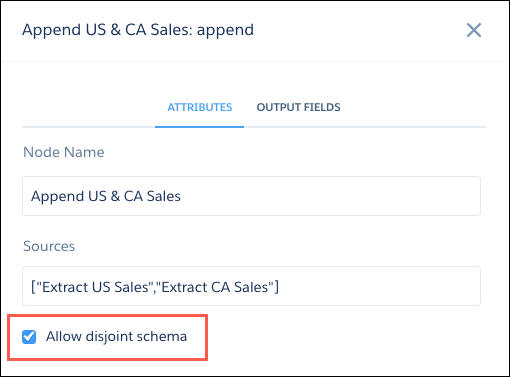
| Parameter | Required? | Value |
|---|---|---|
| sources | Yes | Nodes in the dataflow definition file that identify the dataset that you want to merge. |
| enableDisjointedSchemaMerge | No |
Indicates whether appending datasets with different schema is allowed.
Example:
If this parameter is set to false, appending datasets with different schemas causes the dataflow to fail. |
| Append Node in Dataflow Editor | Append Node in Dataflow JSON |
|---|---|
|
|
| Available in: both Salesforce Classic and Lightning Experience |
| Available in: Essentials, Group (View Only), Professional, Enterprise, Performance, Unlimited, and Developer Editions |
| User Permissions Needed | |
|---|---|
| To view, refresh, and apply filters to dashboards that you created: | Run Reports |
| To view, refresh, and apply filters to dashboards in public folders: | Run Reports AND View Dashboards in Public Folders |
| Available in: All editions supported by Data 360. See Data 360 edition availability. |
| User Permissions Needed | |
|---|---|
| To apply a filter to a related metric: |
Permission set:
AND Semantic Models object |
| View supported editions. |
| User Permissions Needed | |
|---|---|
| To edit a semantic model: | Data Cloud Architect permission set AND Semantic Models object |
| View supported editions. |
| User Permissions Needed | |
|---|---|
| To edit Tableau Next dashboards: | Tableau Unmetered Platform Analyst or Tableau Next Platform Analyst permission set |
| Available in Salesforce Classic and Lightning Experience. |
| Available with CRM Analytics, which is available for an extra cost in Enterprise, Performance, and Unlimited Editions. Also available in Developer Edition. |
| User Permissions Needed | |
|---|---|
| To update a dataset’s extended metadata: | Use CRM Analytics AND Editor access to the dataset’s app |
| Available in Salesforce Classic and Lightning Experience. |
| Available with CRM Analytics, which is available for an extra cost in Enterprise, Performance, and Unlimited Editions. Also available in Developer Edition. |
| User Permissions Needed | |
|---|---|
| To configure text fields in a model: | Create and Update Einstein Discovery Models |
| View supported editions. |
| User Permissions Needed | |
|---|---|
| To edit a semantic model: | Data Cloud Architect permission set AND Semantic Models object |
| Available in Salesforce Classic and Lightning Experience. |
| Available with CRM Analytics, which is available for an extra cost in Enterprise, Performance, and Unlimited Editions. Also available in Developer Edition. |
| User Permissions Needed | |
|---|---|
| To view visualizations: | Use CRM Analytics |
| To create actions: | Customize Application |
| View supported editions. |
| View supported editions. |
| User Permissions Needed | |
|---|---|
| To add reference lines in a Tableau Next visualization: | Tableau Unmetered Platform Analyst or Tableau Next Platform Analyst permission set |
| Available in: Lightning Experience |
| Available in: Essentials, Group, Enterprise, Professional, Unlimited, and Developer Editions. |
| Also available with CRM Analytics, which is available for an extra cost in Performance, Enterprise, Unlimited, and Developer Editions. |
| User Permissions Needed | |
|---|---|
| To manage a collection: |
|
| To manage a collection with CRM Analytics items: | Use CRM Analytics |
| View supported editions. |
| User Permissions Needed | |
|---|---|
| To explore metrics and insights, and ask questions in the agent: | Tableau Unmetered Consumer or Tableau Next Consumer or Tableau Unmetered Self-Service Consumer or Tableau Next Self-Service Consumer permission set |
| To use the agent in Slack: | Agent user permission from Salesforce for the relevant agent |
| View supported editions. |
| User Permissions Needed | |
|---|---|
| To explore metrics and insights, and ask questions in the agent: | Tableau Unmetered Consumer or Tableau Next Consumer or Tableau Unmetered Self-Service Consumer or Tableau Next Self-Service Consumer permission set |
| View supported editions. |
| User Permissions Needed | |
|---|---|
| To assign the Tableau Unmetered Admin or Tableau Next Admin permission set: | System Administrator |
| View supported editions. |
| User Permissions Needed | |
|---|---|
| To assign Tableau Next permission sets: | Tableau Unmetered Admin or Tableau Next Admin permission set, Assign Permission Sets permission |
| Available in: Developer edition and for an extra cost in Enterprise, Performance, and Unlimited editions. |
| Available in: Developer edition and for an extra cost in Enterprise, Performance, and Unlimited editions. |
| Available in: Developer edition and for an extra cost in Enterprise, Performance, and Unlimited editions. |
| User Permissions Needed | |
|---|---|
| To assign a permission set to users: | Assign Permission Sets |
| Available with CRM Analytics, which is available for an extra cost in Enterprise, Performance, and Unlimited Editions. Also available in Developer Edition. Requires a CRM Analytics Growth or CRM Analytics Plus license. |
| Permission Sets Needed | |
|---|---|
| To create and manage the app: | Manage CRM Analytics Templated Apps |
| To use CRM Analytics templated apps: | Use CRM Analytics Templated Apps |
| User Permissions Needed | |
|---|---|
| To assign a permission set to users: | Assign Permission Sets |
| Available in: Developer, Enterprise, Performance, and Unlimited editions where B2B Communications Cloud is enabled |
| Available in: Developer Edition and for an extra cost in Enterprise, Performance, and Unlimited Editions. |
| View supported editions. |
| User Permissions Needed | |
|---|---|
| To assign Tableau Next permission sets: | Tableau Unmetered Admin or Tableau Next Admin permission set, Assign Permission Sets permission |
| To edit user permissions: | Manage Profiles and Permissions Sets |
| Available in: Lightning Experience |
| Available in: Essentials, Group, Professional, Enterprise, Performance, Unlimited, and Developer Editions |
| User Permissions Needed | |
|---|---|
| To subscribe to reports: | Subscribe to Reports |
| To subscribe other people to reports: | Subscribe to Reports: Add Recipients |
| To subscribe other people to reports by groups or roles: | Subscribe to Reports: Send to Groups and Roles |
| To specify who runs the report in a report subscription: | Subscribe to Reports: Set Running User |
| To attach files to report subscriptions | Export Reports |
| Parameter | Required? | Value |
|---|---|---|
| operation | No |
Indicates what the transformation does if it matches multiple rows in the right dataset with a row in the left. Valid values:
For more information about each operation, see Special Cases for Matching Records with the augment Transformation. |
| left | Yes | Node in the dataflow definition file that identifies the left dataset. This is one of two input sources for this transformation. |
| left_key | Yes |
Key column in the left dataset used to augment the dataset. If you use a composite key, the left and right keys must have the same number of columns in the same order. For a composite key, use the following syntax: The left or right key can’t be a multivalue field. A key must be a dimension. |
| right | Yes | Node in the dataflow definition file that identifies the right dataset. This is one of two input sources for this transformation. |
| relationship | Yes | Relationship between the left and right dataset. The dataflow adds the relationship to the beginning of the right column names in the output dataset to make the column names unique and descriptive. Can contain only letters, numbers, dots, underscores, and dashes. |
| right_select | Yes | An array of column names from the right dataset that you want to include in the output dataset. The dataflow adds the relationship as a prefix to the column name to determine the name of the right column in the output dataset. |
| right_key | Yes |
Key column in the right dataset used to augment the dataset. If you use a composite key, the left and right keys must have the same number of columns in the same order. The left or right key can’t be a multivalue field. A key must be a dimension. |
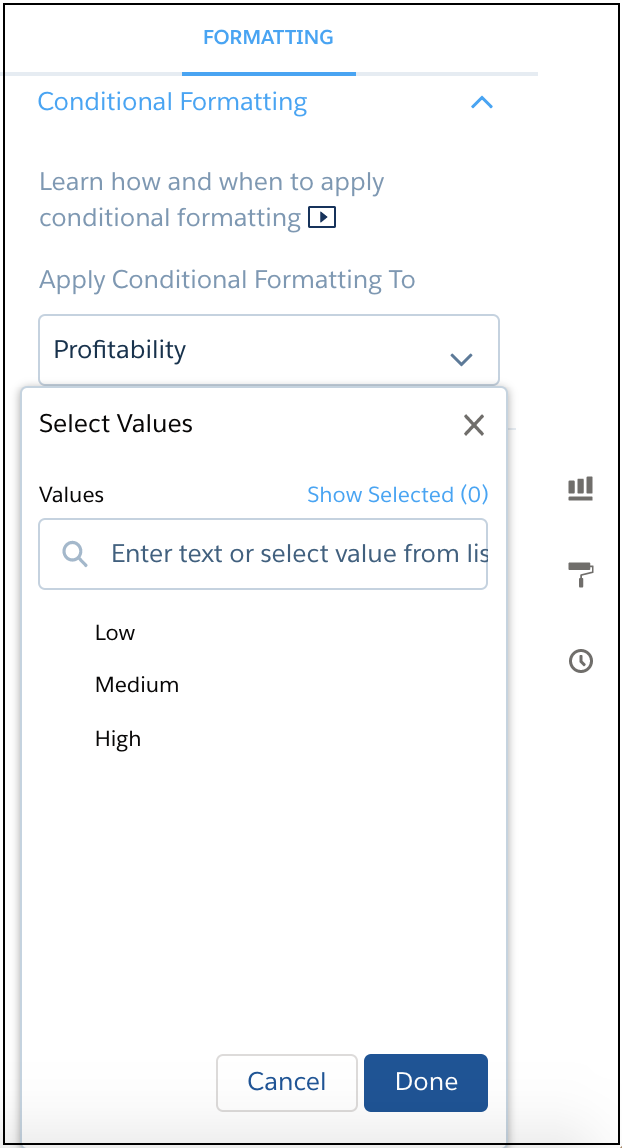 | 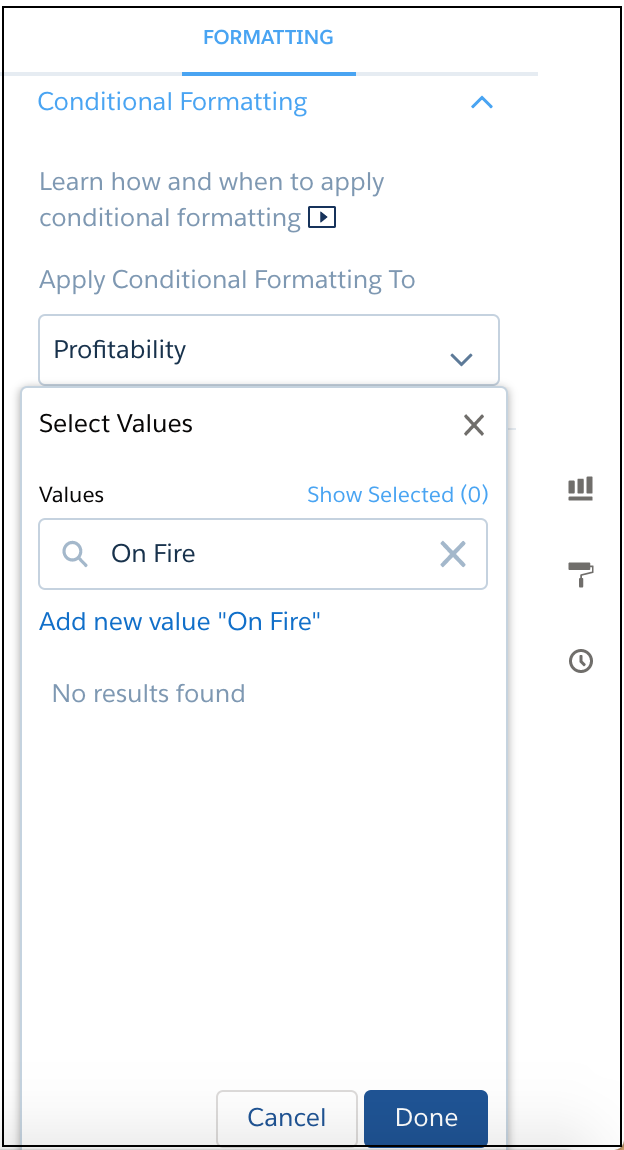 | 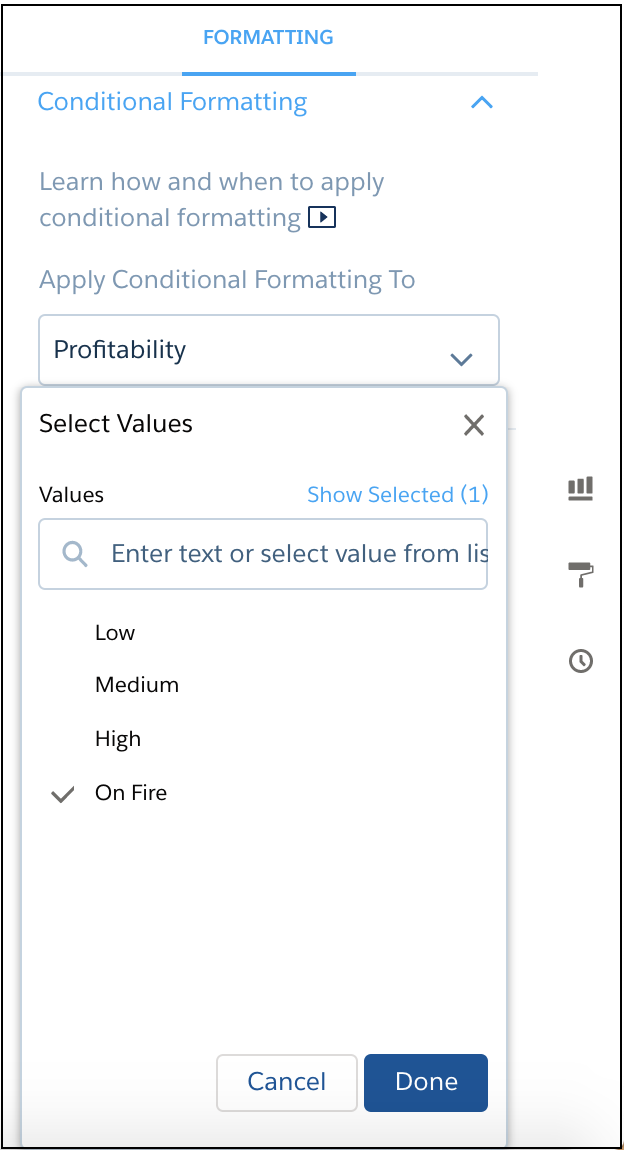 |
| Available in: Salesforce Classic and Lightning Experience |
| Available in: Group, Professional, Enterprise, Performance, Unlimited, and Developer Editions |
| Available in: Salesforce Classic and Lightning Experience |
| Available in: Group, Professional, Enterprise, Performance, Unlimited, and Developer Editions |
| Limit | Value |
|---|---|
| Maximum concurrent queries per tenant | See Data 360 API Limits for Profile, Query, and Calculated Insights. |
| Maximum number of API queries and SQL queries |
| Available in: Developer edition and for an extra cost in Enterprise, Performance, and Unlimited editions. |
| USE CASE | Recommendation | Explanation | Example to Avoid |
|---|---|---|---|
| Definitions that require formulas or expressions | Create a calculated field. | Improves consistency and maintains the integrity of your semantic model. | Sales per Customer are the Sales divided by the Customer Count |
| Manipulate results on the fly (for example, perform addition, subtraction, multiplication, division, or calculate percentages or ratios) | Create a calculated field. | This use case is not supported. |
Multiply percentages by 100 Always round scores |
| General business context | Write direct, actionable guidance. | Analytics Q&A and the analytics agent need specific instructions on how to interpret or display data, not general background information. | Tenant is a specific Salesforce product instance. An Account can have many Tenants, even of the same type |
| Blocking topics or questions | Manage permissions at the data source level. | This use case is not supported. | Don't answer any questions about opportunities |
| Adjust role-specific outputs | Create separate semantic models or views for each role. | This use case is not supported. | When a sales rep asks about financial performance, always aggregate by quarter and show the average deal size trend |
| Alter answer structure. | This use case is not supported. Analytics Q&A determines the best response structure. | When responding, don't show a visualization. On every response, first tell the user 'Thank you,' then show the answer, and then end with 'Goodbye.' | |
| Visual formatting. | This use case is not supported. | When displaying sales metrics over time, use a line chart |
| Scenario | Use Calculated Field | Use Business Preference |
| Arithmetic or logic on fields |  |  |
| Custom groupings or flags | | |
| Adjusting how the analytics agent interprets terminology | | |
| Influencing agentic interpretation or display | | |
| Need for precise and reusable formula | | |
| Expressing a subjective or context-specific rule that is not an expression | | |