Add a Salesforce action to your Tableau Next visualization. Users can invoke these
actions to create, update, and interact with Salesforce records. For example, add actions so users can create cases, update accounts, or post to Chatter.
Required Editions
| User Permissions Needed |
| To edit Tableau Next visualizations: |
Tableau Unmetered Platform Analyst or Tableau Next Platform Analyst permission set |
-
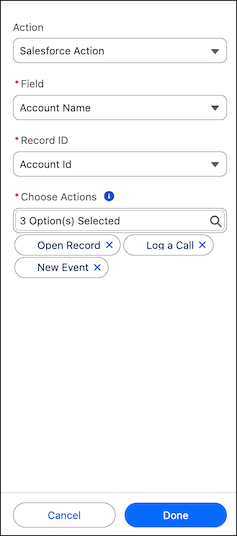
Select Salesforce Action as the action type.
-
Select a data field to add the action to.
-
Select the record ID to run the action on.
This value is the primary ID for the record type. In Spring '25, the record ID must be
part of the visualization.
-
Select up to 5 actions to add to the field.
These actions appear as menu selections when you select the field.
The Open Record action supports multi-org environments. When records with identical names
exist across different data sources, users select the specific record they want, and it opens in
its source org.