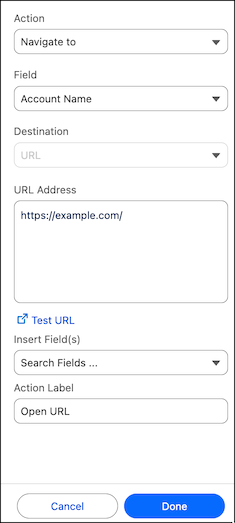
Embed navigation actions into your Tableau Next visualization. The navigate action
allows users to navigate to external sites with clickable links directly in a visualization data
field.
Required Editions
| User Permissions Needed |
| To edit Tableau Next visualizations: |
Tableau Unmetered Platform Analyst or Tableau Next Platform Analyst permission set |
-
Select Navigate to as the action type.
-
Select a data field to add the action to.
-
Use URL Address to specify the destination URL.
The URL must start with one of the following prefixes: http, https, ftp, mailto, news,
gopher, tsc, tsl, sms, or tel.
-
To create a dynamic URL, select data fields from Insert
Fields.
Each data field value is appended to the URL. For example, to take the user to details for
a state.
-
Add the action to the State field and enter a URL Address of
https://en.wikipedia.org/wiki.
-
Insert the State field from the visualization.
-
When the user clicks on a state field with the value California, the dynamic URL
generated is https://en.wikipedia.org/wiki/California.
-
To verify the URL works as expected, click Test URL.
-
Define the action label the user sees when they click on the field, for example,
Open URL.