Group related dimension values into meaningful categories to simplify comparisons and
highlight patterns in your Tableau Next data. Create groups to compare performance across segments
without changing the underlying data.
Required Editions
| User Permissions Needed |
| To use groups in Tableau Next: |
Tableau Unmetered Platform Analyst or Tableau Next Platform Analyst permission set |
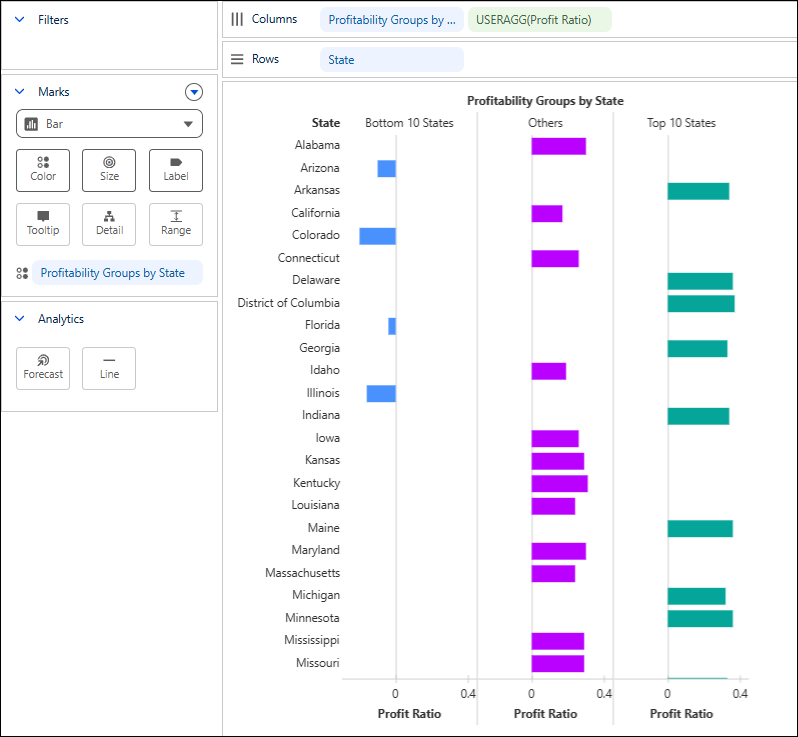
For example, create groups for states based on profitability and compare performance
across Top 10 States, Bottom 10 States, and Others to compare profitability across segments and
quickly identify leading and underperforming states.
-
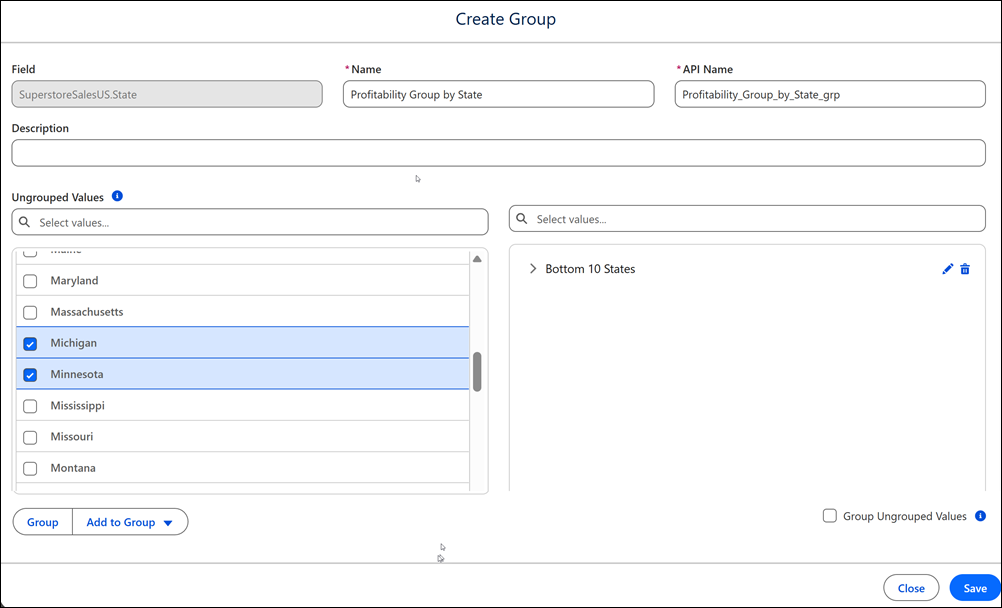
Create a group.
-
From the dimension field's context menu, select Create
Group.
-
Enter the group's name, and optionally, a description.
-
Define group members.
-
In Ungrouped Values select one ore more dimension values.
-
To enter a name for the group member, click
 .
.
-
Create additional group members as needed.
-
Optionally, group all remaining values.
-
Save the group.
-
Apply the group to your visualization.