Group continuous measure values into ranges, called bins, to simplify analysis and
reveal patterns in your Tableau Next data. Create bins to segment values into intervals without
changing the underlying data.
Required Editions
| User Permissions Needed |
| To use bins in Tableau Next: |
Tableau Unmetered Platform Analyst or Tableau Next Platform Analyst permission set |
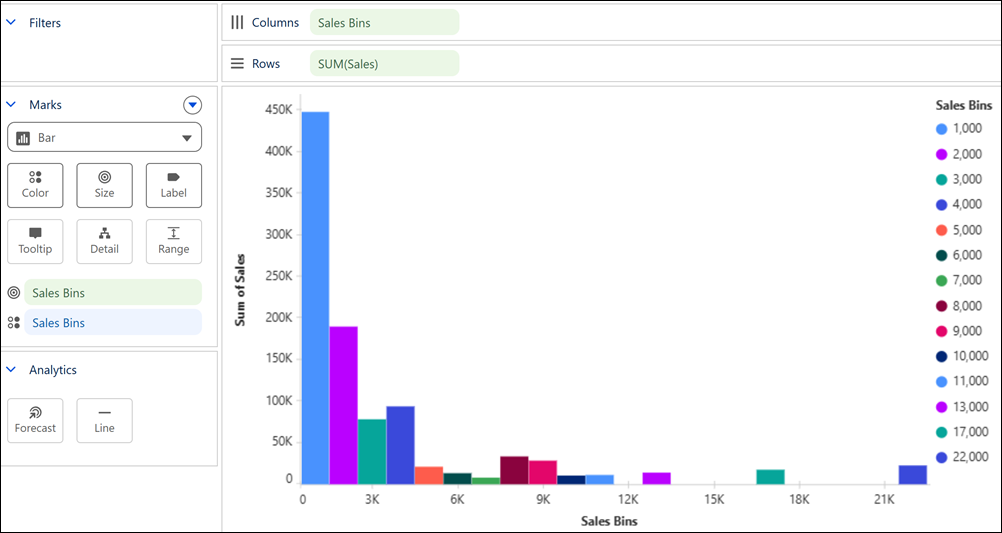
For example, create bins on Sales to group order values into ranges and identify which
sales ranges contribute the most revenue.
-
Create a bin.
-
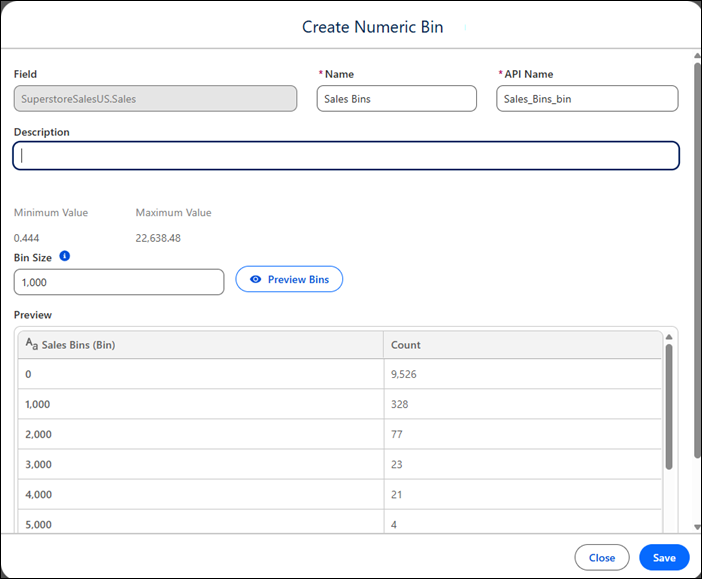
In the Data pane, from the measure field's context menu, select Create
Bin.
-
In the Create Numeric Bin window, enter the bin's name, and optionally, a
description.
-
Enter a value for the bin size.
-
Preview the bin ranges and adjust the bin size if needed.
-
Save the bin.
-
Apply the bin to your visualization.