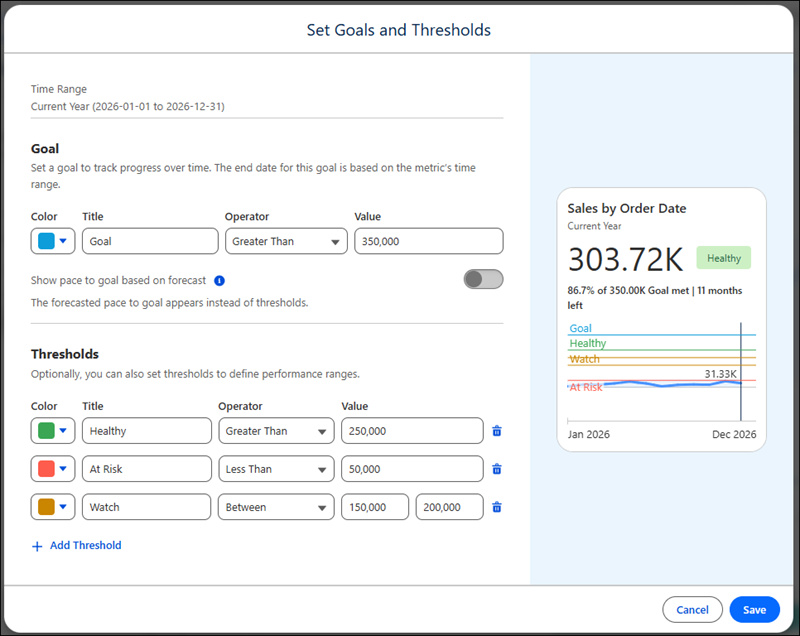
With Tableau Next, you can track important metrics and receive updates right where
you’re working in Salesforce or in Slack. When you set a goal in Tableau Next, you can also
track a metric’s progress toward that goal. And you can set thresholds to add context to your
metrics. For example, if you have a metric that tracks sales over time, you can set a goal and turn on
forecasting to monitor your progress toward that goal. And you can add labels for ranges such
as “at risk,” “healthy,” for more context. Or set thresholds independently of goals, which is
particularly valuable for noncumulative metrics. For example, you could set a threshold that
indicates that it’s time to investigate when a metric is less than a specified value.
Required Editions
| User Permissions Needed |
| To create goals: |
Tableau Unmetered Consumer or Tableau Next Consumer or Tableau Unmetered Self-Service Consumer or Tableau Next Self-Service Consumer
permission set |
When you create a goal or threshold, the goal and thresholds are visible to anyone who views
that metric. And all users can create, edit, or delete a goal or thresholds for a metric.
When you create a goal or threshold, it’s based on the metric’s current filters. Goals and
thresholds also use the time range selected by the user. For example, if the metric’s time
range is quarter to date, then the goal and thresholds set are from the beginning of the
quarter to the end of the quarter.
When the goal’s time period has passed, the goal and thresholds don’t recur. If you have
recurring goals and thresholds, then set them at the beginning of each time period.
- Set Goals and Thresholds for Tableau Next Metrics
When you set a goal, you see your progress toward that goal on your Tableau Next Following page. And thresholds give more context to your metric's value. For example, you can create thresholds for performance ranges, such as "healthy," "at risk," and "critical." You can set thresholds with or without goals. And you can also set goals without thresholds.
- Edit or Delete Tableau Next Goals or Thresholds
Editing a goal or deleting a goal or threshold changes them for all users who follow that Tableau Next metric.