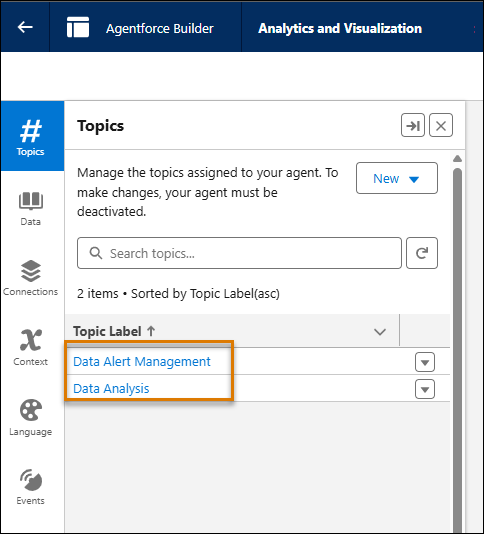
Add the Data Analysis and Data Alert Management subagents, so Agentforce can analyze Tableau Next metrics and semantic data models (SDMs) and send you alerts about them.
Required Editions
If you're using the new Agentforce Builder template, see Set Up Tableau Agent in Tableau Next.
| View supported editions. |
| User Permissions Needed | |
|---|---|
| To enable data alerts in Tableau Next: | Tableau Unmetered Admin or Tableau Next Admin permission set and Assign Permission sets |
- Select the Setup icon (gear).
- In the Quick Find box, type Agent and choose Agentforce Agents.
- Select New Agent. Or choose the name of an existing agent, then select Open in Builder to edit, and skip to step 9.
- If you’re building a new agent, select the Analytics and Visualization agent template in the Agent Creator page. Then click Next.
- Confirm that Data Analysis and Data Alert Management are both added, and click Next.
- Enter a Name, API Name, Description, Role, and Company for your agent. Then click Next.
- Confirm your Default Language and Tone, and click Create.
- In the Agentforce Builder page, select the dropdown arrow next to Data Alert Management. Then select View Details.
- On the This Topic’s Actions tab, confirm that Create Data Alert is listed, and click Activate.
- From the app picker, go to Tableau Next.
- On the left side of Tableau Next, choose Administration and choose Settings.
- Confirm that Tableau Agent: Data Alerting is enabled. If you don't see Tableau Agent: Data Alerting, make sure that Concierge: Analytics Q&A is enabled first.

-
targetEntityIDfor Target Entity Id -
targetEntityTypefor Target Entity Type -
targetEntityStatefor Target Entity State
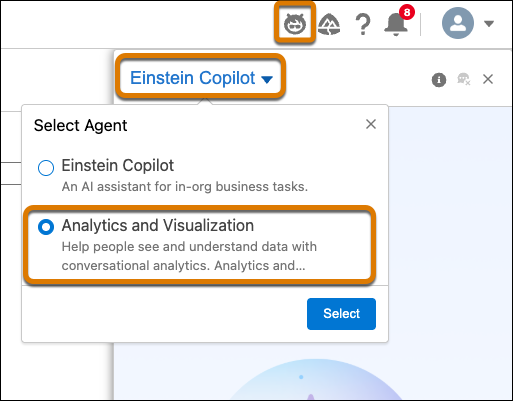
Finally, users must select the Analytics and Visualization agent from Agentforce in Tableau Next. Then to create an alert, open a Tableau Next metric, and open the Agentforce panel by clicking the Agentforce icon. Using natural language, ask Agentforce to send you an alert when a specified metric meets a certain condition, for example “Send me an alert when this metric reaches 10,000.”