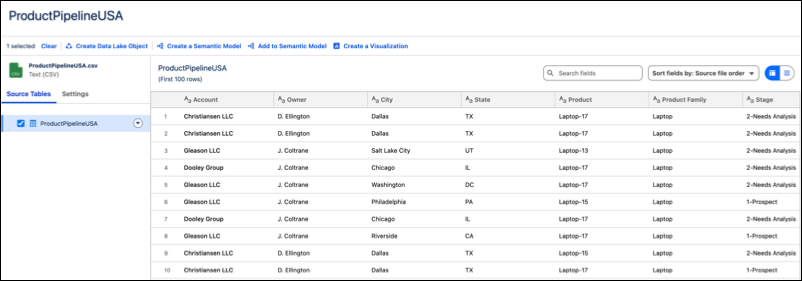
After you upload an existing data asset or a file to a Tableau workspace, you can review
the fields and data types, along with up to 100 rows of data in each field. After reviewing, you
can use newly uploaded data immediately for models or visualizations.
Required Editions
| User Permissions Needed |
| To upload data and create visualizations in Tableau Next: |
Tableau Unmetered Platform Analyst or Tableau Next Platform Analyst permission set |
-
Review the column headers to make sure that the metadata is clear and accurate.
-
Check that the sampled data matches what’s expected in each column, including the data
type.
-
Save the uploaded data and decide next steps.
- To finalize the uploaded data and return to the workspace, click
Save.
- To model the metadata associated with the data, click Create a Semantic
Model.
- To visualize the data, click Create a Visualization. Because a
visualization is based on a semantic model, Tableau generates a basic semantic model to create
the visualization.