Review how data values move across stages in a process to understand how they split,
combine, or drop off. Define the stages using levels, and show the flow between them with links,
where the width reflects the relative value being transferred. Use Sankey charts to evaluate how
inputs lead to outcomes and identify the most and least effective paths. The order of levels
determines the direction of the flow and what you focus on in the analysis.
Required Editions
These examples show how different business areas can analyze data with Sankey charts.
| Business Area |
Use Case |
| Sales |
Track how deals move across pipeline stages by defining stages as levels and
using links to show where opportunities progress, stall, or decline. |
| Marketing |
Analyze how leads move from campaigns through engagement stages by structuring
stages as levels. Using links, identify which channels drive the most effective
conversion paths. |
| Service |
Monitor how cases progress across statuses by defining statuses as levels. Spot
where resolutions are delayed and which paths lead to faster case closure. |
Create a Sankey Chart to Analyze Value Flow
In Tableau Next, you can analyze how values change across stages using Sankey charts.
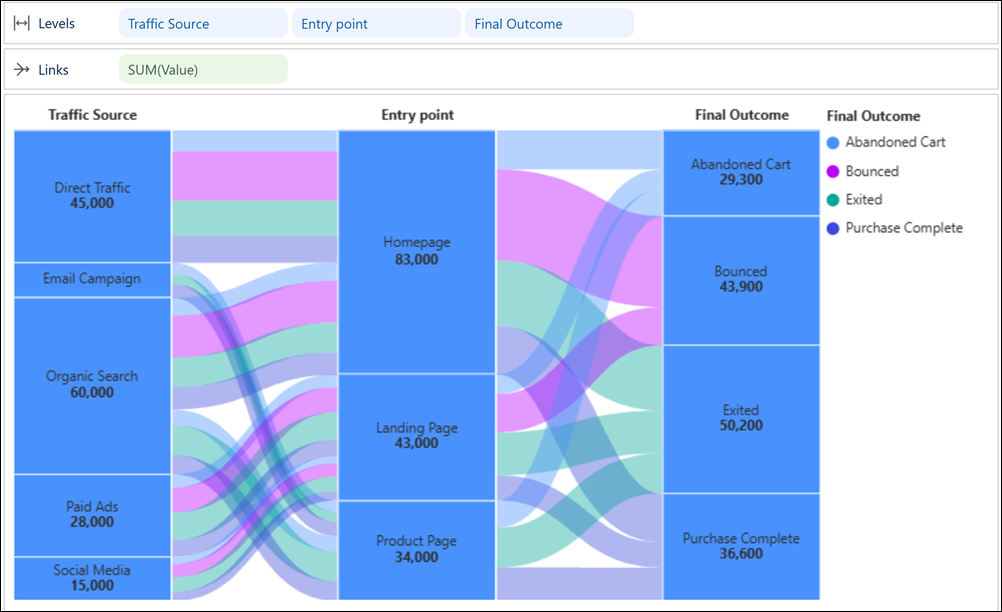
For example, evaluate how traffic sources move through entry points to final outcomes. Compare
patterns across paths or focus on specific journeys such as purchases or abandoned
sessions.
Required Editions
| User Permissions Needed |
| To create a Sankey chart in Tableau Next: |
Tableau Unmetered Platform Analyst or Tableau Next Platform Analyst permission set |
-
From the Show Me pane in your visualization, click the
 thumbnail.
The layout changes to Flow. And, the Show Me pane shows you
the minimum required fields for the chart type: two dimensions on Levels and one measure on
Links.
-
For the chart in the example, from the Data pane in your visualization, double-click these
fields to add them to Levels: Traffic Source,
Entry Point, and Final Outcome.
-
To show how values move across stages, add Order Value to
Links.
-
Optionally, color flows by outcome to make traffic patterns easier to spot.