The Tableau Next Service-Risk Adjusted Win Score composite metric template combines
sales conversion performance with service-risk. It signals which accounts have strong win rates
and low service escalations, ideal targets for upsell and expansion. This template installs the
pre-configured metric and 1 calculated field used to determine your service-risk adjusted win
scores. Designed to allow analysts to visualize their data instantly and provide stakeholders with
actionable insights, bypassing the time-consuming process of manual chart configuration and
complex data modeling.
Required Editions
| User Permissions Needed |
| To view Marketplace templates: |
Tableau Unmetered Platform Analyst or Tableau Next Platform Analyst permission set |
| To install semantic models in Data 360: |
Data Cloud Architect permission set |
This template requires:
- C360 Semantic Data Model
- C360 DMOs: Account, Opportunity, and Case
This template is designed to work with the C360 data, mapping your data into a composite
metric.
-
On the Tableau Next home page, select Marketplace.
-
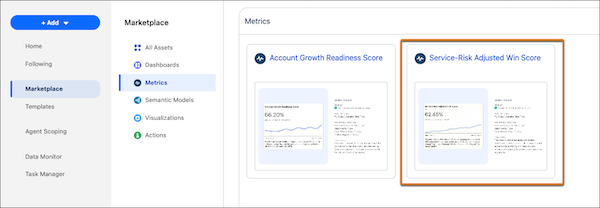
In the Marketplace, select Metrics, and then the Service-Risk Adjusted Win Score tile.
-
View the template details and click Next.
-
Configure the metric.
-
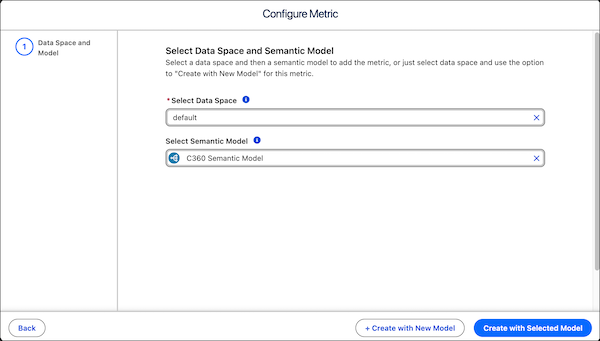
Select the data space for the model and metric.
-
Select an existing semantic model to use. To extend the existing C360 semantic into a new
model for customization, leave this blank.
-
Click Create with Selected Model to start the installation process
with your selected model. Or click Create with New Model to install with
a new semantic model.
The template checks your org to make sure that all prerequisites and permissions are
set up correctly to install the metric. If the template validation is successful, the
installation process begins. If it fails, you’re provided with a list of errors to
resolve.
If you create a model, a successful install opens a new model extended from the C360 semantic
model.
Primary Metric Calculation:
0.60×WinRate+0.40×(1−EscalationRate)