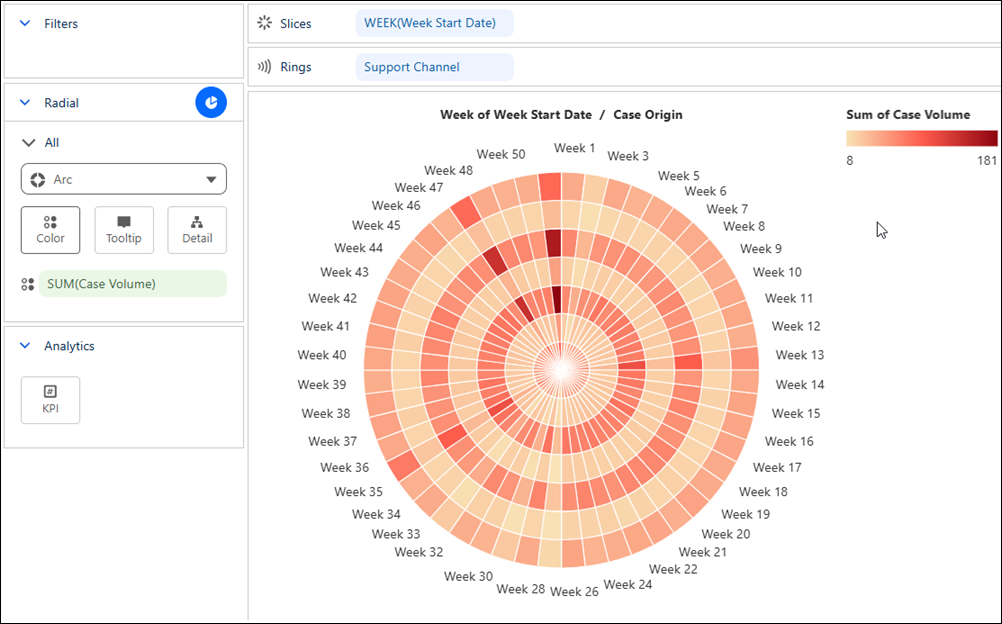
Surface trends, gaps, and intensity across equal, cyclical time periods with a Tableau
Next radial heatmap. Use color to reveal variations in a measure across categories while
preserving the cyclical sequence. For example, visualize weekly case volume by support channel to
identify seasonal peaks, quieter periods, and recurring patterns throughout the year.
Required Editions
| User Permissions Needed |
| To create Tableau Next visualizations: |
Tableau Unmetered Platform Analyst or Tableau Next Platform Analyst permission set |
-
From the Show Me pane in your visualization, click the
 thumbnail. The layout changes to Radial heatmap, and the pane shows the required
fields and supported field encodings for the chart type.
thumbnail. The layout changes to Radial heatmap, and the pane shows the required
fields and supported field encodings for the chart type.
-
From the Data pane in your visualization, drag the dimension field you want to analyze onto
Rings. For the chart in the example, select Support
Channel.
-
Drag the time field that represents the analysis period, such as Start
Date onto Slices. For the chart in this example, set the
date part to Week.
-
Drag a continuous measure field, such as Sum of Case Volume onto
Color.
-
Save your visualization.