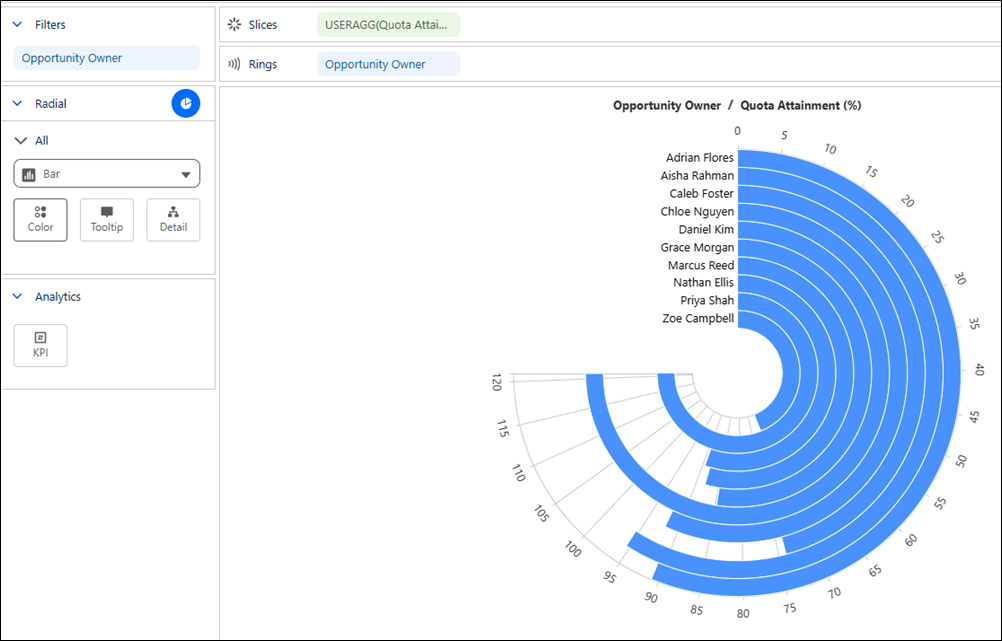
Visualize how close each entity is to reaching its goal in a compact circular layout
with a Tableau Next radial bar chart. The chart's common scale makes it easy to compare relative
performance and quickly identify leaders and areas that need attention. For example, review quota
attainment by sales representatives to identify the top performers against their annual sales
goals.
Required Editions
| User Permissions Needed |
| To create Tableau Next visualizations: |
Tableau Unmetered Platform Analyst or Tableau Next Platform Analyst permission set |
-
From the Show Me pane in your visualization, click the
 thumbnail. The layout changes to radial bar, and the pane shows the required fields
and supported field encodings for the chart type.
thumbnail. The layout changes to radial bar, and the pane shows the required fields
and supported field encodings for the chart type.
-
From the Data pane in your visualization, drag the continuous measure field you want to
analyze onto Slices. For the chart in the example, select
Quota Attainment (%).
-
Drag a dimension field that defines each bar, such as Opportunity
Owner, onto Rings.
-
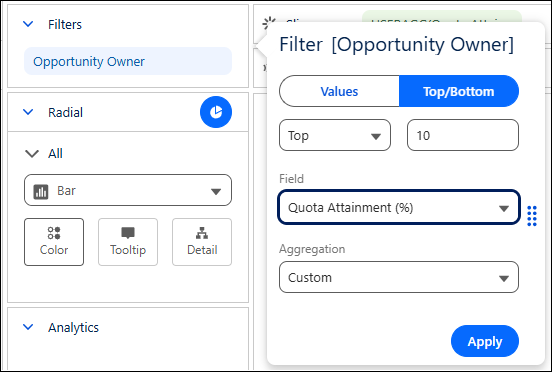
Optionally, to focus on the top performers:
-
Drag Opportunity Owner to Filters.
-
Set the Top/Bottom filter to Top 10
-
Set the ranking field to Quota Attainment (%)
-
Click Apply.
-
Optionally, drag a measure onto KPI to highlight its value in the center of the
chart.
-
You can further customize the visualization with colors, labels, or tooltips to make the
chart easier to interpret.
-
Save your visualization.