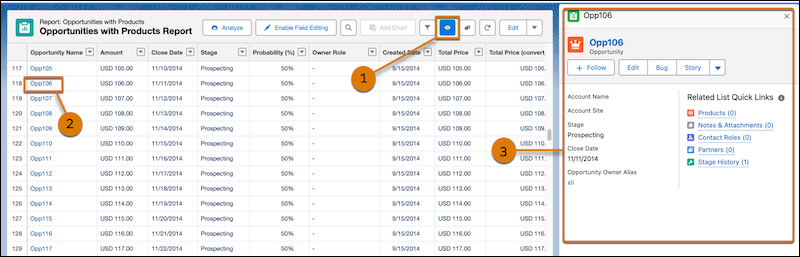
Review and work with records directly from a report instead of opening each record on a
separate page. Turn on preview mode to open records in a side panel while keeping the report
visible. Record preview is available only in the report view mode.
Required Editions
| Available in: Lightning Experience |
| Available in: Enterprise, Performance, Unlimited, and
Developer editions.
|
-
From Setup, in the Quick Find box, enter Reports and select
Reports and Dashboards Settings.
-
Select Show record previews on Lightning Reports (Beta).
-
Open a report, and then click
 at the top of the report run page.
-
In the report, select a record link.
The record opens in a side panel next to the report.
-
Review the record details and interact with it directly from the side panel:
- To view more information in a pop-up, hover over the links in the Related List Quick
Links section.
- To open the record in a new tab, click any action buttons at the top of the
panel.