
Set the correct cardinality type to define how two objects are related and ensure Tableau Semantics interprets joins accurately. This helps prevent unexpected duplicates or missing data and improves overall query performance.
Required Editions
| Available in: All editions supported by Data 360. See Data 360 edition availability. |
| User Permissions Needed | |
|---|---|
| To set cardinality in a semantic model: |
Permission set:
AND Semantic Models object |
- In Data Cloud or a Tableau Next workspace, go to the Semantic Layer tab and open a semantic model.
- Hover over a line connecting two objects to see a summary of the relationship, including the objects involved, the join fields, and the current cardinality type. This quick view lets you confirm the setup before making changes.
- Click the line. The Relationship panel opens, showing the fields used for the join.
-
Choose the appropriate cardinality type from the Cardinality Type dropdown. Your options
include One-to-One, One-to-Many, Many-to-One, and Many-to-Many.
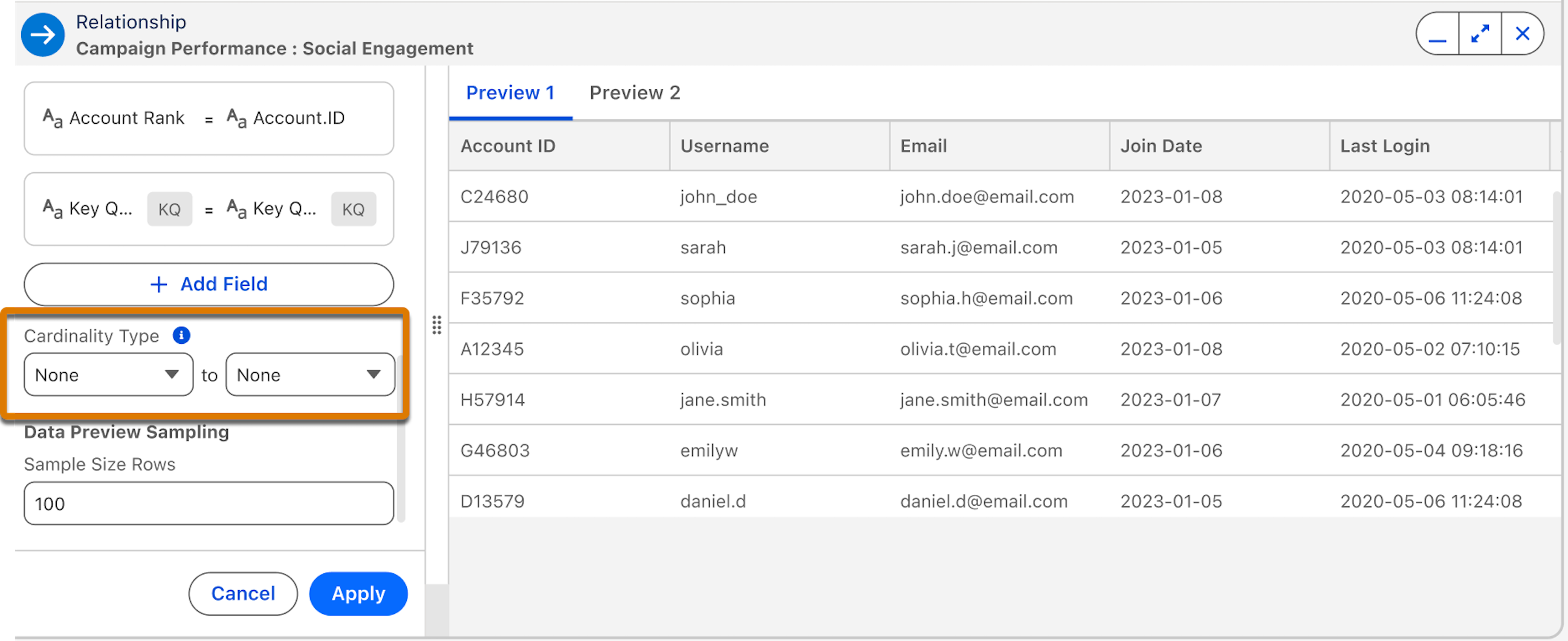
- Use the data preview to verify that your choice matches the actual behavior of your data. If you see duplicates or missing values, select a different type that better reflects the real-world relationship.
- Click Apply to save your changes.