Set dataflow notifications to
receive an email notification when a dataflow job finishes. You can be notified only when there
are warnings, only when the dataflow fails, or every time the dataflow finishes. You can also
set an elapsed time notification to notify you when a dataflow is still running after a
specified length of time.
Required Editions
| User Permissions
Needed |
| To set a dataflow
notification: |
Edit CRM Analytics Dataflows |
- In CRM Analytics, click the gear icon (
 ) and
then click Data Manager.
) and
then click Data Manager.
The data manager opens on the Monitor tab, with the Jobs tab open by
default.
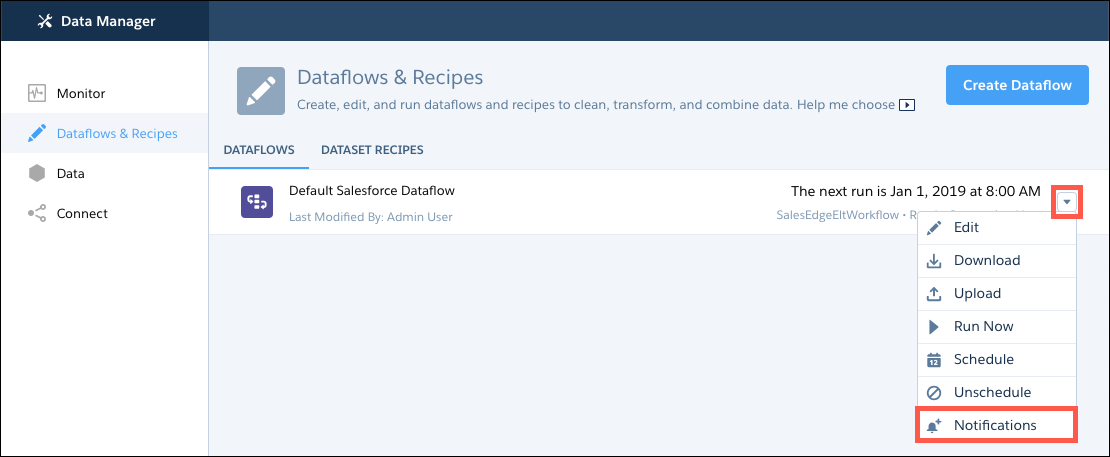
- Click the Dataflows & Recipes tab.
- On the right of the dataflow, click
 and select
Notifications.
and select
Notifications.
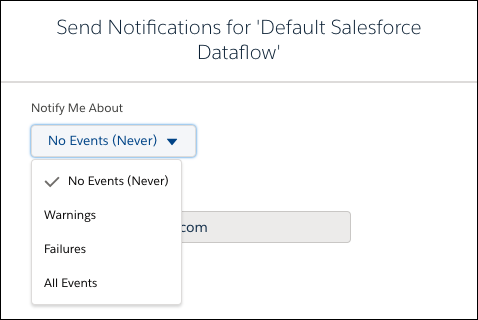
- From the Notify Me About picklist, select what you want to be notified about.
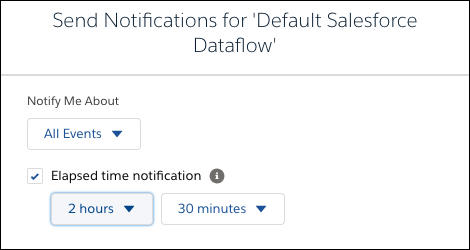
- To receive an elapsed time notification, select All Events from
the Notify Me About options. Then select Elapsed time notification
and select the number of hours and minutes.