
You can edit your collection properties, such as name and description, and also delete the collection altogether. Shared users with the Manager role can also edit and delete the collection.
Required Editions
| Available in: Lightning Experience |
| Available in: Essentials, Group, Enterprise, Professional, Unlimited, and Developer Editions. |
| Also available with CRM Analytics, which is available for an extra cost in Performance, Enterprise, Unlimited, and Developer Editions. |
| User Permissions Needed | |
|---|---|
| To manage a collection: |
|
| To manage a collection with CRM Analytics items: | Use CRM Analytics |
- Edit a collection.
- Open a collection.
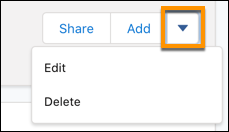
- Click the dropdown menu and click Edit.
- Add your changes in the Edit Collection window.
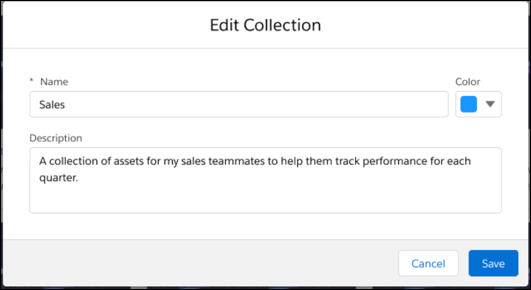
- Click Save.
- Delete a collection.
- Open a collection.
- Click the dropdown menu and click Delete.
- Click Delete again to confirm your action.