Explore a Second-Order Insight

A second-order insight shows how the combination of two explanatory variables explains variation in the outcome variable. In second-order analysis, the combined impact of both variables together on the outcome is sometimes called the interaction effect.

The following example shows a second-order insight.
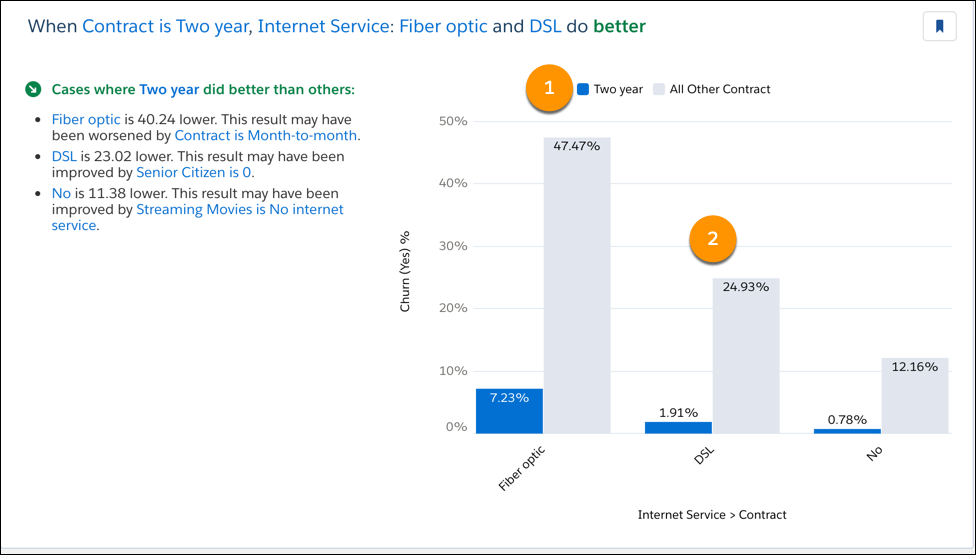
Bar chart showing, second-order insight with two numbered elements

To help orient you to what this chart reveals, refer to the headline on the left. In the chart, generally look for blue bars, starting from left to right.

Chart Axes
Axis Description
Horizontal

Explanatory variables for this insight. Each pair of vertical bars represents a category of one explanatory variable. Within each pair, the vertical bar on the left represents a single category of the other explanatory variable . The vertical on the right represents all other categories of the other explanatory variable.

Categories are sorted by descending frequency from left to right (unless otherwise selected in Model Setup). Categories containing the highest frequency of observations are shown to the left, and the categories with the lowest frequency of observations are shown to the right.

Vertical Outcome variable for this model.
Chart Elements
Number Element Description
1 Legend

Describes the meaning of the vertical bars in the pairs.

  • Category - The left bar is blue when it is statistically significant or dark gray when it is statistically insignificant.
  • All Other Categories - The right bar is light gray.

To determine whether the left bar is significant, Einstein performs the following tests:

  • For the numeric use case (numeric outcome variables), Einstein performs a two-sample unpaired Student’s t-test (no assumption of equal variance) for each bar, testing it against its complement (such as Type is Consulting and Type is NOT Consulting).
  • For the classification use case (binary outcomes), Einstein performs a Chi-Square Goodness of Fit test to compare the observed number of the desired outcome to the expected number based on the complement.

If the p-value of the test is below 0.01, the left bar is colored blue. Otherwise, it is colored a dark gray. Blue bars, then, are statistically significantly different from their complement (that their average would be so far from their complement is unlikely to have happened randomly).

2 Paired Vertical Bar

Each pair represents a category of the explanatory variable that appears along the horizontal axis. With each pair:

  • The left bar represents one category of another Explanatory Variable.
  • The right bar represents all other categories of this Explanatory Variable.
  • The height of each vertical bar shows the average Outcome Variable for this category or categories.

Hover over a bar to see additional information.

  Left Bar Popup
  • First Explanatory Variable and Category
  • Second Explanatory Variable and Category
  • Difference in Average for Other Buckets: The differences between the average of records that are left bar and the right bar (left bar Average - right bar Average).
  • Total: Sum of all Outcome Variables for this category.
  • Count: Number of observations of this category.
  • Difference from Average: How much this category average differs from the global average (Average - Global Average).
  • Outcome Variable: Average Outcome Variable for this category (Total / Count).
  • Global Average: Global average of all variables.
  Right Bar Popup
  • First Explanatory Variable and Category
  • Second Explanatory Variable and All Other Categories
  • Total: Sum of all Outcome Variables for this combination of categories.
  • Count: Number of observations within this combination of categories.
  • Difference from Average: How much this combination of categories average differs from the global average (Average - Global Average).
  • Outcome Variable: Average Outcome Variable for this category (Total / Count).
  • Global Average: Global average of all variables.