
Export your CRM Analytics dashboard as a PDF to share your insights. Preserve your applied filters and the active page, and customize the layout with specific page sizes and data options.
Required Editions
| Available in: Lightning Experience |
| Available in: Enterprise, Performance, Unlimited, and Developer Editions |

Note Document downloads is a pilot or beta service that is subject to the Beta Services Terms at
Agreements - Salesforce.com or a written Unified Pilot Agreement
if executed by Customer, and applicable terms in the Product Terms Directory. Use of this pilot or beta
service is at the Customer's sole discretion.
| User Permissions Needed | |
|---|---|
| To download data in tabular format: | Download CRM Analytics Data |
- From Setup, in the Quick Find box, enter Analytics, and then click Settings.
- Select Enable dashboard saved views, Secure image sharing and downloading, and Opt into Hyperforce Headless Browser Service.
-
In the CRM Analytics dashboard, click the Download icon
 .
.
-
Select Document (Beta).
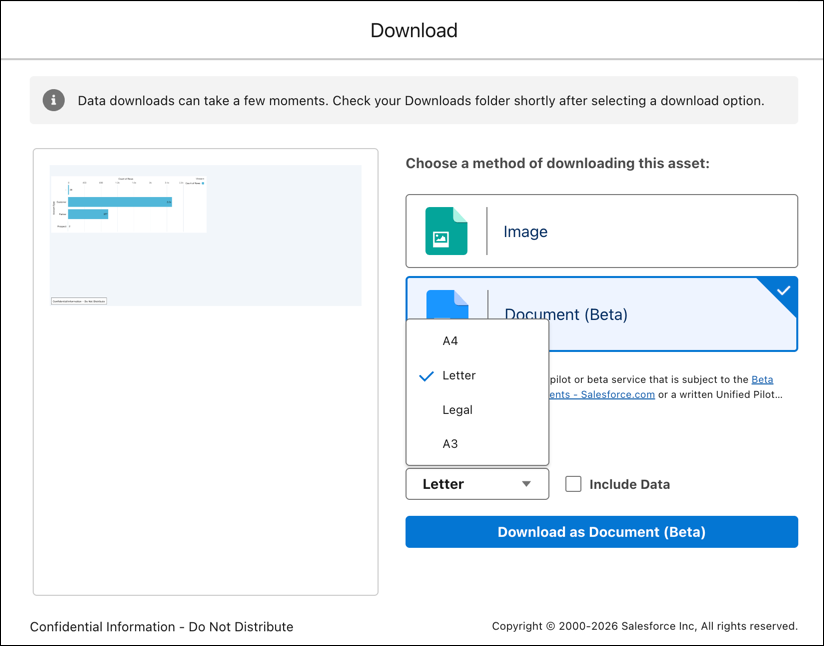
- Select a standard document size, such as A4, Letter, Legal, or A3.
- To include the underlying tabular data for dashboard widgets, select Include Data. When this option is deselected, the PDF includes only the visual dashboard screenshot.
- Click Download as Document (Beta).
- Considerations and Limitations for Downloading CRM Analytics Dashboards as Documents (Beta)
Keep these considerations and limitations in mind when downloading CRM Analytics dashboards as documents.