---
schema_version: "1"
id: b81de653f6b0ebfa46708bfe71093dc84fa05d470bdf394d8ff018426dabb64a
title: Download CRM Analytics Dashboards as Documents (Beta)
collection: admin
version: current
locale: en-us
portal_url: https://docs.salesforce.com/admin/current/en-us/analytics/264-0-0/bi_dashboard_document_download.md
canonical_url: https://help.salesforce.com/s/articleView?id=analytics.bi_dashboard_document_download.htm&release=264.0.0&type=5
source_site: help.salesforce.com
content_type: documentation
content_hash: e7bc9cebac8a784e8c69540c1925075a77c069dc6c0a4160a998d93530886279
description: Export your CRM Analytics dashboard as a PDF to share your insights. Preserve your applied filters and the active page, and customize the layout with specific page sizes and data options.
products:
- CRM Analytics
- Cross Cloud
release: "264"
---
# Download CRM Analytics Dashboards as Documents (Beta)
Export your CRM Analytics dashboard as a PDF to share your insights. Preserve your applied filters and the active page, and customize the layout with specific page sizes and data options.
### Required Editions
Available in: Lightning Experience
Available in: Enterprise, Performance, Unlimited, and Developer Editions

Note Document downloads is a pilot or beta service that is subject to the Beta Services Terms at [Agreements - Salesforce.com](https://www.salesforce.com/company/legal/agreements/) or a written Unified Pilot Agreement if executed by Customer, and applicable terms in the [Product Terms Directory](https://ptd.salesforce.com/). Use of this pilot or beta service is at the Customer's sole discretion.
User Permissions Needed
To download data in tabular format:
Download CRM Analytics Data
1. From Setup, in the Quick Find box, enter Analytics, and then click **Settings**.
2. Select **Enable dashboard saved views**, **Secure image sharing and downloading**, and **Opt into Hyperforce Headless Browser Service**.
3. In the CRM Analytics dashboard, click the **Download** icon .
4. Select **Document (Beta)**.
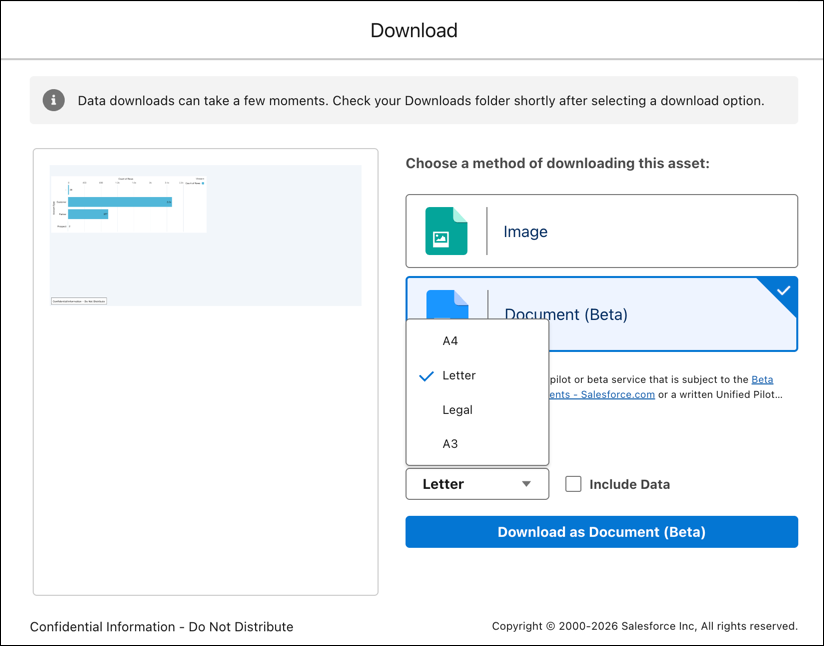
5. Select a standard document size, such as A4, Letter, Legal, or A3.
6. To include the underlying tabular data for dashboard widgets, select **Include Data**. When this option is deselected, the PDF includes only the visual dashboard screenshot.
7. Click **Download as Document (Beta)**.
- **[Considerations and Limitations for Downloading CRM Analytics Dashboards as Documents (Beta)](https://help.salesforce.com/s/articleView?id=analytics.bi_dashboard_document_download_considerations_limitations.htm&release=264.0.0&type=5)**
Keep these considerations and limitations in mind when downloading CRM Analytics dashboards as documents.