
|
可能な場合は、Equality の会社の値に一致するように、含めない用語を変更しました。顧客の実装に対する影響を回避するために、一部の用語は変更されていません。 |
アプリケーションバリデーターサービスを使用すると、独自のカスタムバリデーターを作成し、特定の条件を満たさなかった場合にアプリケーションがデプロイされるのを防止できます。 Mule Runtime Agent 設定に応じて、このサービスではカスタムバリデーターを呼び出し、署名検証、命名規則、モラトリアム日などのビジネスルールを適用します。
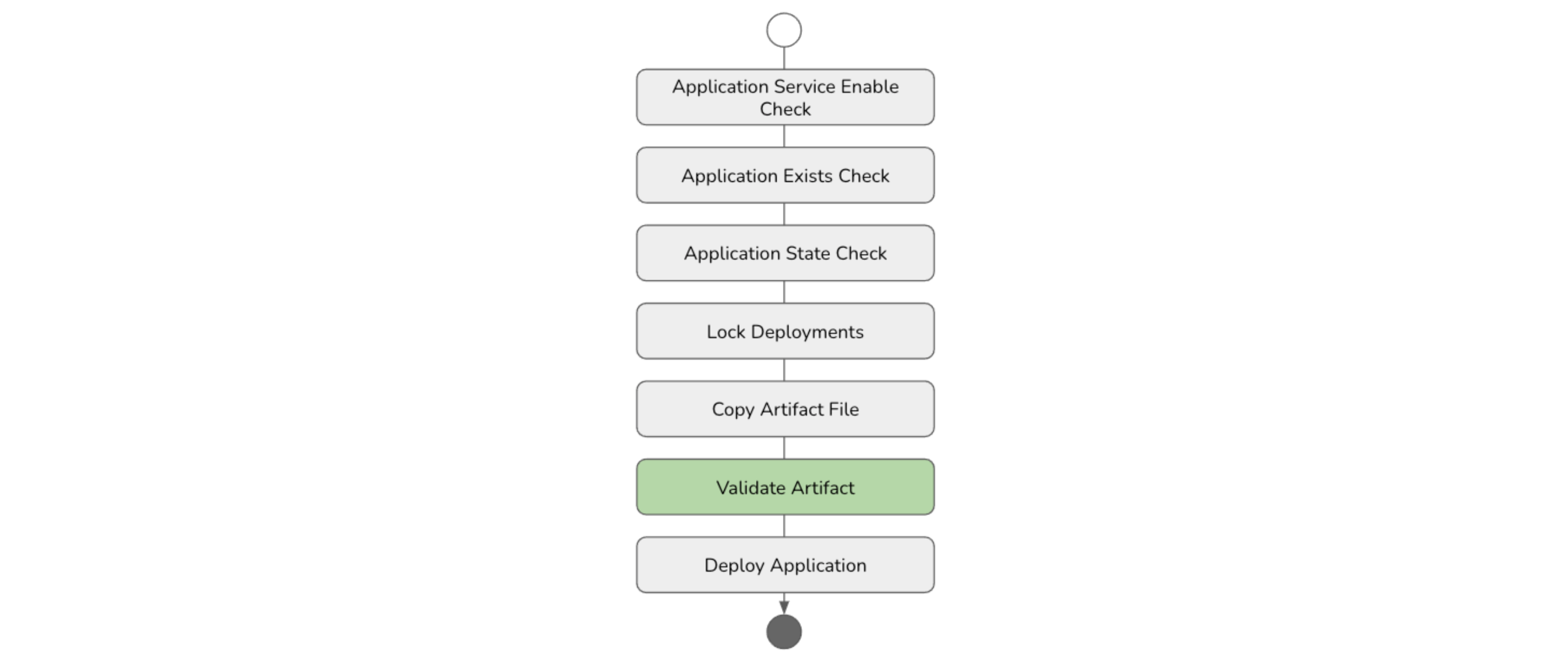
アプリケーションバリデーターの作成
次の手順に従って、アプリケーションプロパティの値を確認し、指定された条件を満たさない場合はデプロイメントを停止するカスタムバリデーターを作成します。
Maven プロジェクトを作成する
ターミナルを開き、Java プロジェクトを作成するフォルダーに移動して、次のコマンドを入力します。
mvn archetype:generate \
	-DgroupId=org.example.agent \
	-DartifactId=mule-agent-hello-validator \
	-DarchetypeArtifactId=maven-archetype-quickstart \
	-DinteractiveMode=false
Maven ディレクトリレイアウト
前のコマンドにより、次のプロジェクトディレクトリ構造が作成されます。
./mule-agent-hello-validator
./mule-agent-hello-validator/pom.xml
./mule-agent-hello-validator/src
./mule-agent-hello-validator/src/test
./mule-agent-hello-validator/src/test/java
./mule-agent-hello-validator/src/test/java/org
./mule-agent-hello-validator/src/test/java/org/example
./mule-agent-hello-validator/src/test/java/org/example/agent
./mule-agent-hello-validator/src/test/java/org/example/agent/AppTest.java
./mule-agent-hello-validator/src/main
./mule-agent-hello-validator/src/main/java
./mule-agent-hello-validator/src/main/java/org
./mule-agent-hello-validator/src/main/java/org/example
./mule-agent-hello-validator/src/main/java/org/example/agent
./mule-agent-hello-validator/src/main/java/org/example/agent/App.java
Project Object Model (POM) ファイルを作成する
次の設定の詳細で POM ファイルを作成します。
プロパティ
-
生成されたフォルダーにアクセスして、生成された
pom.xml を特定します。 -
次のプロパティを追加します。
<properties>
    <maven.compiler.source>8</maven.compiler.source>
    <maven.compiler.target>8</maven.compiler.target>
    <mule.agent.version>2.4.28</mule.agent.version>
    <javax.servlet-api.version>3.1.0</javax.servlet-api.version>
    <javax.ws.version>2.0</javax.ws.version>
    <log4j.version>2.17.1</log4j.version>
    <guice.version>5.0.1</guice.version>
    <javax.inject.version>1</javax.inject.version>
</properties>
前のプロパティは、次の必須の連動関係に使用されるバージョンを表します。
|
Mule エージェントプラグイン用の Java API |
|
RESTful Web サービス用の Java API |
|
Java Servlet API |
|
javax.inject API |
|
Google Guice コアライブラリ |
|
Apache Log4j API |
連動関係
com.mulesoft.agent:mule-agent-api の連動関係を追加します。
        <dependency>
            <groupId>com.mulesoft.agent</groupId>
            <artifactId>mule-agent-api</artifactId>
            <version>${mule.agent.version}</version>
            <scope>provided</scope>
        </dependency>
javax.ws.rs:javax.ws.rs-api の連動関係を追加します。
        <dependency>
            <groupId>javax.ws.rs</groupId>
            <artifactId>javax.ws.rs-api</artifactId>
            <version>${javax.ws.version}</version>
        </dependency>
javax.servlet:javax.servlet-api の連動関係を追加します。
        <dependency>
            <groupId>javax.servlet</groupId>
            <artifactId>javax.servlet-api</artifactId>
            <version>${javax.servlet-api.version}</version>
        </dependency>
javax.inject:javax.inject の連動関係を追加します。
        <dependency>
            <groupId>javax.inject</groupId>
            <artifactId>javax.inject</artifactId>
            <version>${javax.inject.version}</version>
        </dependency>
com.google.inject:guice の連動関係を追加します。
        <dependency>
            <groupId>com.google.inject</groupId>
            <artifactId>guice</artifactId>
            <version>${guice.version}</version>
        </dependency>
log4j の連動関係を追加します。
        <dependency>
            <groupId>org.apache.logging.log4j</groupId>
            <artifactId>log4j-api</artifactId>
            <version>${log4j.version}</version>
            <scope>compile</scope>
        </dependency>

        <dependency>
            <groupId>org.apache.logging.log4j</groupId>
            <artifactId>log4j-core</artifactId>
            <version>${log4j.version}</version>
            <scope>compile</scope>
        </dependency>

        <dependency>
            <groupId>org.apache.logging.log4j</groupId>
            <artifactId>log4j-slf4j-impl</artifactId>
            <version>${log4j.version}</version>
            <scope>compile</scope>
        </dependency>
リポジトリ
MuleSoft リポジトリとスナップショットリポジトリを追加します。
    <repositories>
        <repository>
            <id>mulesoft-ci-releases</id>
            <name>Mulesoft Release Repository</name>
            <url>https://repository-master.mulesoft.org/nexus/content/repositories/releases-ee/</url>
        </repository>
        <repository>
            <id>mulesoft-ci-snapshots</id>
            <name>MuleSoft Snapshot Repository</name>
            <url>https://repository-master.mulesoft.org/nexus/content/repositories/ci-snapshots/</url>
        </repository>
    </repositories>
バリデータークラスを作成する
-
デフォルトのクラスの名前を
MuleAgentHelloValidator に変更します。変更前:
mule-agent-hello-validator/src/main/java/org/example/App.java変更後:
mule-agent-hello-validator/src/main/java/org/example/MuleAgentHelloValidator.java -
次のアノテーションを追加します。
@Named("MuleAgentHelloValidator") @Singleton -
次のプロパティを追加し、バリデータークラスに基づいて指定ロガーを取得します。
private static final Logger LOGGER = LogManager.getLogger(MuleAgentHelloWorld.class); -
アーティファクトバリデーターインターフェースを実装します。
public class MuleAgentHelloWorld implements ApplicationValidator { private static final Logger LOGGER = LogManager.getLogger(MuleAgentHelloWorld.class); // Type represents a group of validator implementations public String getType() { return "helloValidator"; } // Custom name for the implementation. // Represent a specific use case related to the validator type // Must be unique in the type. public String getName() { return "defaultHelloValidator"; } public void validate(Map<String, Object> args) throws ArtifactValidationException { } } -
mule-agent.yml ファイルで提供されるバリデーター設定を含む args パラメーターを追加します。services: mule.agent.artifact.validator.service: enabled: true validators: - type: helloValidator name: defaultHelloValidator enabled: true args: business: finance welcomeMessage: 'Hi, welcome to Finance Cluster Runtimes' errorMessage: 'I am sorry, you are not allowed to deploy in this Cluster'また、サービスによって挿入される次の値も含まれます。
| キー | 説明 |
|---|---|
|
アプリケーションの名前を表す文字列。 |
|
アプリケーションのデプロイに使用される一時ファイルのパスを表す文字列値。 |
|
アプリケーションのプロパティを表す Map<String, String>。 |
ビジネスロジックの実装
次の例では、Mule Runtime にデプロイされるすべてのアプリケーションに business というアプリケーションプロパティが必要です。このプロパティ値は、アプリケーションの部門オーナーを表します。
string applicationBusiness =
(applicationProperties == null)
? null
: applicationProperties.get("business");
if (applicationBusiness != null && applicationBusiness.equals(allowedBusiness)) {
LOGGER.info(welcomeMessage);
return;
}
throw new ArtifactValidationException(errorMessage);カスタム例外の実装
前のエラーを表すカスタム例外を作成します。
パッケージ org.example で、exceptions という名前の新しいパッケージを追加し、次のクラスを作成します。
public class BusinessNotAllowedException extends ApplicationValidationException {
public BusinessNotAllowedException(String message) {
super(message);
}
}プロジェクトディレクトリのレイアウトは次のようになります。
./mule-agent-hello-validator/src/main/java/org/example/agent/exceptions
./mule-agent-hello-validator/src/main/java/org/example/agent/exceptions/BusinessNotAllowedException.java汎用の ApplicationValidationException を BusinessNotAllowedException に置き換えます。
throw new BusinessNotAllowedException(errorMessage);Guice 設定を追加する
-
BaseModuleProvider クラスを作成します。パッケージ
org.example で、configuration.guice という名前の新しいパッケージを追加し、次のクラスを作成します。public class MuleAgentHelloValidatorProvider extends BaseModuleProvider { @Override protected void configureModule(Binder binder) { bindNamedSingleton(binder, ApplicationValidator.class, MuleAgentHelloValidator.class); } } -
BaseModuleProvider クラスを作成します。ディレクトリ
src/main で、META-INF/services という名前の新しいフォルダーを追加し、次のファイルを作成します。名前:
com.mulesoft.agent.configuration.guice.ModuleProviderコンテンツ:
com.example.configuration.guice.MuleAgentHelloValidatorProvider
プロジェクトディレクトリのレイアウトは次のようになります。
./mule-agent-hello-validator/src/main/resources
./mule-agent-hello-validator/src/main/resources/META-INF
./mule-agent-hello-validator/src/main/resources/META-INF/services
./mule-agent-hello-validator/src/main/resources/META-INF/services/com.mulesoft.agent.configuration.guice.ModuleProvider
./mule-agent-hello-validator/src/main/java/org/example/agent/configuration
./mule-agent-hello-validator/src/main/java/org/example/agent/configuration/guice
./mule-agent-hello-validator/src/main/java/org/example/agent/configuration/guice/MuleAgentHelloValidatorProvider.javaアプリケーションバリデーターを作成する
次のコマンドを実行します。
mvn clean install対象ディレクトリに JAR ファイルが生成されます。
./mule-agent-hello-validator/target
./mule-agent-hello-validator/target/mule-agent-hello-validator-1.0-SNAPSHOT.jarアプリケーションバリデーターをインストールする
-
JAR ファイルを
$MULE_HOME/server-plugins/mule-agent-plugin/lib に配置します。 -
args パラメーターの鍵と値にアクセスして、コンソールに出力します。public void validate(Map<String, Object> args) throws ApplicationValidationException { // Values injected by the MuleAgentApplicationValidator service String applicationName = (String) args.get("_APPLICATION_NAME"); String applicationFilePath = (String) args.get("_APPLICATION_FILE_PATH"); Map<String, String> applicationProperties = (Map) args.get("_APPLICATION_PROPERTIES"); // Validator configuration values String business = (String) args.get("business"); String welcomeMessage = (String) args.get("welcomeMessage"); String errorMessage = (String) args.get("errorMessage"); LOGGER.info("Values injected by the service:"); LOGGER.info("\tApplication name: {}", applicationName); LOGGER.info("\tApplication file path: {}", applicationFilePath); LOGGER.info("\tApplication properties: {}", applicationProperties); LOGGER.info("Validator configurations:"); LOGGER.info("\tBusiness: {}", business); LOGGER.info("\tWelcome message: {}", welcomeMessage); LOGGER.info("\tError message: {}", errorMessage); }
mule-agent.yml ファイルの更新
サービスの検証設定を追加します。
  services:
	mule.agent.artifact.validator.service:
		enabled: true
		validators:
		- type: helloValidator
			name: defaultHelloValidator
			enabled: true
			args:
				business: finance
				welcomeMessage: 'Hi, welcome to Finance Cluster Runtimes'
errorMessage: 'I am sorry, you are not allowed to deploy in this Cluster'アプリケーションをデプロイする
バリデーターを作成してインストールすると、エージェントバリデーターサービスは、アプリケーションのデプロイ時にカスタムバリデーターを呼び出します。
curl コマンド:
curl -X PUT 'http://localhost:9999/mule/applications/app-01' \
-H 'Content-Type: application/json' \
-d '{
  "url": "file:/tmp/app-01.jar",
  "configuration": {
    "mule.agent.application.properties.service": {
      "applicationName": "app-01",
      "properties": {
          "business": "finance"
      }
    }
  }
}'
応答:
{
  "application": {
    "name": "app-01"
  },
  "status": "Deployment attempt started"
}
コンソールログ:
MuleAgentHelloValidator: Values injected by the service:
MuleAgentHelloValidator:   Application name: app-01
MuleAgentHelloValidator:   Application file path: /tmp/mule-received-artifact-1793122713159733968/app-01.jar
MuleAgentHelloValidator:   Application properties: {business=finance}
MuleAgentHelloValidator: Validator configurations:
MuleAgentHelloValidator:   Allowed Business: finance
MuleAgentHelloValidator:   Welcome message: Hi, welcome to Finance Cluster Runtimes
MuleAgentHelloValidator:   Error message: I am sorry you not allowed to be deployed in this Cluster
MuleAgentHelloValidator: Hi, welcome to Finance Cluster Runtimes
バリデーター設定で値を暗号化する
バリデーターが mule-agent.yml で指定されたシークレットを必要とする場合は、amc_setup.sh スクリプトを使用してシークレットおよびパスワードや、その他の値を暗号化することができます。
詳細は「パスワードを暗号化する」を参照してください。
-
単一値を暗号化します。
AGENT_VAR_master_password 環境変数をメインパスワードに設定します。export AGENT_VAR_master_password=myPassword -
暗号化ユーティリティを実行します。
$MULE_HOME/bin/amc_setup --encrypt my-secret-value出力:
Mule Agent Installer ----------------------------- INFO: The encrypted value to paste on the mule-agent.yml file is: '![PBEWITHSHA1ANDDESEDE,wFE1D5V4DMb0uG77mzU+gibrlmnj3Kzb]' -
バリデーター設定サービスで暗号化された値を追加します。
  mule.agent.artifact.validator.service:
    enabled: true
    validators:
    - type: helloValidator
      name: defaultHelloValidator
      enabled: true
      args:
        business: finance
        welcomeMessage: 'Hi, welcome to Finance Cluster Runtimes'
        errorMessage: 'I am sorry you not allowed to be deployed in this Cluster'
        secret: '![PBEWITHSHA1ANDDESEDE,wFE1D5V4DMb0uG77mzU+gibrlmnj3Kzb]'
バリデーターで値を復号化する
暗号化サービスを使用して値を復号化することができます。
-
バリデータークラスに暗号化サービスを挿入します。
@Inject EncryptionService encryptionService; -
値を復号化します。
String secret = (String) args.get("secret");

String secretPlainText = null;

try {
   secretPlainText = encryptionService.decrypt(secret);
} catch (AgentEncryptionException e) {
   LOGGER.error(e);
}

LOGGER.info("\tSecret: {}", secret);
LOGGER.info("\tSecret (plain text): {}", secretPlainText);
ユースケース: バリデーターに暗号化された値を渡す
curl コマンド:
curl -X PUT 'http://localhost:9999/mule/applications/app-01' \
-H 'Content-Type: application/json' \
-d '{
  "url": "file:/tmp/app-01.jar",
  "configuration": {
    "mule.agent.application.properties.service": {
      "applicationName": "app-01",
      "properties": {
          "business": "finance"
      }
    }
  }
}'
応答:
{
  "application": {
    "name": "app-01"
  },
  "status": "Deployment attempt started"
}
コンソールログ:
AgentApplicationService: Deploying the app-01 application from URL file:/tmp/app-01.jar
MuleAgentHelloValidator: Values injected by the service:
MuleAgentHelloValidator: Application name: app-01
MuleAgentHelloValidator: Application file path: /tmp/mule-received-artifact-6683649864468336756/app-01.jar
MuleAgentHelloValidator: Application properties: {business=finance}
MuleAgentHelloValidator: Validator configurations:
MuleAgentHelloValidator: Allowed Business: finance
MuleAgentHelloValidator: Welcome message: Hi, welcome to Finance Cluster Runtimes
MuleAgentHelloValidator: Secret: ![PBEWITHSHA1ANDDESEDE,wFE1D5V4DMb0uG77mzU+gibrlmnj3Kzb]
MuleAgentHelloValidator: Secret (plain text): my-secret-value
MuleAgentHelloValidator: Hi, welcome to Finance Cluster Runtimes