
次の例は、Microsoft Outlook 365 Connector のメッセージ、イベント、添付ファイルリソースを処理する操作を実行する方法を示しています。
始める前に
-
Java 8 または 11
-
Anypoint Studio 7.5 以降
-
Mule Runtime Engine (Mule) 4.3.0 以降
-
DataWeave
| 一部の操作には、前提条件データが必要です。たとえばその ID に基づいてメッセージやイベントを取得するには、最初にメッセージまたはイベントを作成する必要があります。 |
Create Message
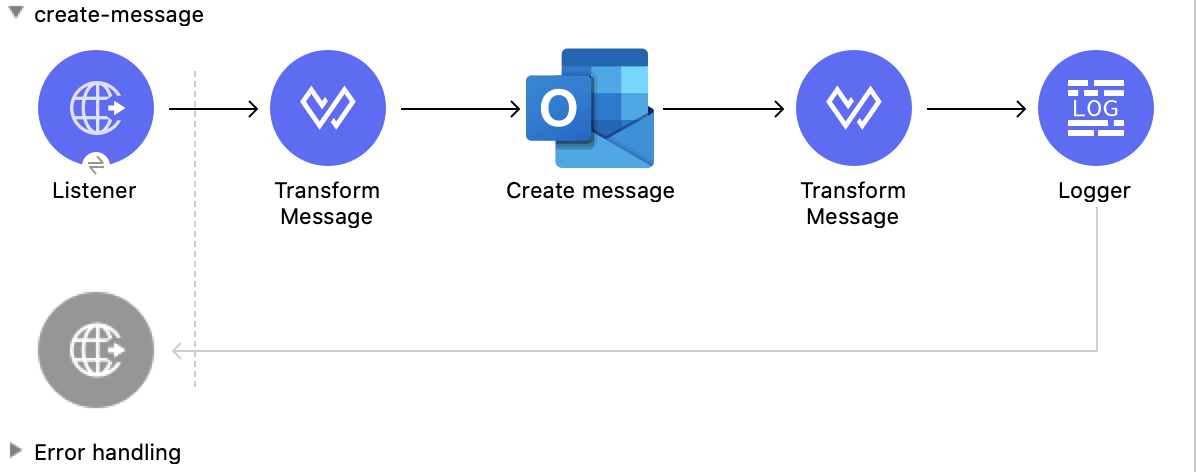
この Mule フローでは、後で送信するメッセージを作成します。メッセージは下書きフォルダーに保存されます。
この例では、次の操作を使用します。
-
HTTP Listener
HTTP 要求からデータを受け取ります。 -
Transform Message
メッセージを作成するために使用される HTTP 入力を変換します。 -
Create message
メッセージの下書きを作成します。 -
Transform Message
Create message 操作の結果を JSON 形式で出力します。 -
Logger
Create message 操作からの HTTP 応答を表示します。
この例の XML
この例のフローをすばやく Mule アプリケーションに読み込むには、次のコードを Studio XML エディターに貼り付けます。
<?xml version="1.0" encoding="UTF-8"?>

<mule xmlns:tableau-specialist="http://www.mulesoft.org/schema/mule/tableau-specialist" xmlns:email="http://www.mulesoft.org/schema/mule/email"
	  xmlns:ee="http://www.mulesoft.org/schema/mule/ee/core"
	  xmlns:http="http://www.mulesoft.org/schema/mule/http" xmlns:outlook365="http://www.mulesoft.org/schema/mule/outlook365" xmlns:salesforce="http://www.mulesoft.org/schema/mule/salesforce" xmlns="http://www.mulesoft.org/schema/mule/core" xmlns:doc="http://www.mulesoft.org/schema/mule/documentation" xmlns:xsi="http://www.w3.org/2001/XMLSchema-instance" xsi:schemaLocation="http://www.mulesoft.org/schema/mule/core http://www.mulesoft.org/schema/mule/core/current/mule.xsd
http://www.mulesoft.org/schema/mule/outlook365 http://www.mulesoft.org/schema/mule/outlook365/current/mule-outlook365.xsd
http://www.mulesoft.org/schema/mule/http http://www.mulesoft.org/schema/mule/http/current/mule-http.xsd
http://www.mulesoft.org/schema/mule/ee/core http://www.mulesoft.org/schema/mule/ee/core/current/mule-ee.xsd
http://www.mulesoft.org/schema/mule/email http://www.mulesoft.org/schema/mule/email/current/mule-email.xsd
http://www.mulesoft.org/schema/mule/tableau-specialist http://www.mulesoft.org/schema/mule/tableau-specialist/current/mule-tableau-specialist.xsd">
	<http:listener-config name="HTTP_Listener_config" doc:name="HTTP Listener config" doc:id="7ca945b4-7657-4688-90bf-5b9b8aa9b78b" >
		<http:listener-connection host="0.0.0.0" port="8083" />
	</http:listener-config>

	<outlook365:outlook365-config name="outlook365_client_credentials" doc:name="Outlook365 Outlook365 Config" doc:id="1ae40dd0-f924-457e-b702-946d5e896ec2" >
		<outlook365:oauth-client-credentials-connection >
			<outlook365:oauth-client-credentials clientId="${oauth-client-credentials.clientId}" clientSecret="${oauth-client-credentials.clientSecret}" tokenUrl="${oauth-client-credentials.tokenUrl}" scopes="${oauth-client-credentials.scopes}" />
		</outlook365:oauth-client-credentials-connection>
	</outlook365:outlook365-config>

	<flow name="create-message" doc:id="e5a15ff1-0ded-45ae-9c20-bf71b3367edd" >
		<http:listener doc:name="Listener" doc:id="493d0ed4-3f5a-4777-ba2c-454e6e640461" path="/create-msg" config-ref="HTTP_Listener_config"/>
		<ee:transform doc:name="Transform Message" doc:id="47b52140-9bb6-4d15-9e4d-d480ebb3dcd8" >
			<ee:message >
				<ee:set-payload ><![CDATA[%dw 2.0
output application/json
---
{
 "subject":"Last night game - Test - Ignore please",
"importance":"Low",
"body":{
"contentType":"HTML",
"content":"They were <b>awesome</b>!"
},
"toRecipients":[
{
    "emailAddress":{
        "address":"muletest@mulesoft.com"
     }
},
{
    "emailAddress":{
        "address":"muletest@mulesoft.com"
     }
}
    ]
}]]></ee:set-payload>
			</ee:message>
		</ee:transform>
		<outlook365:create-message doc:name="Create message" doc:id="4723c105-b33b-40b7-a480-118e7b486f97" config-ref="outlook365_client_credentials" userId="88f176b2-84ca-4cfe-828c-954db0096efa">
		</outlook365:create-message>
		<ee:transform doc:name="Transform Message" doc:id="e23d752c-1c63-4c9b-b664-e94fa2f274fc" >
			<ee:message >
				<ee:set-payload ><![CDATA[%dw 2.0
output application/json
---
payload]]></ee:set-payload>
			</ee:message>
		</ee:transform>
		<logger level="INFO" doc:name="Logger" doc:id="88008b17-7027-4142-a8e4-a2a59f949756" message="#[payload]"/>
	</flow>
</mule>
この例の実行手順
-
コネクタが設定されていることを確認します。
-
プロジェクトを保存します。
-
Web ブラウザーから「
http://localhost:8083/create-msg」と入力してアプリケーションをテストします。
Delete Message
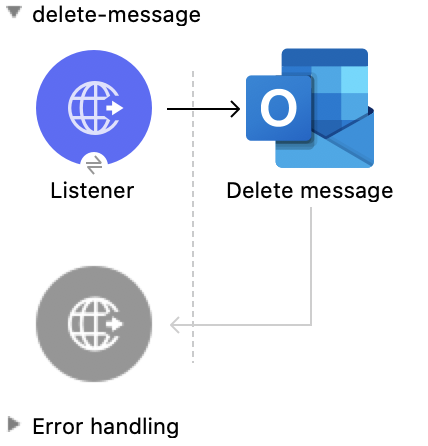
この Mule フローでは、既存のメッセージを削除します。
この例では、次の操作を使用します。
-
HTTP Listener
HTTP 要求からデータを受け取ります。 -
Delete message
指定されたユーザーのメールボックスからメッセージを削除します。
この例の XML
この例のフローをすばやく Mule アプリケーションに読み込むには、次のコードを Studio XML エディターに貼り付けます。
<?xml version="1.0" encoding="UTF-8"?>

<mule xmlns:tableau-specialist="http://www.mulesoft.org/schema/mule/tableau-specialist" xmlns:email="http://www.mulesoft.org/schema/mule/email"
	  xmlns:ee="http://www.mulesoft.org/schema/mule/ee/core"
	  xmlns:http="http://www.mulesoft.org/schema/mule/http" xmlns:outlook365="http://www.mulesoft.org/schema/mule/outlook365" xmlns:salesforce="http://www.mulesoft.org/schema/mule/salesforce" xmlns="http://www.mulesoft.org/schema/mule/core" xmlns:doc="http://www.mulesoft.org/schema/mule/documentation" xmlns:xsi="http://www.w3.org/2001/XMLSchema-instance" xsi:schemaLocation="http://www.mulesoft.org/schema/mule/core http://www.mulesoft.org/schema/mule/core/current/mule.xsd
http://www.mulesoft.org/schema/mule/outlook365 http://www.mulesoft.org/schema/mule/outlook365/current/mule-outlook365.xsd
http://www.mulesoft.org/schema/mule/http http://www.mulesoft.org/schema/mule/http/current/mule-http.xsd
http://www.mulesoft.org/schema/mule/ee/core http://www.mulesoft.org/schema/mule/ee/core/current/mule-ee.xsd
http://www.mulesoft.org/schema/mule/email http://www.mulesoft.org/schema/mule/email/current/mule-email.xsd
http://www.mulesoft.org/schema/mule/tableau-specialist http://www.mulesoft.org/schema/mule/tableau-specialist/current/mule-tableau-specialist.xsd">
	<http:listener-config name="HTTP_Listener_config" doc:name="HTTP Listener config" doc:id="7ca945b4-7657-4688-90bf-5b9b8aa9b78b" >
		<http:listener-connection host="0.0.0.0" port="8083" />
	</http:listener-config>

	<outlook365:outlook365-config name="outlook365_client_credentials" doc:name="Outlook365 Outlook365 Config" doc:id="1ae40dd0-f924-457e-b702-946d5e896ec2" >
		<outlook365:oauth-client-credentials-connection >
			<outlook365:oauth-client-credentials clientId="${oauth-client-credentials.clientId}" clientSecret="${oauth-client-credentials.clientSecret}" tokenUrl="${oauth-client-credentials.tokenUrl}" scopes="${oauth-client-credentials.scopes}" />
		</outlook365:oauth-client-credentials-connection>
	</outlook365:outlook365-config>

	<flow name="delete-message" doc:id="f5a345c9-3adb-4371-a420-d4f103f8b514" >
		<http:listener doc:name="Listener" doc:id="2d56056f-ebb3-4759-aabe-4c0e97d5a4d9" config-ref="HTTP_Listener_config" path="/delete-msg"/>
		<outlook365:delete-message doc:name="Delete message" doc:id="98511d16-2de9-4d3e-abc3-41239eeefe36" config-ref="outlook365_client_credentials" userId="88f176b2-84ca-4cfe-828c-954db0096efa" messageId="AAMkADg5NjIxODNkLWRkNzAtNGFkNC04YjUwLWFjOTEyMzg0YzA5NgBGAAAAAADzzlN7RptORYu7QgvFkvQJBwCthX8I2XTFT5_USx5R95fIAAAAAAEPAACthX8I2XTFT5_USx5R95fIAAFXpn4vAAA="/>
	</flow>
</mule>
この例の実行手順
-
コネクタが設定されていることを確認します。
-
プロジェクトを保存します。
-
Web ブラウザーから「
http://localhost:8083/delete-msg」と入力してアプリケーションをテストします。
Get Message
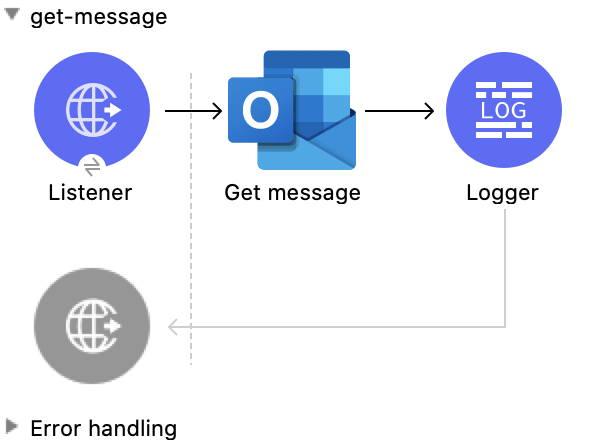
この Mule フローでは、既存のメッセージを取得します。
この例では、次の操作を使用します。
-
HTTP Listener
HTTP 要求からデータを受け取ります。 -
Get message
メッセージオブジェクトのプロパティおよびリレーションを取得します。
この例の XML
この例のフローをすばやく Mule アプリケーションに読み込むには、次のコードを Studio XML エディターに貼り付けます。
<?xml version="1.0" encoding="UTF-8"?>

<mule xmlns:tableau-specialist="http://www.mulesoft.org/schema/mule/tableau-specialist" xmlns:email="http://www.mulesoft.org/schema/mule/email"
	  xmlns:ee="http://www.mulesoft.org/schema/mule/ee/core"
	  xmlns:http="http://www.mulesoft.org/schema/mule/http" xmlns:outlook365="http://www.mulesoft.org/schema/mule/outlook365" xmlns:salesforce="http://www.mulesoft.org/schema/mule/salesforce" xmlns="http://www.mulesoft.org/schema/mule/core" xmlns:doc="http://www.mulesoft.org/schema/mule/documentation" xmlns:xsi="http://www.w3.org/2001/XMLSchema-instance" xsi:schemaLocation="http://www.mulesoft.org/schema/mule/core http://www.mulesoft.org/schema/mule/core/current/mule.xsd
http://www.mulesoft.org/schema/mule/outlook365 http://www.mulesoft.org/schema/mule/outlook365/current/mule-outlook365.xsd
http://www.mulesoft.org/schema/mule/http http://www.mulesoft.org/schema/mule/http/current/mule-http.xsd
http://www.mulesoft.org/schema/mule/ee/core http://www.mulesoft.org/schema/mule/ee/core/current/mule-ee.xsd
http://www.mulesoft.org/schema/mule/email http://www.mulesoft.org/schema/mule/email/current/mule-email.xsd
http://www.mulesoft.org/schema/mule/tableau-specialist http://www.mulesoft.org/schema/mule/tableau-specialist/current/mule-tableau-specialist.xsd">
	<http:listener-config name="HTTP_Listener_config" doc:name="HTTP Listener config" doc:id="7b5e348d-2f1c-4a09-b73a-7b1f84d89060" >
		<http:listener-connection host="0.0.0.0" port="8083" />
	</http:listener-config>

	<outlook365:outlook365-config name="outlook365_client_credentials" doc:name="Outlook365 Outlook365 Config" doc:id="ab1353ac-79b8-4718-a96c-a2c9e9d1d996" >
		<outlook365:oauth-client-credentials-connection >
			<outlook365:oauth-client-credentials clientId="${oauth-client-credentials.clientId}" clientSecret="${oauth-client-credentials.clientSecret}" tokenUrl="${oauth-client-credentials.tokenUrl}" scopes="${oauth-client-credentials.scopes}" />
		</outlook365:oauth-client-credentials-connection>
	</outlook365:outlook365-config>

	<flow name="get-message" doc:id="f4d095f0-3841-4b6e-b8ab-73986a37339d" >
		<http:listener doc:name="Listener" doc:id="744e331c-a530-41b2-b6a1-a7b251248578" config-ref="HTTP_Listener_config" path="/get-msg"/>
		<outlook365:get-message doc:name="Get message" doc:id="67f75fea-3c1a-4dbc-a4fe-00503d68565b" config-ref="outlook365_client_credentials" userId="88f176b2-84ca-4cfe-828c-954db0096efa" messageId="AAMkADg5NjIxODNkLWRkNzAtNGFkNC04YjUwLWFjOTEyMzg0YzA5NgBGAAAAAADzzlN7RptORYu7QgvFkvQJBwCthX8I2XTFT5_USx5R95fIAAAAAAEPAACthX8I2XTFT5_USx5R95fIAAFXpn4vAAA=" getMIMEContent="true"/>
		<logger level="INFO" doc:name="Logger" doc:id="191b1e4b-1acf-452c-b1af-62c7d14fc06d" message="#[payload]"/>
	</flow>
</mule>
この例の実行手順
-
コネクタが設定されていることを確認します。
-
プロジェクトを保存します。
-
Web ブラウザーから「
http://localhost:8083/get-msg」と入力してアプリケーションをテストします。
List Messages
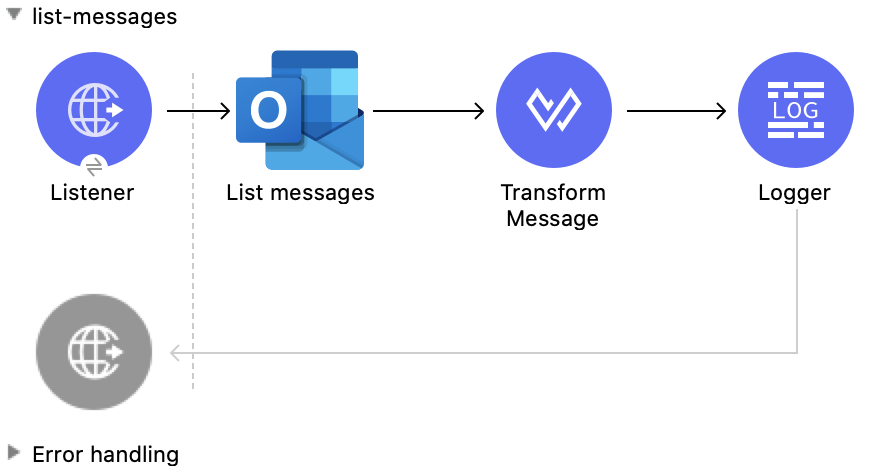
この Mule フローでは、サインインしたユーザーのメールボックスからすべてのメッセージを取得します。
この例では、次の操作を使用します。
-
HTTP Listener
HTTP 要求からデータを受け取ります。 -
List messages
削除済みアイテムフォルダーや低優先メールフォルダーのメッセージを含めて、サインインしたユーザーのメールボックスからメッセージを取得します。
この例の XML
この例のフローをすばやく Mule アプリケーションに読み込むには、次のコードを Studio XML エディターに貼り付けます。
<?xml version="1.0" encoding="UTF-8"?>

<mule xmlns:tableau-specialist="http://www.mulesoft.org/schema/mule/tableau-specialist" xmlns:email="http://www.mulesoft.org/schema/mule/email"
	  xmlns:ee="http://www.mulesoft.org/schema/mule/ee/core"
	  xmlns:http="http://www.mulesoft.org/schema/mule/http" xmlns:outlook365="http://www.mulesoft.org/schema/mule/outlook365" xmlns:salesforce="http://www.mulesoft.org/schema/mule/salesforce" xmlns="http://www.mulesoft.org/schema/mule/core" xmlns:doc="http://www.mulesoft.org/schema/mule/documentation" xmlns:xsi="http://www.w3.org/2001/XMLSchema-instance" xsi:schemaLocation="http://www.mulesoft.org/schema/mule/core http://www.mulesoft.org/schema/mule/core/current/mule.xsd
http://www.mulesoft.org/schema/mule/outlook365 http://www.mulesoft.org/schema/mule/outlook365/current/mule-outlook365.xsd
http://www.mulesoft.org/schema/mule/http http://www.mulesoft.org/schema/mule/http/current/mule-http.xsd
http://www.mulesoft.org/schema/mule/ee/core http://www.mulesoft.org/schema/mule/ee/core/current/mule-ee.xsd
http://www.mulesoft.org/schema/mule/email http://www.mulesoft.org/schema/mule/email/current/mule-email.xsd
http://www.mulesoft.org/schema/mule/tableau-specialist http://www.mulesoft.org/schema/mule/tableau-specialist/current/mule-tableau-specialist.xsd">
	<http:listener-config name="HTTP_Listener_config" doc:name="HTTP Listener config" doc:id="7b5e348d-2f1c-4a09-b73a-7b1f84d89060" >
		<http:listener-connection host="0.0.0.0" port="8083" />
	</http:listener-config>

	<outlook365:outlook365-config name="outlook365_client_credentials" doc:name="Outlook365 Outlook365 Config" doc:id="ab1353ac-79b8-4718-a96c-a2c9e9d1d996" >
		<outlook365:oauth-client-credentials-connection >
			<outlook365:oauth-client-credentials clientId="${oauth-client-credentials.clientId}" clientSecret="${oauth-client-credentials.clientSecret}" tokenUrl="${oauth-client-credentials.tokenUrl}" scopes="${oauth-client-credentials.scopes}" />
		</outlook365:oauth-client-credentials-connection>
	</outlook365:outlook365-config>

	<flow name="list-messages" doc:id="bd553217-a020-415a-a313-edb2cb42e551" >
		<http:listener doc:name="Listener" doc:id="b3414782-db80-40e0-895b-e7fd33109238" config-ref="HTTP_Listener_config" path="/list-messages"/>
		<outlook365:list-messages doc:name="List messages" doc:id="ebc105a3-438d-4b72-9e07-10799b760abd" config-ref="outlook365_client_credentials" userId="88f176b2-84ca-4cfe-828c-954db0096efa">
			<outlook365:o-data-query-params orderBy="createdDateTime desc" />
		</outlook365:list-messages>
		<ee:transform doc:name="Transform Message" doc:id="6cddacd2-044e-45fa-b2a0-8e0388cc4d1c" >
			<ee:message >
				<ee:set-payload ><![CDATA[%dw 2.0
output application/json
---
payload]]></ee:set-payload>
			</ee:message>
		</ee:transform>
		<logger level="INFO" doc:name="Logger" doc:id="3a8707e4-a258-42d1-96db-3dd47f7bbf8a" message="#[payload]"/>
	</flow>
</mule>
この例の実行手順
-
コネクタが設定されていることを確認します。
-
プロジェクトを保存します。
-
Web ブラウザーから「
http://localhost:8083/list-messages」と入力してアプリケーションをテストします。
Delete Event
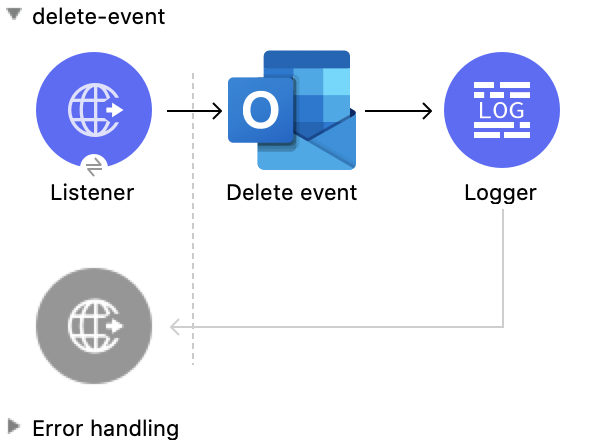
この Mule フローでは、既存のイベントを削除します。
この例では、次の操作を使用します。
-
HTTP Listener
HTTP 要求からデータを受け取ります。 -
Delete event
指定されたイベントをカレンダーから削除します。 -
Logger
Delete event 操作からの HTTP 応答を表示します。
この例の XML
この例のフローをすばやく Mule アプリケーションに読み込むには、次のコードを Studio XML エディターに貼り付けます。
<?xml version="1.0" encoding="UTF-8"?>

<mule xmlns:tableau-specialist="http://www.mulesoft.org/schema/mule/tableau-specialist" xmlns:email="http://www.mulesoft.org/schema/mule/email"
	  xmlns:ee="http://www.mulesoft.org/schema/mule/ee/core"
	  xmlns:http="http://www.mulesoft.org/schema/mule/http" xmlns:outlook365="http://www.mulesoft.org/schema/mule/outlook365" xmlns:salesforce="http://www.mulesoft.org/schema/mule/salesforce" xmlns="http://www.mulesoft.org/schema/mule/core" xmlns:doc="http://www.mulesoft.org/schema/mule/documentation" xmlns:xsi="http://www.w3.org/2001/XMLSchema-instance" xsi:schemaLocation="http://www.mulesoft.org/schema/mule/core http://www.mulesoft.org/schema/mule/core/current/mule.xsd
http://www.mulesoft.org/schema/mule/outlook365 http://www.mulesoft.org/schema/mule/outlook365/current/mule-outlook365.xsd
http://www.mulesoft.org/schema/mule/http http://www.mulesoft.org/schema/mule/http/current/mule-http.xsd
http://www.mulesoft.org/schema/mule/ee/core http://www.mulesoft.org/schema/mule/ee/core/current/mule-ee.xsd
http://www.mulesoft.org/schema/mule/email http://www.mulesoft.org/schema/mule/email/current/mule-email.xsd
http://www.mulesoft.org/schema/mule/tableau-specialist http://www.mulesoft.org/schema/mule/tableau-specialist/current/mule-tableau-specialist.xsd">
	<http:listener-config name="HTTP_Listener_config" doc:name="HTTP Listener config" doc:id="7b5e348d-2f1c-4a09-b73a-7b1f84d89060" >
		<http:listener-connection host="0.0.0.0" port="8083" />
	</http:listener-config>

	<outlook365:outlook365-config name="outlook365_client_credentials" doc:name="Outlook365 Outlook365 Config" doc:id="ab1353ac-79b8-4718-a96c-a2c9e9d1d996" >
		<outlook365:oauth-client-credentials-connection >
			<outlook365:oauth-client-credentials clientId="${oauth-client-credentials.clientId}" clientSecret="${oauth-client-credentials.clientSecret}" tokenUrl="${oauth-client-credentials.tokenUrl}" scopes="${oauth-client-credentials.scopes}" />
		</outlook365:oauth-client-credentials-connection>
	</outlook365:outlook365-config>

	<flow name="delete-event" doc:id="52cb41b0-d1b7-4ea6-9794-325ce76330a2" >
		<http:listener doc:name="Listener" doc:id="105e968f-dd1e-438b-ae7a-4931b143f4ec" config-ref="HTTP_Listener_config" path="/delete-event"/>
		<outlook365:delete-event doc:name="Delete event" doc:id="dbd4e75f-9380-4e83-9218-604ee5d696ec" config-ref="outlook365_client_credentials" eventId="AAMkADg5NjIxODNkLWRkNzAtNGFkNC04YjUwLWFjOTEyMzg0YzA5NgBGAAAAAADzzlN7RptORYu7QgvFkvQJBwCthX8I2XTFT5_USx5R95fIAAAAAAENAACthX8I2XTFT5_USx5R95fIAAFXpoYNAAA=" userId="88f176b2-84ca-4cfe-828c-954db0096efa"/>
		<logger level="INFO" doc:name="Logger" doc:id="81bea8fa-22ec-42e3-ac58-156fa59e8ebb" message="#[payload]"/>
	</flow>
</mule>
この例の実行手順
-
コネクタが設定されていることを確認します。
-
プロジェクトを保存します。
-
Web ブラウザーから「
http://localhost:8083/delete-event」と入力してアプリケーションをテストします。
Create Event
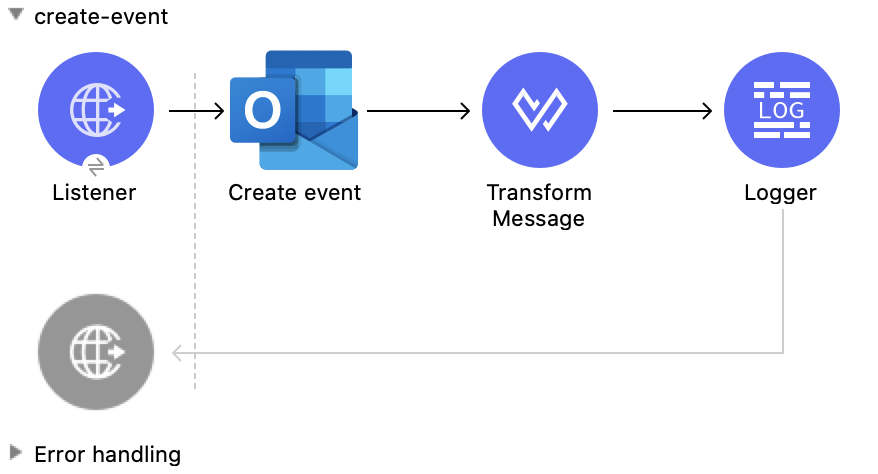
この Mule フローでは、デフォルトユーザーのカレンダーまたは指定されたカレンダーにイベントを作成します。
この例では、次の操作を使用します。
-
HTTP Listener
HTTP 要求からデータを受け取ります。 -
Create event
デフォルトユーザーのカレンダーまたは指定されたカレンダーにイベントを作成します。 -
Transform Message
Create event 操作の結果を JSON 形式で出力します。 -
Logger
Create event 操作からの HTTP 応答を表示します。
この例の XML
この例のフローをすばやく Mule アプリケーションに読み込むには、次のコードを Studio XML エディターに貼り付けます。
<?xml version="1.0" encoding="UTF-8"?>

<mule xmlns:tableau-specialist="http://www.mulesoft.org/schema/mule/tableau-specialist" xmlns:email="http://www.mulesoft.org/schema/mule/email"
	  xmlns:ee="http://www.mulesoft.org/schema/mule/ee/core"
	  xmlns:http="http://www.mulesoft.org/schema/mule/http" xmlns:outlook365="http://www.mulesoft.org/schema/mule/outlook365" xmlns:salesforce="http://www.mulesoft.org/schema/mule/salesforce" xmlns="http://www.mulesoft.org/schema/mule/core" xmlns:doc="http://www.mulesoft.org/schema/mule/documentation" xmlns:xsi="http://www.w3.org/2001/XMLSchema-instance" xsi:schemaLocation="http://www.mulesoft.org/schema/mule/core http://www.mulesoft.org/schema/mule/core/current/mule.xsd
http://www.mulesoft.org/schema/mule/outlook365 http://www.mulesoft.org/schema/mule/outlook365/current/mule-outlook365.xsd
http://www.mulesoft.org/schema/mule/http http://www.mulesoft.org/schema/mule/http/current/mule-http.xsd
http://www.mulesoft.org/schema/mule/ee/core http://www.mulesoft.org/schema/mule/ee/core/current/mule-ee.xsd
http://www.mulesoft.org/schema/mule/email http://www.mulesoft.org/schema/mule/email/current/mule-email.xsd
http://www.mulesoft.org/schema/mule/tableau-specialist http://www.mulesoft.org/schema/mule/tableau-specialist/current/mule-tableau-specialist.xsd">
	<http:listener-config name="HTTP_Listener_config" doc:name="HTTP Listener config" doc:id="7b5e348d-2f1c-4a09-b73a-7b1f84d89060" >
		<http:listener-connection host="0.0.0.0" port="8083" />
	</http:listener-config>

	<outlook365:outlook365-config name="outlook365_client_credentials" doc:name="Outlook365 Outlook365 Config" doc:id="ab1353ac-79b8-4718-a96c-a2c9e9d1d996" >
		<outlook365:oauth-client-credentials-connection >
			<outlook365:oauth-client-credentials clientId="${oauth-client-credentials.clientId}" clientSecret="${oauth-client-credentials.clientSecret}" tokenUrl="${oauth-client-credentials.tokenUrl}" scopes="${oauth-client-credentials.scopes}" />
		</outlook365:oauth-client-credentials-connection>
	</outlook365:outlook365-config>

	<flow name="create-event" doc:id="53b324a6-02e7-45ab-8ba6-29861daf34c9" >
		<http:listener doc:name="Listener" doc:id="e5ad9b28-c411-4ae7-8b12-ee95a0a4f145" config-ref="HTTP_Listener_config" path="/create-event"/>
		<outlook365:create-event doc:name="Create event" doc:id="def0e304-1e18-4f92-806f-f9654b064b1e" config-ref="outlook365_client_credentials" userId="88f176b2-84ca-4cfe-828c-954db0096efa" calendarId="AQMkADg5NjIxODNkLWRkADcwLTRhZDQtOGI1MC1hYzkxMjM4NGMwOTYARgAAA-POU3tGm05Fi7tCC8WS9AkHAK2FfwjZdMVPn5RLHlH3l8gAAAIBBgAAAK2FfwjZdMVPn5RLHlH3l8gAAAKEKAAAAA==">
			<outlook365:event ><![CDATA[#[{
  "subject": "Let's go for lunch again in July",
  "body": {
    "contentType": "HTML",
    "content": "Does noon work for you?"
  },
  "start": {
      "dateTime": "2018-04-15T12:00:00",
      "timeZone": "Pacific Standard Time"
  },
  "end": {
      "dateTime": "2018-04-15T14:00:00",
      "timeZone": "Pacific Standard Time"
  },
  "location":{
      "displayName":"Harry's Bar"
  },
  "attendees": [
    {
      "emailAddress": {
        "address":"muletest@mulesoft.com",
        "name": "Mule Test"
      },
      "type": "required"
    }
  ],
  "allowNewTimeProposals": true
}]]]></outlook365:event>
		</outlook365:create-event>
		<ee:transform doc:name="Transform Message" doc:id="24c6fb20-0288-421c-994d-30de24eaef35" >
			<ee:message >
				<ee:set-payload ><![CDATA[%dw 2.0
output application/json
---
payload]]></ee:set-payload>
			</ee:message>
		</ee:transform>
		<logger level="INFO" doc:name="Logger" doc:id="2c57de93-d25b-46a9-8874-83570527d694" message="#[payload]"/>
	</flow>
</mule>
この例の実行手順
-
コネクタが設定されていることを確認します。
-
プロジェクトを保存します。
-
Web ブラウザーから「
http://localhost:8083/create-event」と入力してアプリケーションをテストします。
Update Event
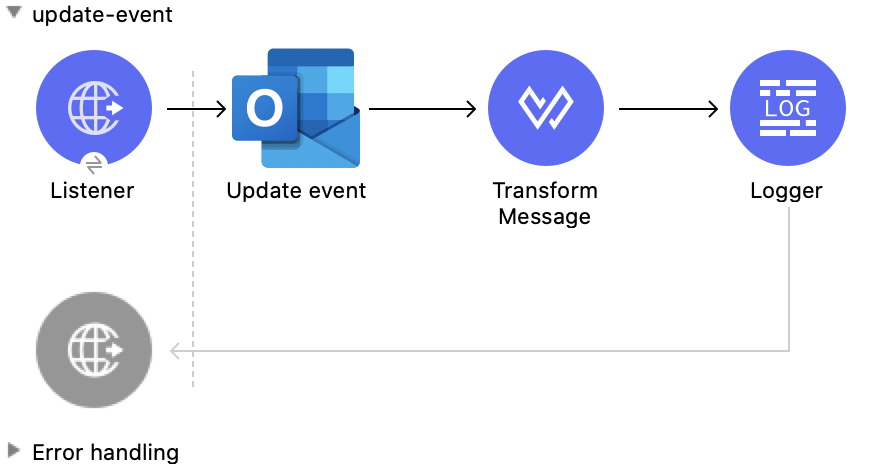
この Mule フローでは、既存のイベントを更新します。
この例では、次の操作を使用します。
-
HTTP Listener
HTTP 要求からデータを受け取ります。 -
Update event
イベントオブジェクトのプロパティを更新します。 -
Transform Message
Update event 操作の結果を JSON 形式で出力します。 -
Logger
Update event 操作からの HTTP 応答を表示します。
この例の XML
この例のフローをすばやく Mule アプリケーションに読み込むには、次のコードを Studio XML エディターに貼り付けます。
<?xml version="1.0" encoding="UTF-8"?>

<mule xmlns:tableau-specialist="http://www.mulesoft.org/schema/mule/tableau-specialist" xmlns:email="http://www.mulesoft.org/schema/mule/email"
	  xmlns:ee="http://www.mulesoft.org/schema/mule/ee/core"
	  xmlns:http="http://www.mulesoft.org/schema/mule/http" xmlns:outlook365="http://www.mulesoft.org/schema/mule/outlook365" xmlns:salesforce="http://www.mulesoft.org/schema/mule/salesforce" xmlns="http://www.mulesoft.org/schema/mule/core" xmlns:doc="http://www.mulesoft.org/schema/mule/documentation" xmlns:xsi="http://www.w3.org/2001/XMLSchema-instance" xsi:schemaLocation="http://www.mulesoft.org/schema/mule/core http://www.mulesoft.org/schema/mule/core/current/mule.xsd
http://www.mulesoft.org/schema/mule/outlook365 http://www.mulesoft.org/schema/mule/outlook365/current/mule-outlook365.xsd
http://www.mulesoft.org/schema/mule/http http://www.mulesoft.org/schema/mule/http/current/mule-http.xsd
http://www.mulesoft.org/schema/mule/ee/core http://www.mulesoft.org/schema/mule/ee/core/current/mule-ee.xsd
http://www.mulesoft.org/schema/mule/email http://www.mulesoft.org/schema/mule/email/current/mule-email.xsd
http://www.mulesoft.org/schema/mule/tableau-specialist http://www.mulesoft.org/schema/mule/tableau-specialist/current/mule-tableau-specialist.xsd">
	<http:listener-config name="HTTP_Listener_config" doc:name="HTTP Listener config" doc:id="7b5e348d-2f1c-4a09-b73a-7b1f84d89060" >
		<http:listener-connection host="0.0.0.0" port="8083" />
	</http:listener-config>

	<outlook365:outlook365-config name="outlook365_client_credentials" doc:name="Outlook365 Outlook365 Config" doc:id="ab1353ac-79b8-4718-a96c-a2c9e9d1d996" >
		<outlook365:oauth-client-credentials-connection >
			<outlook365:oauth-client-credentials clientId="${oauth-client-credentials.clientId}" clientSecret="${oauth-client-credentials.clientSecret}" tokenUrl="${oauth-client-credentials.tokenUrl}" scopes="${oauth-client-credentials.scopes}" />
		</outlook365:oauth-client-credentials-connection>
	</outlook365:outlook365-config>

	<flow name="update-event" doc:id="36e43afe-dc2b-4895-b03e-eb4ba43233dd" >
		<http:listener doc:name="Listener" doc:id="3cabeba4-5be7-43dc-b768-ca09b6f88a69" config-ref="HTTP_Listener_config" path="/update-event"/>
		<outlook365:update-event doc:name="Update event" doc:id="bbaf5f53-e697-4b18-8df8-f4ce844f8656" config-ref="outlook365_client_credentials" eventId="AAMkADg5NjIxODNkLWRkNzAtNGFkNC04YjUwLWFjOTEyMzg0YzA5NgBGAAAAAADzzlN7RptORYu7QgvFkvQJBwCthX8I2XTFT5_USx5R95fIAAAAAAENAACthX8I2XTFT5_USx5R95fIAAFXpoYNAAA=" userId="88f176b2-84ca-4cfe-828c-954db0096efa">
			<outlook365:event-fields-to-be-updated ><![CDATA[#[{
	"categories": ["Red category", "Vlad category"]
}]]]></outlook365:event-fields-to-be-updated>
		</outlook365:update-event>
		<ee:transform doc:name="Transform Message" doc:id="f1220217-7036-4128-afaf-43cec2f9fa0f" >
			<ee:message >
				<ee:set-payload ><![CDATA[%dw 2.0
output application/json
---
payload]]></ee:set-payload>
			</ee:message>
		</ee:transform>
		<logger level="INFO" doc:name="Logger" doc:id="33205271-6e16-4162-83a2-c88897c4b030" message="#[payload]"/>
	</flow>
</mule>
この例の実行手順
-
コネクタが設定されていることを確認します。
-
プロジェクトを保存します。
-
Web ブラウザーから「
http://localhost:8083/update-event」と入力してアプリケーションをテストします。
List Events
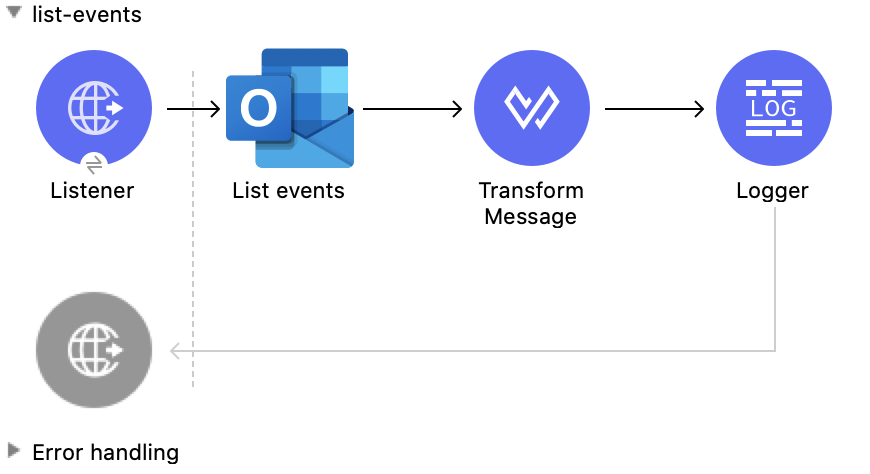
この Mule フローでは、すべてのイベントをリストします。
この例では、次の操作を使用します。
-
HTTP Listener
HTTP 要求からデータを受け取ります。 -
List events
ユーザーのメールボックスからイベントオブジェクトのリストを取得します。 -
Transform Message
List events 操作の結果を JSON 形式で出力します。 -
Logger
List events 操作からの HTTP 応答を表示します。
この例の XML
この例のフローをすばやく Mule アプリケーションに読み込むには、次のコードを Studio XML エディターに貼り付けます。
<?xml version="1.0" encoding="UTF-8"?>

<mule xmlns:tableau-specialist="http://www.mulesoft.org/schema/mule/tableau-specialist" xmlns:email="http://www.mulesoft.org/schema/mule/email"
	  xmlns:ee="http://www.mulesoft.org/schema/mule/ee/core"
	  xmlns:http="http://www.mulesoft.org/schema/mule/http" xmlns:outlook365="http://www.mulesoft.org/schema/mule/outlook365" xmlns:salesforce="http://www.mulesoft.org/schema/mule/salesforce" xmlns="http://www.mulesoft.org/schema/mule/core" xmlns:doc="http://www.mulesoft.org/schema/mule/documentation" xmlns:xsi="http://www.w3.org/2001/XMLSchema-instance" xsi:schemaLocation="http://www.mulesoft.org/schema/mule/core http://www.mulesoft.org/schema/mule/core/current/mule.xsd
http://www.mulesoft.org/schema/mule/outlook365 http://www.mulesoft.org/schema/mule/outlook365/current/mule-outlook365.xsd
http://www.mulesoft.org/schema/mule/http http://www.mulesoft.org/schema/mule/http/current/mule-http.xsd
http://www.mulesoft.org/schema/mule/ee/core http://www.mulesoft.org/schema/mule/ee/core/current/mule-ee.xsd
http://www.mulesoft.org/schema/mule/email http://www.mulesoft.org/schema/mule/email/current/mule-email.xsd
http://www.mulesoft.org/schema/mule/tableau-specialist http://www.mulesoft.org/schema/mule/tableau-specialist/current/mule-tableau-specialist.xsd">
	<http:listener-config name="HTTP_Listener_config" doc:name="HTTP Listener config" doc:id="7b5e348d-2f1c-4a09-b73a-7b1f84d89060" >
		<http:listener-connection host="0.0.0.0" port="8083" />
	</http:listener-config>

	<outlook365:outlook365-config name="outlook365_client_credentials" doc:name="Outlook365 Outlook365 Config" doc:id="ab1353ac-79b8-4718-a96c-a2c9e9d1d996" >
		<outlook365:oauth-client-credentials-connection >
			<outlook365:oauth-client-credentials clientId="${oauth-client-credentials.clientId}" clientSecret="${oauth-client-credentials.clientSecret}" tokenUrl="${oauth-client-credentials.tokenUrl}" scopes="${oauth-client-credentials.scopes}" />
		</outlook365:oauth-client-credentials-connection>
	</outlook365:outlook365-config>

	<flow name="list-events" doc:id="7eb6a6e3-9ec5-41be-8d66-87d645edc07d" >
		<http:listener doc:name="Listener" doc:id="416b9729-d390-439d-93a6-d3a024af7fc0" config-ref="HTTP_Listener_config" path="/list-events"/>
		<outlook365:list-events doc:name="List events" doc:id="a72dc766-a4f1-4038-a2d1-0c7a9e225dce" config-ref="outlook365_client_credentials" userId="sharepoint-teams@muleconnector.onmicrosoft.com" calendarId="AQMkADg5NjIxODNkLWRkADcwLTRhZDQtOGI1MC1hYzkxMjM4NGMwOTYARgAAA-POU3tGm05Fi7tCC8WS9AkHAK2FfwjZdMVPn5RLHlH3l8gAAAIBBgAAAK2FfwjZdMVPn5RLHlH3l8gAAAKEKAAAAA==">
		</outlook365:list-events>
		<ee:transform doc:name="Transform Message" doc:id="df5c6914-b3c0-4539-a84a-9abaa6c9e6d3" >
			<ee:message >
				<ee:set-payload ><![CDATA[%dw 2.0
output application/json
---
payload]]></ee:set-payload>
			</ee:message>
		</ee:transform>
		<logger level="INFO" doc:name="Logger" doc:id="21d29450-0e7f-4f7f-b063-37b7af31f1aa" message="#[payload]"/>
	</flow>
</mule>
この例の実行手順
-
コネクタが設定されていることを確認します。
-
プロジェクトを保存します。
-
Web ブラウザーから「
http://localhost:8083/list-events」と入力してアプリケーションをテストします。
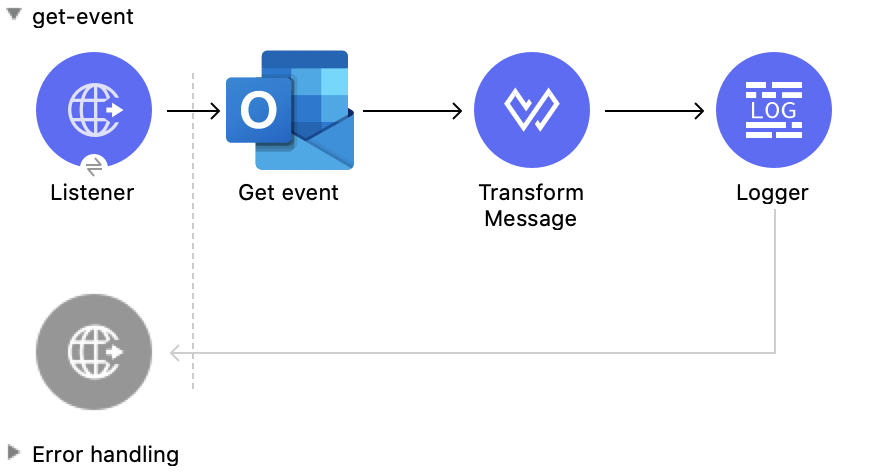
Get Event
この Mule フローでは、既存のイベントを取得します。
この例では、次の操作を使用します。
-
HTTP Listener
HTTP 要求からデータを受け取ります。 -
Get event
指定したイベントオブジェクトのプロパティおよびリレーションを取得します。 -
Transform Message
Get event 操作の結果を JSON 形式で出力します。 -
Logger
Get event 操作からの HTTP 応答を表示します。
この例の XML
この例のフローをすばやく Mule アプリケーションに読み込むには、次のコードを Studio XML エディターに貼り付けます。
<?xml version="1.0" encoding="UTF-8"?>

<mule xmlns:tableau-specialist="http://www.mulesoft.org/schema/mule/tableau-specialist" xmlns:email="http://www.mulesoft.org/schema/mule/email"
	  xmlns:ee="http://www.mulesoft.org/schema/mule/ee/core"
	  xmlns:http="http://www.mulesoft.org/schema/mule/http" xmlns:outlook365="http://www.mulesoft.org/schema/mule/outlook365" xmlns:salesforce="http://www.mulesoft.org/schema/mule/salesforce" xmlns="http://www.mulesoft.org/schema/mule/core" xmlns:doc="http://www.mulesoft.org/schema/mule/documentation" xmlns:xsi="http://www.w3.org/2001/XMLSchema-instance" xsi:schemaLocation="http://www.mulesoft.org/schema/mule/core http://www.mulesoft.org/schema/mule/core/current/mule.xsd
http://www.mulesoft.org/schema/mule/outlook365 http://www.mulesoft.org/schema/mule/outlook365/current/mule-outlook365.xsd
http://www.mulesoft.org/schema/mule/http http://www.mulesoft.org/schema/mule/http/current/mule-http.xsd
http://www.mulesoft.org/schema/mule/ee/core http://www.mulesoft.org/schema/mule/ee/core/current/mule-ee.xsd
http://www.mulesoft.org/schema/mule/email http://www.mulesoft.org/schema/mule/email/current/mule-email.xsd
http://www.mulesoft.org/schema/mule/tableau-specialist http://www.mulesoft.org/schema/mule/tableau-specialist/current/mule-tableau-specialist.xsd">
	<http:listener-config name="HTTP_Listener_config" doc:name="HTTP Listener config" doc:id="7b5e348d-2f1c-4a09-b73a-7b1f84d89060" >
		<http:listener-connection host="0.0.0.0" port="8083" />
	</http:listener-config>

	<outlook365:outlook365-config name="outlook365_client_credentials" doc:name="Outlook365 Outlook365 Config" doc:id="ab1353ac-79b8-4718-a96c-a2c9e9d1d996" >
		<outlook365:oauth-client-credentials-connection >
			<outlook365:oauth-client-credentials clientId="${oauth-client-credentials.clientId}" clientSecret="${oauth-client-credentials.clientSecret}" tokenUrl="${oauth-client-credentials.tokenUrl}" scopes="${oauth-client-credentials.scopes}" />
		</outlook365:oauth-client-credentials-connection>
	</outlook365:outlook365-config>

	<flow name="get-event" doc:id="0aa74710-8f47-426f-bd5d-2feefb06040d" >
		<http:listener doc:name="Listener" doc:id="84e0a134-a20d-470f-ab41-d941f092d90c" config-ref="HTTP_Listener_config" path="/get-event"/>
		<outlook365:get-event doc:name="Get event" doc:id="2f6f1dc9-3a8a-4ed4-8348-3d25f807967e" config-ref="outlook365_client_credentials" eventId="AAMkADg5NjIxODNkLWRkNzAtNGFkNC04YjUwLWFjOTEyMzg0YzA5NgBGAAAAAADzzlN7RptORYu7QgvFkvQJBwCthX8I2XTFT5_USx5R95fIAAAAAAENAACthX8I2XTFT5_USx5R95fIAAFXpoYMAAA=" userId="88f176b2-84ca-4cfe-828c-954db0096efa" calendarId="AAMkADg5NjIxODNkLWRkNzAtNGFkNC04YjUwLWFjOTEyMzg0YzA5NgBGAAAAAADzzlN7RptORYu7QgvFkvQJBwCthX8I2XTFT5_USx5R95fIAAAAAAEGAACthX8I2XTFT5_USx5R95fIAADmNDgwAAA=" outlookTimeZone="Fiji Standard Time"/>
		<ee:transform doc:name="Transform Message" doc:id="2e206f7f-492f-4a42-ad58-1819cdbfb602" >
			<ee:message >
				<ee:set-payload ><![CDATA[%dw 2.0
output application/json
---
payload]]></ee:set-payload>
			</ee:message>
		</ee:transform>
		<logger level="INFO" doc:name="Logger" doc:id="d21f3b2c-5837-4329-b8eb-a84433cea076" message="#[payload]"/>
	</flow>
</mule>
この例の実行手順
-
コネクタが設定されていることを確認します。
-
プロジェクトを保存します。
-
Web ブラウザーから「
http://localhost:8083/get-event」と入力してアプリケーションをテストします。
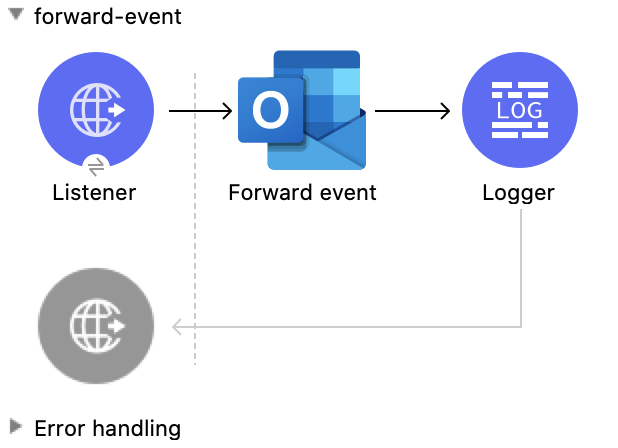
Forward Event
この Mule フローでは、既存のイベントを転送します。
この例では、次の操作を使用します。
-
HTTP Listener
HTTP 要求からデータを受け取ります。 -
Forward event
ミーティング要求を新しい受信者に転送します。 -
Logger
Forward event 操作からの HTTP 応答を表示します。
この例の XML
この例のフローをすばやく Mule アプリケーションに読み込むには、次のコードを Studio XML エディターに貼り付けます。
<?xml version="1.0" encoding="UTF-8"?>

<mule xmlns:tableau-specialist="http://www.mulesoft.org/schema/mule/tableau-specialist" xmlns:email="http://www.mulesoft.org/schema/mule/email"
	  xmlns:ee="http://www.mulesoft.org/schema/mule/ee/core"
	  xmlns:http="http://www.mulesoft.org/schema/mule/http" xmlns:outlook365="http://www.mulesoft.org/schema/mule/outlook365" xmlns:salesforce="http://www.mulesoft.org/schema/mule/salesforce" xmlns="http://www.mulesoft.org/schema/mule/core" xmlns:doc="http://www.mulesoft.org/schema/mule/documentation" xmlns:xsi="http://www.w3.org/2001/XMLSchema-instance" xsi:schemaLocation="http://www.mulesoft.org/schema/mule/core http://www.mulesoft.org/schema/mule/core/current/mule.xsd
http://www.mulesoft.org/schema/mule/outlook365 http://www.mulesoft.org/schema/mule/outlook365/current/mule-outlook365.xsd
http://www.mulesoft.org/schema/mule/http http://www.mulesoft.org/schema/mule/http/current/mule-http.xsd
http://www.mulesoft.org/schema/mule/ee/core http://www.mulesoft.org/schema/mule/ee/core/current/mule-ee.xsd
http://www.mulesoft.org/schema/mule/email http://www.mulesoft.org/schema/mule/email/current/mule-email.xsd
http://www.mulesoft.org/schema/mule/tableau-specialist http://www.mulesoft.org/schema/mule/tableau-specialist/current/mule-tableau-specialist.xsd">
	<http:listener-config name="HTTP_Listener_config" doc:name="HTTP Listener config" doc:id="7b5e348d-2f1c-4a09-b73a-7b1f84d89060" >
		<http:listener-connection host="0.0.0.0" port="8083" />
	</http:listener-config>

	<outlook365:outlook365-config name="outlook365_client_credentials" doc:name="Outlook365 Outlook365 Config" doc:id="ab1353ac-79b8-4718-a96c-a2c9e9d1d996" >
		<outlook365:oauth-client-credentials-connection >
			<outlook365:oauth-client-credentials clientId="${oauth-client-credentials.clientId}" clientSecret="${oauth-client-credentials.clientSecret}" tokenUrl="${oauth-client-credentials.tokenUrl}" scopes="${oauth-client-credentials.scopes}" />
		</outlook365:oauth-client-credentials-connection>
	</outlook365:outlook365-config>

	<flow name="forward-event" doc:id="e283a9a8-75f8-4c82-a598-4858a99ee9c2" >
		<http:listener doc:name="Listener" doc:id="248bbf13-316d-43d0-bb05-04be5bc0c25a" config-ref="HTTP_Listener_config" path="/forward-event"/>
		<outlook365:forward-event doc:name="Forward event" doc:id="bc49959a-69f2-4603-a5d1-b8f3420feae6" config-ref="outlook365_client_credentials" eventId="AAMkADg5NjIxODNkLWRkNzAtNGFkNC04YjUwLWFjOTEyMzg0YzA5NgBGAAAAAADzzlN7RptORYu7QgvFkvQJBwCthX8I2XTFT5_USx5R95fIAAAAAAENAACthX8I2XTFT5_USx5R95fIAAFXpoYMAAA=" userId="88f176b2-84ca-4cfe-828c-954db0096efa">
			<outlook365:forward-event-properties ><![CDATA[#[{
  "ToRecipients":[
      {
        "emailAddress": {
          "address":"muletest@mulesoft.com",
          "name":"Mule Test"
        }
      }
     ],
  "Comment": "Dana, hope you can make this meeting."
}]]]></outlook365:forward-event-properties>
		</outlook365:forward-event>
		<logger level="INFO" doc:name="Logger" doc:id="26c1b6ea-6431-4046-9f66-a4787e80942a" />
	</flow>
</mule>
この例の実行手順
-
コネクタが設定されていることを確認します。
-
プロジェクトを保存します。
-
Web ブラウザーから「
http://localhost:8083/forward-event」と入力してアプリケーションをテストします。
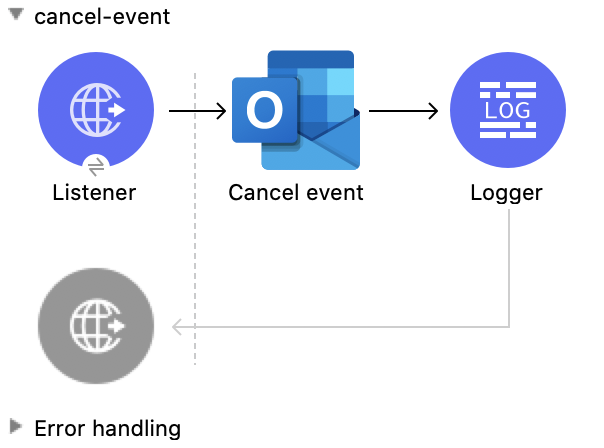
Cancel Event
この Mule フローでは、既存のイベントをキャンセルします。
この例では、次の操作を使用します。
-
HTTP Listener
HTTP 要求からデータを受け取ります。 -
Cancel event
指定されたイベントをユーザーのカレンダーからキャンセルします。 -
Logger
Cancel event 操作からの HTTP 応答を表示します。
この例の XML
この例のフローをすばやく Mule アプリケーションに読み込むには、次のコードを Studio XML エディターに貼り付けます。
<?xml version="1.0" encoding="UTF-8"?>

<mule xmlns:tableau-specialist="http://www.mulesoft.org/schema/mule/tableau-specialist" xmlns:email="http://www.mulesoft.org/schema/mule/email"
	  xmlns:ee="http://www.mulesoft.org/schema/mule/ee/core"
	  xmlns:http="http://www.mulesoft.org/schema/mule/http" xmlns:outlook365="http://www.mulesoft.org/schema/mule/outlook365" xmlns:salesforce="http://www.mulesoft.org/schema/mule/salesforce" xmlns="http://www.mulesoft.org/schema/mule/core" xmlns:doc="http://www.mulesoft.org/schema/mule/documentation" xmlns:xsi="http://www.w3.org/2001/XMLSchema-instance" xsi:schemaLocation="http://www.mulesoft.org/schema/mule/core http://www.mulesoft.org/schema/mule/core/current/mule.xsd
http://www.mulesoft.org/schema/mule/outlook365 http://www.mulesoft.org/schema/mule/outlook365/current/mule-outlook365.xsd
http://www.mulesoft.org/schema/mule/http http://www.mulesoft.org/schema/mule/http/current/mule-http.xsd
http://www.mulesoft.org/schema/mule/ee/core http://www.mulesoft.org/schema/mule/ee/core/current/mule-ee.xsd
http://www.mulesoft.org/schema/mule/email http://www.mulesoft.org/schema/mule/email/current/mule-email.xsd
http://www.mulesoft.org/schema/mule/tableau-specialist http://www.mulesoft.org/schema/mule/tableau-specialist/current/mule-tableau-specialist.xsd">
	<http:listener-config name="HTTP_Listener_config" doc:name="HTTP Listener config" doc:id="7b5e348d-2f1c-4a09-b73a-7b1f84d89060" >
		<http:listener-connection host="0.0.0.0" port="8083" />
	</http:listener-config>

	<outlook365:outlook365-config name="outlook365_client_credentials" doc:name="Outlook365 Outlook365 Config" doc:id="ab1353ac-79b8-4718-a96c-a2c9e9d1d996" >
		<outlook365:oauth-client-credentials-connection >
			<outlook365:oauth-client-credentials clientId="${oauth-client-credentials.clientId}" clientSecret="${oauth-client-credentials.clientSecret}" tokenUrl="${oauth-client-credentials.tokenUrl}" scopes="${oauth-client-credentials.scopes}" />
		</outlook365:oauth-client-credentials-connection>
	</outlook365:outlook365-config>

	<flow name="cancel-event" doc:id="96f49b9f-fd57-4f54-a946-fbf3545f8091" >
		<http:listener doc:name="Listener" doc:id="08256991-d387-4d45-ac28-b9efc56ff9ae" config-ref="HTTP_Listener_config" path="/cancel-event"/>
		<outlook365:cancel-event doc:name="Cancel event" doc:id="3f19035c-040b-4cf9-854b-23d54748900d" config-ref="outlook365_client_credentials" eventId="AAMkADg5NjIxODNkLWRkNzAtNGFkNC04YjUwLWFjOTEyMzg0YzA5NgBGAAAAAADzzlN7RptORYu7QgvFkvQJBwCthX8I2XTFT5_USx5R95fIAAAAAAENAACthX8I2XTFT5_USx5R95fIAAFXpoYMAAA=" userId="88f176b2-84ca-4cfe-828c-954db0096efa"/>
		<logger level="INFO" doc:name="Logger" doc:id="c90dab5c-b0e4-438c-8ea0-e3802759921e" message="#[payload]"/>
	</flow>
</mule>
この例の実行手順
-
コネクタが設定されていることを確認します。
-
プロジェクトを保存します。
-
Web ブラウザーから「
http://localhost:8083/cancel-event」と入力してアプリケーションをテストします。
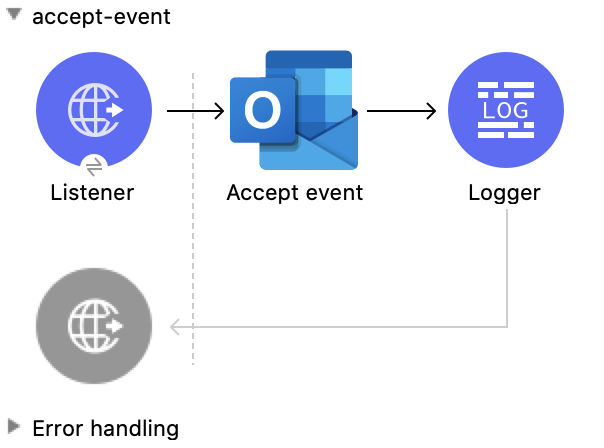
Accept Event
この Mule フローでは、既存のイベントを受け入れます。
この例では、次の操作を使用します。
-
HTTP Listener
HTTP 要求からデータを受け取ります。 -
Accept event
指定されたイベントをユーザーのカレンダーから受け入れます。 -
Logger
Accept event 操作からの HTTP 応答を表示します。
この例の XML
この例のフローをすばやく Mule アプリケーションに読み込むには、次のコードを Studio XML エディターに貼り付けます。
<?xml version="1.0" encoding="UTF-8"?>

<mule xmlns:tableau-specialist="http://www.mulesoft.org/schema/mule/tableau-specialist" xmlns:email="http://www.mulesoft.org/schema/mule/email"
	  xmlns:ee="http://www.mulesoft.org/schema/mule/ee/core"
	  xmlns:http="http://www.mulesoft.org/schema/mule/http" xmlns:outlook365="http://www.mulesoft.org/schema/mule/outlook365" xmlns:salesforce="http://www.mulesoft.org/schema/mule/salesforce" xmlns="http://www.mulesoft.org/schema/mule/core" xmlns:doc="http://www.mulesoft.org/schema/mule/documentation" xmlns:xsi="http://www.w3.org/2001/XMLSchema-instance" xsi:schemaLocation="http://www.mulesoft.org/schema/mule/core http://www.mulesoft.org/schema/mule/core/current/mule.xsd
http://www.mulesoft.org/schema/mule/outlook365 http://www.mulesoft.org/schema/mule/outlook365/current/mule-outlook365.xsd
http://www.mulesoft.org/schema/mule/http http://www.mulesoft.org/schema/mule/http/current/mule-http.xsd
http://www.mulesoft.org/schema/mule/ee/core http://www.mulesoft.org/schema/mule/ee/core/current/mule-ee.xsd
http://www.mulesoft.org/schema/mule/email http://www.mulesoft.org/schema/mule/email/current/mule-email.xsd
http://www.mulesoft.org/schema/mule/tableau-specialist http://www.mulesoft.org/schema/mule/tableau-specialist/current/mule-tableau-specialist.xsd">
	<http:listener-config name="HTTP_Listener_config" doc:name="HTTP Listener config" doc:id="7b5e348d-2f1c-4a09-b73a-7b1f84d89060" >
		<http:listener-connection host="0.0.0.0" port="8083" />
	</http:listener-config>

	<outlook365:outlook365-config name="outlook365_client_credentials" doc:name="Outlook365 Outlook365 Config" doc:id="ab1353ac-79b8-4718-a96c-a2c9e9d1d996" >
		<outlook365:oauth-client-credentials-connection >
			<outlook365:oauth-client-credentials clientId="${oauth-client-credentials.clientId}" clientSecret="${oauth-client-credentials.clientSecret}" tokenUrl="${oauth-client-credentials.tokenUrl}" scopes="${oauth-client-credentials.scopes}" />
		</outlook365:oauth-client-credentials-connection>
	</outlook365:outlook365-config>

	<flow name="accept-event" doc:id="1078eca8-fa88-4072-98b4-107427b1ac83" >
		<http:listener doc:name="Listener" doc:id="49aa293c-9ec0-43d2-b45e-78e8e4fc5091" config-ref="HTTP_Listener_config" path="/accept-event"/>
		<outlook365:accept-event doc:name="Accept event" doc:id="2a0aba0e-b970-420c-8df2-cf64d13a1079" config-ref="outlook365_client_credentials" eventId="AAMkADg5NjIxODNkLWRkNzAtNGFkNC04YjUwLWFjOTEyMzg0YzA5NgBGAAAAAADzzlN7RptORYu7QgvFkvQJBwCthX8I2XTFT5_USx5R95fIAAAAAAENAACthX8I2XTFT5_USx5R95fIAAFXpoYKAAA=" userId="88f176b2-84ca-4cfe-828c-954db0096efa" calendarId="AAMkADg5NjIxODNkLWRkNzAtNGFkNC04YjUwLWFjOTEyMzg0YzA5NgBGAAAAAADzzlN7RptORYu7QgvFkvQJBwCthX8I2XTFT5_USx5R95fIAAAAAAEGAACthX8I2XTFT5_USx5R95fIAADmNDgwAAA=">
		</outlook365:accept-event>
		<logger level="INFO" doc:name="Logger" doc:id="af2bf8e8-b43d-45c4-9459-a29d0230308d" message="#[payload]"/>
	</flow>
</mule>
この例の実行手順
-
コネクタが設定されていることを確認します。
-
プロジェクトを保存します。
-
Web ブラウザーから「
http://localhost:8083/accept-event」と入力してアプリケーションをテストします。
Decline Event
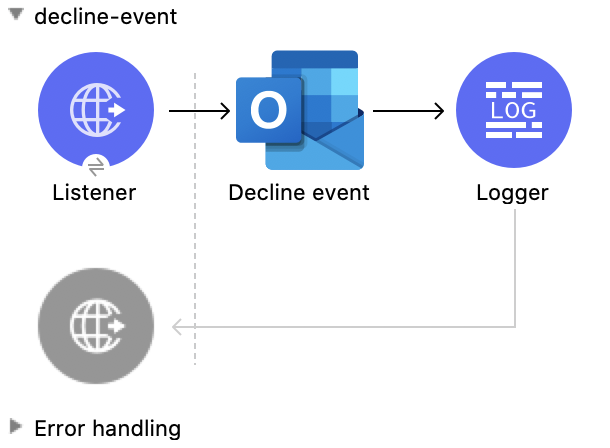
この Mule フローでは、既存のイベントを拒否します。
この例では、次の操作を使用します。
-
HTTP Listener
HTTP 要求からデータを受け取ります。 -
Decline event
指定されたイベントをユーザーのカレンダーから拒否します。 -
Logger
Decline event 操作からの HTTP 応答を表示します。
この例の XML
この例のフローをすばやく Mule アプリケーションに読み込むには、次のコードを Studio XML エディターに貼り付けます。
<?xml version="1.0" encoding="UTF-8"?>

<mule xmlns:tableau-specialist="http://www.mulesoft.org/schema/mule/tableau-specialist" xmlns:email="http://www.mulesoft.org/schema/mule/email"
	  xmlns:ee="http://www.mulesoft.org/schema/mule/ee/core"
	  xmlns:http="http://www.mulesoft.org/schema/mule/http" xmlns:outlook365="http://www.mulesoft.org/schema/mule/outlook365" xmlns:salesforce="http://www.mulesoft.org/schema/mule/salesforce" xmlns="http://www.mulesoft.org/schema/mule/core" xmlns:doc="http://www.mulesoft.org/schema/mule/documentation" xmlns:xsi="http://www.w3.org/2001/XMLSchema-instance" xsi:schemaLocation="http://www.mulesoft.org/schema/mule/core http://www.mulesoft.org/schema/mule/core/current/mule.xsd
http://www.mulesoft.org/schema/mule/outlook365 http://www.mulesoft.org/schema/mule/outlook365/current/mule-outlook365.xsd
http://www.mulesoft.org/schema/mule/http http://www.mulesoft.org/schema/mule/http/current/mule-http.xsd
http://www.mulesoft.org/schema/mule/ee/core http://www.mulesoft.org/schema/mule/ee/core/current/mule-ee.xsd
http://www.mulesoft.org/schema/mule/email http://www.mulesoft.org/schema/mule/email/current/mule-email.xsd
http://www.mulesoft.org/schema/mule/tableau-specialist http://www.mulesoft.org/schema/mule/tableau-specialist/current/mule-tableau-specialist.xsd">
	<http:listener-config name="HTTP_Listener_config" doc:name="HTTP Listener config" doc:id="7b5e348d-2f1c-4a09-b73a-7b1f84d89060" >
		<http:listener-connection host="0.0.0.0" port="8083" />
	</http:listener-config>

	<outlook365:outlook365-config name="outlook365_client_credentials" doc:name="Outlook365 Outlook365 Config" doc:id="ab1353ac-79b8-4718-a96c-a2c9e9d1d996" >
		<outlook365:oauth-client-credentials-connection >
			<outlook365:oauth-client-credentials clientId="${oauth-client-credentials.clientId}" clientSecret="${oauth-client-credentials.clientSecret}" tokenUrl="${oauth-client-credentials.tokenUrl}" scopes="${oauth-client-credentials.scopes}" />
		</outlook365:oauth-client-credentials-connection>
	</outlook365:outlook365-config>

	<flow name="decline-event" doc:id="5f8072e7-f703-4309-a22c-fdcbd307c51d" >
		<http:listener doc:name="Listener" doc:id="73b3f688-8159-42b5-857b-e8f19186ecfd" config-ref="HTTP_Listener_config" path="/decline-event"/>
		<outlook365:decline-event doc:name="Decline event" doc:id="752343c1-b0c2-41b2-b1c2-dbbbe563b419" config-ref="outlook365_client_credentials" eventId="AAMkADg5NjIxODNkLWRkNzAtNGFkNC04YjUwLWFjOTEyMzg0YzA5NgBGAAAAAADzzlN7RptORYu7QgvFkvQJBwCthX8I2XTFT5_USx5R95fIAAAAAAENAACthX8I2XTFT5_USx5R95fIAAElkjSCAAA=" userId="88f176b2-84ca-4cfe-828c-954db0096efa"/>
		<logger level="INFO" doc:name="Logger" doc:id="2f3e9117-760a-4003-a03f-b34026b233c7" message="#[payload]"/>
	</flow>
</mule>
この例の実行手順
-
コネクタが設定されていることを確認します。
-
プロジェクトを保存します。
-
Web ブラウザーから「
http://localhost:8083/decline-event」と入力してアプリケーションをテストします。
List Event Attachments
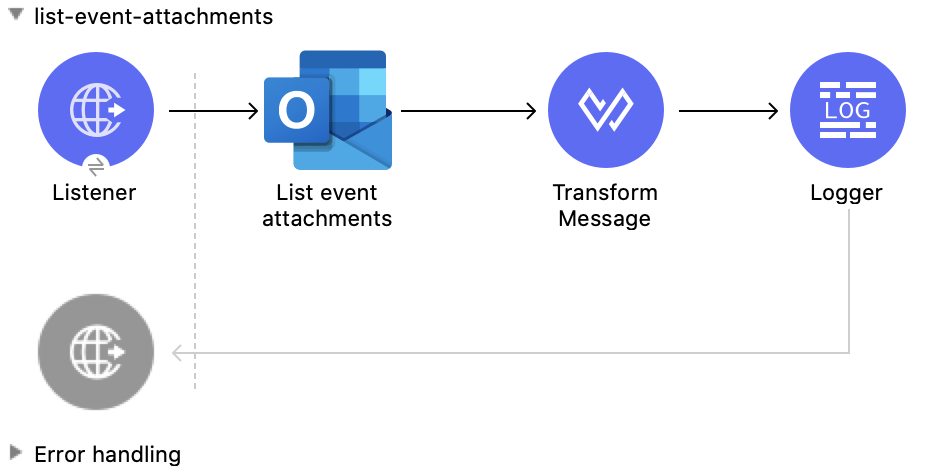
この Mule フローでは、既存のイベントの添付ファイルをリストします。
この例では、次の操作を使用します。
-
HTTP Listener
HTTP 要求からデータを受け取ります。 -
List event attachments
イベントに添付された添付ファイルオブジェクトのリストを取得します。 -
Transform Message
List event attachments 操作の結果を JSON 形式で出力します。 -
Logger
List event attachments 操作からの HTTP 応答を表示します。
この例の XML
この例のフローをすばやく Mule アプリケーションに読み込むには、次のコードを Studio XML エディターに貼り付けます。
<?xml version="1.0" encoding="UTF-8"?>

<mule xmlns:tableau-specialist="http://www.mulesoft.org/schema/mule/tableau-specialist" xmlns:email="http://www.mulesoft.org/schema/mule/email"
	  xmlns:ee="http://www.mulesoft.org/schema/mule/ee/core"
	  xmlns:http="http://www.mulesoft.org/schema/mule/http" xmlns:outlook365="http://www.mulesoft.org/schema/mule/outlook365" xmlns:salesforce="http://www.mulesoft.org/schema/mule/salesforce" xmlns="http://www.mulesoft.org/schema/mule/core" xmlns:doc="http://www.mulesoft.org/schema/mule/documentation" xmlns:xsi="http://www.w3.org/2001/XMLSchema-instance" xsi:schemaLocation="http://www.mulesoft.org/schema/mule/core http://www.mulesoft.org/schema/mule/core/current/mule.xsd
http://www.mulesoft.org/schema/mule/outlook365 http://www.mulesoft.org/schema/mule/outlook365/current/mule-outlook365.xsd
http://www.mulesoft.org/schema/mule/http http://www.mulesoft.org/schema/mule/http/current/mule-http.xsd
http://www.mulesoft.org/schema/mule/ee/core http://www.mulesoft.org/schema/mule/ee/core/current/mule-ee.xsd
http://www.mulesoft.org/schema/mule/email http://www.mulesoft.org/schema/mule/email/current/mule-email.xsd
http://www.mulesoft.org/schema/mule/tableau-specialist http://www.mulesoft.org/schema/mule/tableau-specialist/current/mule-tableau-specialist.xsd">
	<http:listener-config name="HTTP_Listener_config" doc:name="HTTP Listener config" doc:id="7b5e348d-2f1c-4a09-b73a-7b1f84d89060" >
		<http:listener-connection host="0.0.0.0" port="8083" />
	</http:listener-config>

	<outlook365:outlook365-config name="outlook365_client_credentials" doc:name="Outlook365 Outlook365 Config" doc:id="ab1353ac-79b8-4718-a96c-a2c9e9d1d996" >
		<outlook365:oauth-client-credentials-connection >
			<outlook365:oauth-client-credentials clientId="${oauth-client-credentials.clientId}" clientSecret="${oauth-client-credentials.clientSecret}" tokenUrl="${oauth-client-credentials.tokenUrl}" scopes="${oauth-client-credentials.scopes}" />
		</outlook365:oauth-client-credentials-connection>
	</outlook365:outlook365-config>

	<flow name="list-event-attachments" doc:id="d6e2c77e-1e14-48d9-a555-4ad0e8384850" >
		<http:listener doc:name="Listener" doc:id="3f1db425-2751-474c-ab5f-8ea77aa4c2f6" config-ref="HTTP_Listener_config" path="/list-event-attachments"/>
		<outlook365:list-event-attachments doc:name="List event attachments" doc:id="bb3b3e63-0443-4de9-ad46-39ec836146d2" config-ref="outlook365_client_credentials" eventId="AAMkADg5NjIxODNkLWRkNzAtNGFkNC04YjUwLWFjOTEyMzg0YzA5NgBGAAAAAADzzlN7RptORYu7QgvFkvQJBwCthX8I2XTFT5_USx5R95fIAAAAAAENAACthX8I2XTFT5_USx5R95fIAAE8i1INAAA=" userId="88f176b2-84ca-4cfe-828c-954db0096efa"/>
		<ee:transform doc:name="Transform Message" doc:id="b4c1aee0-f17b-4a15-817e-5070d5f15491" >
			<ee:message >
				<ee:set-payload ><![CDATA[%dw 2.0
output application/json
---
payload]]></ee:set-payload>
			</ee:message>
		</ee:transform>
		<logger level="INFO" doc:name="Logger" doc:id="ae6157a3-7c41-44a8-bf9d-4b666a5b10b6" message="#[payload]"/>
	</flow>
</mule>
この例の実行手順
-
コネクタが設定されていることを確認します。
-
プロジェクトを保存します。
-
Web ブラウザーから「
http://localhost:8083/list-event-attachments」と入力してアプリケーションをテストします。
Add Event Attachment
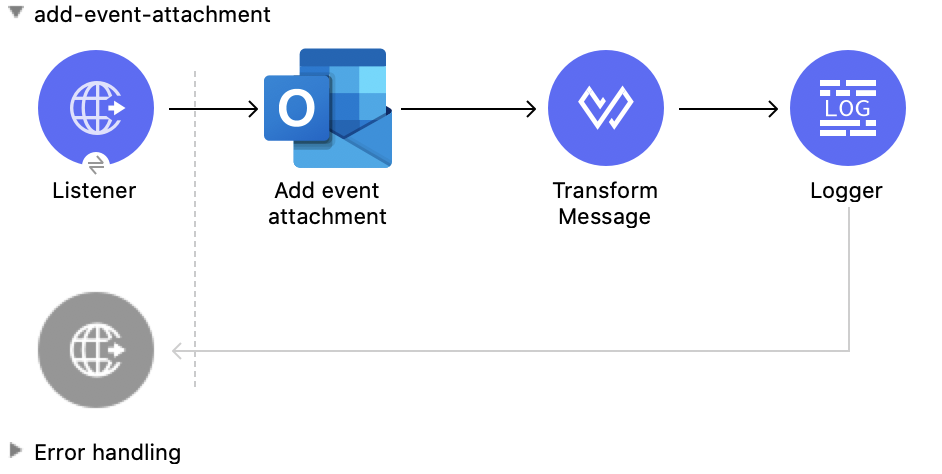
この Mule フローでは、既存のイベントに添付ファイルを追加します。
この例では、次の操作を使用します。
-
HTTP Listener
HTTP 要求からデータを受け取ります。 -
Add event attachment
イベントに添付ファイルを追加します。 -
Transform Message
Add event attachment 操作の結果を JSON 形式で出力します。 -
Logger
Add event attachment 操作からの HTTP 応答を表示します。
この例の XML
この例のフローをすばやく Mule アプリケーションに読み込むには、次のコードを Studio XML エディターに貼り付けます。
<?xml version="1.0" encoding="UTF-8"?>

<mule xmlns:tableau-specialist="http://www.mulesoft.org/schema/mule/tableau-specialist" xmlns:email="http://www.mulesoft.org/schema/mule/email"
	  xmlns:ee="http://www.mulesoft.org/schema/mule/ee/core"
	  xmlns:http="http://www.mulesoft.org/schema/mule/http" xmlns:outlook365="http://www.mulesoft.org/schema/mule/outlook365" xmlns:salesforce="http://www.mulesoft.org/schema/mule/salesforce" xmlns="http://www.mulesoft.org/schema/mule/core" xmlns:doc="http://www.mulesoft.org/schema/mule/documentation" xmlns:xsi="http://www.w3.org/2001/XMLSchema-instance" xsi:schemaLocation="http://www.mulesoft.org/schema/mule/core http://www.mulesoft.org/schema/mule/core/current/mule.xsd
http://www.mulesoft.org/schema/mule/outlook365 http://www.mulesoft.org/schema/mule/outlook365/current/mule-outlook365.xsd
http://www.mulesoft.org/schema/mule/http http://www.mulesoft.org/schema/mule/http/current/mule-http.xsd
http://www.mulesoft.org/schema/mule/ee/core http://www.mulesoft.org/schema/mule/ee/core/current/mule-ee.xsd
http://www.mulesoft.org/schema/mule/email http://www.mulesoft.org/schema/mule/email/current/mule-email.xsd
http://www.mulesoft.org/schema/mule/tableau-specialist http://www.mulesoft.org/schema/mule/tableau-specialist/current/mule-tableau-specialist.xsd">
	<http:listener-config name="HTTP_Listener_config" doc:name="HTTP Listener config" doc:id="7b5e348d-2f1c-4a09-b73a-7b1f84d89060" >
		<http:listener-connection host="0.0.0.0" port="8083" />
	</http:listener-config>

	<outlook365:outlook365-config name="outlook365_client_credentials" doc:name="Outlook365 Outlook365 Config" doc:id="ab1353ac-79b8-4718-a96c-a2c9e9d1d996" >
		<outlook365:oauth-client-credentials-connection >
			<outlook365:oauth-client-credentials clientId="${oauth-client-credentials.clientId}" clientSecret="${oauth-client-credentials.clientSecret}" tokenUrl="${oauth-client-credentials.tokenUrl}" scopes="${oauth-client-credentials.scopes}" />
		</outlook365:oauth-client-credentials-connection>
	</outlook365:outlook365-config>

	<flow name="add-event-attachment" doc:id="da5d88b0-08ac-4ea9-a267-03f4ef1978dd" >
		<http:listener doc:name="Listener" doc:id="2c78cdb1-1f8c-410b-9f25-f1810c9cf8ac" config-ref="HTTP_Listener_config" path="/add-event-attachment"/>
		<outlook365:add-event-attachment doc:name="Add event attachment" doc:id="df2f4976-bd7a-46df-9594-4c7b3c6ffbd5" userId="88f176b2-84ca-4cfe-828c-954db0096efa" config-ref="outlook365_client_credentials" eventId="AAMkADg5NjIxODNkLWRkNzAtNGFkNC04YjUwLWFjOTEyMzg0YzA5NgBGAAAAAADzzlN7RptORYu7QgvFkvQJBwCthX8I2XTFT5_USx5R95fIAAAAAAENAACthX8I2XTFT5_USx5R95fIAAE8i1INAAA=" calendarId="AAMkADg5NjIxODNkLWRkNzAtNGFkNC04YjUwLWFjOTEyMzg0YzA5NgBGAAAAAADzzlN7RptORYu7QgvFkvQJBwCthX8I2XTFT5_USx5R95fIAAAAAAEGAACthX8I2XTFT5_USx5R95fIAADk2CUpAAA=">
			<outlook365:attachment-for-event ><![CDATA[#[%dw 2.0
output application/json
---
{
  "@odata.type": "#microsoft.graph.fileAttachment",
  "name": "smile",
  "contentBytes": "VGhlIHF1aWNrIGJyb3duIGZveCBqdW1wcyBvdmVyIDEzIGxhenkgZG9ncy4="
}]]]></outlook365:attachment-for-event>
		</outlook365:add-event-attachment>
		<ee:transform doc:name="Transform Message" doc:id="f81537d5-01dd-4373-be50-d5de61d5c81f" >
			<ee:message >
				<ee:set-payload ><![CDATA[%dw 2.0
output application/json
---
payload]]></ee:set-payload>
			</ee:message>
		</ee:transform>
		<logger level="INFO" doc:name="Logger" doc:id="ccaa4716-6441-4291-985a-8cef8cf7e186" message="#[payload]"/>
	</flow>
</mule>
この例の実行手順
-
コネクタが設定されていることを確認します。
-
プロジェクトを保存します。
-
Web ブラウザーから「
http://localhost:8083/add-event-attachment」と入力してアプリケーションをテストします。
Add Message Attachment
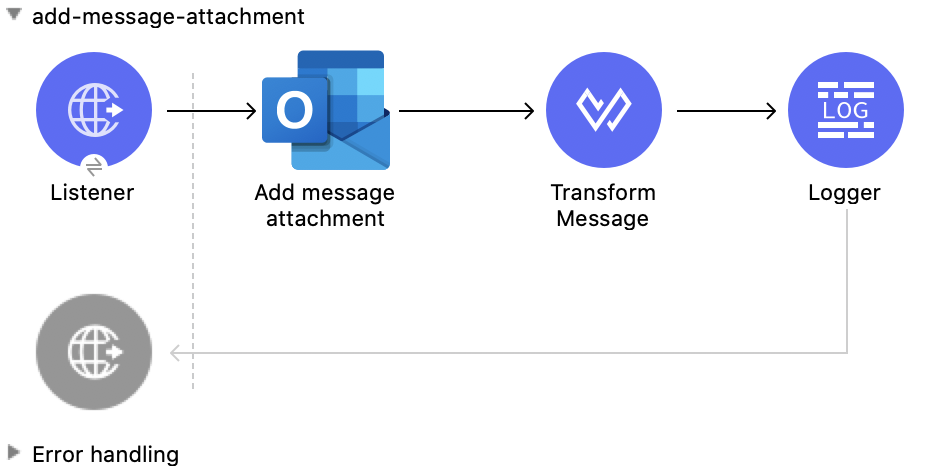
この Mule フローでは、既存のメッセージに添付ファイルを追加します。
この例では、次の操作を使用します。
-
HTTP Listener
HTTP 要求からデータを受け取ります。 -
Add message attachment
メッセージに添付ファイルを追加します。 -
Transform Message
Add message attachment 操作の結果を JSON 形式で出力します。 -
Logger
Add message attachment 操作からの HTTP 応答を表示します。
この例の XML
この例のフローをすばやく Mule アプリケーションに読み込むには、次のコードを Studio XML エディターに貼り付けます。
<?xml version="1.0" encoding="UTF-8"?>

<mule xmlns:tableau-specialist="http://www.mulesoft.org/schema/mule/tableau-specialist" xmlns:email="http://www.mulesoft.org/schema/mule/email"
	  xmlns:ee="http://www.mulesoft.org/schema/mule/ee/core"
	  xmlns:http="http://www.mulesoft.org/schema/mule/http" xmlns:outlook365="http://www.mulesoft.org/schema/mule/outlook365" xmlns:salesforce="http://www.mulesoft.org/schema/mule/salesforce" xmlns="http://www.mulesoft.org/schema/mule/core" xmlns:doc="http://www.mulesoft.org/schema/mule/documentation" xmlns:xsi="http://www.w3.org/2001/XMLSchema-instance" xsi:schemaLocation="http://www.mulesoft.org/schema/mule/core http://www.mulesoft.org/schema/mule/core/current/mule.xsd
http://www.mulesoft.org/schema/mule/outlook365 http://www.mulesoft.org/schema/mule/outlook365/current/mule-outlook365.xsd
http://www.mulesoft.org/schema/mule/http http://www.mulesoft.org/schema/mule/http/current/mule-http.xsd
http://www.mulesoft.org/schema/mule/ee/core http://www.mulesoft.org/schema/mule/ee/core/current/mule-ee.xsd
http://www.mulesoft.org/schema/mule/email http://www.mulesoft.org/schema/mule/email/current/mule-email.xsd
http://www.mulesoft.org/schema/mule/tableau-specialist http://www.mulesoft.org/schema/mule/tableau-specialist/current/mule-tableau-specialist.xsd">
	<http:listener-config name="HTTP_Listener_config" doc:name="HTTP Listener config" doc:id="7b5e348d-2f1c-4a09-b73a-7b1f84d89060" >
		<http:listener-connection host="0.0.0.0" port="8083" />
	</http:listener-config>

	<outlook365:outlook365-config name="outlook365_client_credentials" doc:name="Outlook365 Outlook365 Config" doc:id="ab1353ac-79b8-4718-a96c-a2c9e9d1d996" >
		<outlook365:oauth-client-credentials-connection >
			<outlook365:oauth-client-credentials clientId="${oauth-client-credentials.clientId}" clientSecret="${oauth-client-credentials.clientSecret}" tokenUrl="${oauth-client-credentials.tokenUrl}" scopes="${oauth-client-credentials.scopes}" />
		</outlook365:oauth-client-credentials-connection>
	</outlook365:outlook365-config>

	<flow name="add-message-attachment" doc:id="0a662a35-6cb1-43f6-8585-00c9496b0d6b" >
		<http:listener doc:name="Listener" doc:id="1377bbf5-0db5-42e5-a61a-48c8ecebd0f7" config-ref="HTTP_Listener_config" path="/add-msg-attachment"/>
		<outlook365:add-message-attachment doc:name="Add message attachment" doc:id="1024c88f-110b-40fe-8079-90c35e0a2b7e" config-ref="outlook365_client_credentials" userId="88f176b2-84ca-4cfe-828c-954db0096efa" messageId="AAMkADg5NjIxODNkLWRkNzAtNGFkNC04YjUwLWFjOTEyMzg0YzA5NgBGAAAAAADzzlN7RptORYu7QgvFkvQJBwCthX8I2XTFT5_USx5R95fIAAAAAAEMAACthX8I2XTFT5_USx5R95fIAAEwN5RlAAA=">
			<outlook365:attachment-for-message ><![CDATA[#[%dw 2.0
output application/json
---
{
  "@odata.type": "#microsoft.graph.fileAttachment",
  "name": "smile",
  "contentBytes": "VGhlIHF1aWNrIGJyb3duIGZveCBqdW1wcyBvdmVyIDEzIGxhenkgZG9ncy4="
}]]]></outlook365:attachment-for-message>
		</outlook365:add-message-attachment>
		<ee:transform doc:name="Transform Message" doc:id="8fc0abfd-7193-429c-bf94-b6287de873f1" >
			<ee:message >
				<ee:set-payload ><![CDATA[%dw 2.0
output application/json
---
payload]]></ee:set-payload>
			</ee:message>
		</ee:transform>
		<logger level="INFO" doc:name="Logger" doc:id="ddd2f6c8-bc4d-4716-9bc3-1285b95bd7e6" message="#[payload]"/>
	</flow>
</mule>
この例の実行手順
-
コネクタが設定されていることを確認します。
-
プロジェクトを保存します。
-
Web ブラウザーから「
http://localhost:8083/add-message-attachment」と入力してアプリケーションをテストします。
List Message Attachments
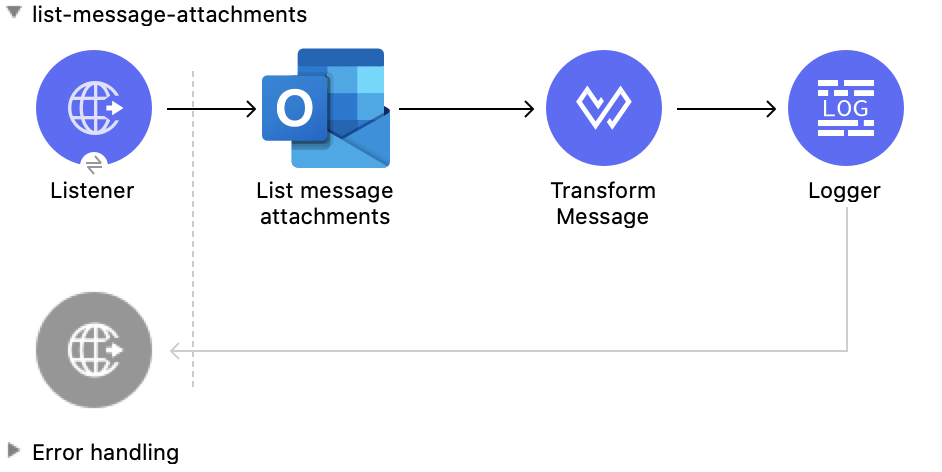
この Mule フローでは、既存のメッセージのすべての添付ファイルをリストします。
この例では、次の操作を使用します。
-
HTTP Listener
HTTP 要求からデータを受け取ります。 -
List message attachments
メッセージに添付された添付ファイルオブジェクトのリストを取得します。 -
Transform Message
List message attachments 操作の結果を JSON 形式で出力します。 -
Logger
List message attachments 操作からの HTTP 応答を表示します。
この例の XML
この例のフローをすばやく Mule アプリケーションに読み込むには、次のコードを Studio XML エディターに貼り付けます。
<?xml version="1.0" encoding="UTF-8"?>

<mule xmlns:tableau-specialist="http://www.mulesoft.org/schema/mule/tableau-specialist" xmlns:email="http://www.mulesoft.org/schema/mule/email"
	  xmlns:ee="http://www.mulesoft.org/schema/mule/ee/core"
	  xmlns:http="http://www.mulesoft.org/schema/mule/http" xmlns:outlook365="http://www.mulesoft.org/schema/mule/outlook365" xmlns:salesforce="http://www.mulesoft.org/schema/mule/salesforce" xmlns="http://www.mulesoft.org/schema/mule/core" xmlns:doc="http://www.mulesoft.org/schema/mule/documentation" xmlns:xsi="http://www.w3.org/2001/XMLSchema-instance" xsi:schemaLocation="http://www.mulesoft.org/schema/mule/core http://www.mulesoft.org/schema/mule/core/current/mule.xsd
http://www.mulesoft.org/schema/mule/outlook365 http://www.mulesoft.org/schema/mule/outlook365/current/mule-outlook365.xsd
http://www.mulesoft.org/schema/mule/http http://www.mulesoft.org/schema/mule/http/current/mule-http.xsd
http://www.mulesoft.org/schema/mule/ee/core http://www.mulesoft.org/schema/mule/ee/core/current/mule-ee.xsd
http://www.mulesoft.org/schema/mule/email http://www.mulesoft.org/schema/mule/email/current/mule-email.xsd
http://www.mulesoft.org/schema/mule/tableau-specialist http://www.mulesoft.org/schema/mule/tableau-specialist/current/mule-tableau-specialist.xsd">
	<http:listener-config name="HTTP_Listener_config" doc:name="HTTP Listener config" doc:id="7b5e348d-2f1c-4a09-b73a-7b1f84d89060" >
		<http:listener-connection host="0.0.0.0" port="8083" />
	</http:listener-config>

	<outlook365:outlook365-config name="outlook365_client_credentials" doc:name="Outlook365 Outlook365 Config" doc:id="ab1353ac-79b8-4718-a96c-a2c9e9d1d996" >
		<outlook365:oauth-client-credentials-connection >
			<outlook365:oauth-client-credentials clientId="${oauth-client-credentials.clientId}" clientSecret="${oauth-client-credentials.clientSecret}" tokenUrl="${oauth-client-credentials.tokenUrl}" scopes="${oauth-client-credentials.scopes}" />
		</outlook365:oauth-client-credentials-connection>
	</outlook365:outlook365-config>

	<flow name="list-message-attachments" doc:id="f5669f25-f382-46f5-bdc6-455206f0e4a4" >
		<http:listener doc:name="Listener" doc:id="1c38582a-eed8-40ab-8398-e502beeeba99" config-ref="HTTP_Listener_config" path="/list-attachments-for-msgs"/>
		<outlook365:list-message-attachments doc:name="List message attachments" doc:id="b1db9405-7c4f-436d-9e4a-e07be85cc95f" config-ref="outlook365_client_credentials" userId="88f176b2-84ca-4cfe-828c-954db0096efa" messageId="AAMkADg5NjIxODNkLWRkNzAtNGFkNC04YjUwLWFjOTEyMzg0YzA5NgBGAAAAAADzzlN7RptORYu7QgvFkvQJBwCthX8I2XTFT5_USx5R95fIAAAAAAEMAACthX8I2XTFT5_USx5R95fIAAEwN5RlAAA="/>
		<ee:transform doc:name="Transform Message" doc:id="96fa5ba5-e3df-4964-88d2-251355b42d94" >
			<ee:message >
				<ee:set-payload ><![CDATA[%dw 2.0
output application/json
---
payload]]></ee:set-payload>
			</ee:message>
		</ee:transform>
		<logger level="INFO" doc:name="Logger" doc:id="aa5314be-67e6-4785-b8fc-8b5a11aad79a" message="#[payload]"/>
	</flow>
</mule>
この例の実行手順
-
コネクタが設定されていることを確認します。
-
プロジェクトを保存します。
-
Web ブラウザーから「
http://localhost:8083/list-message-attachments」と入力してアプリケーションをテストします。
Get Message Attachment
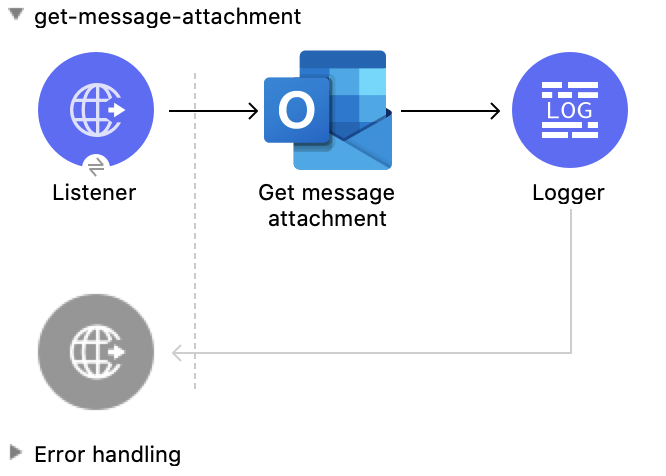
この Mule フローでは、既存のメッセージから添付ファイルを取得します。
この例では、次の操作を使用します。
-
HTTP Listener
HTTP 要求からデータを受け取ります。 -
Get message attachment
ユーザーメッセージに添付された添付ファイルのプロパティおよびリレーションを読み取ります。 -
Logger
Get message attachment 操作からの HTTP 応答を表示します。
この例の XML
この例のフローをすばやく Mule アプリケーションに読み込むには、次のコードを Studio XML エディターに貼り付けます。
<?xml version="1.0" encoding="UTF-8"?>

<mule xmlns:tableau-specialist="http://www.mulesoft.org/schema/mule/tableau-specialist" xmlns:email="http://www.mulesoft.org/schema/mule/email"
	  xmlns:ee="http://www.mulesoft.org/schema/mule/ee/core"
	  xmlns:http="http://www.mulesoft.org/schema/mule/http" xmlns:outlook365="http://www.mulesoft.org/schema/mule/outlook365" xmlns:salesforce="http://www.mulesoft.org/schema/mule/salesforce" xmlns="http://www.mulesoft.org/schema/mule/core" xmlns:doc="http://www.mulesoft.org/schema/mule/documentation" xmlns:xsi="http://www.w3.org/2001/XMLSchema-instance" xsi:schemaLocation="http://www.mulesoft.org/schema/mule/core http://www.mulesoft.org/schema/mule/core/current/mule.xsd
http://www.mulesoft.org/schema/mule/outlook365 http://www.mulesoft.org/schema/mule/outlook365/current/mule-outlook365.xsd
http://www.mulesoft.org/schema/mule/http http://www.mulesoft.org/schema/mule/http/current/mule-http.xsd
http://www.mulesoft.org/schema/mule/ee/core http://www.mulesoft.org/schema/mule/ee/core/current/mule-ee.xsd
http://www.mulesoft.org/schema/mule/email http://www.mulesoft.org/schema/mule/email/current/mule-email.xsd
http://www.mulesoft.org/schema/mule/tableau-specialist http://www.mulesoft.org/schema/mule/tableau-specialist/current/mule-tableau-specialist.xsd">
	<http:listener-config name="HTTP_Listener_config" doc:name="HTTP Listener config" doc:id="7b5e348d-2f1c-4a09-b73a-7b1f84d89060" >
		<http:listener-connection host="0.0.0.0" port="8083" />
	</http:listener-config>

	<outlook365:outlook365-config name="outlook365_client_credentials" doc:name="Outlook365 Outlook365 Config" doc:id="ab1353ac-79b8-4718-a96c-a2c9e9d1d996" >
		<outlook365:oauth-client-credentials-connection >
			<outlook365:oauth-client-credentials clientId="${oauth-client-credentials.clientId}" clientSecret="${oauth-client-credentials.clientSecret}" tokenUrl="${oauth-client-credentials.tokenUrl}" scopes="${oauth-client-credentials.scopes}" />
		</outlook365:oauth-client-credentials-connection>
	</outlook365:outlook365-config>

	<flow name="get-message-attachment" doc:id="41bd505f-6a0d-4079-bb81-8b79083fc336" >
		<http:listener doc:name="Listener" doc:id="858ac6db-7fbb-496c-b630-bb86c2958b63" config-ref="HTTP_Listener_config" path="/get-msg-attachment"/>
		<outlook365:get-message-attachment doc:name="Get message attachment" doc:id="519415c5-0205-487a-bbfc-802207b90b1e" config-ref="outlook365_client_credentials" userId="88f176b2-84ca-4cfe-828c-954db0096efa" messageId="AAMkADg5NjIxODNkLWRkNzAtNGFkNC04YjUwLWFjOTEyMzg0YzA5NgBGAAAAAADzzlN7RptORYu7QgvFkvQJBwCthX8I2XTFT5_USx5R95fIAAAAAAEMAACthX8I2XTFT5_USx5R95fIAAEwN5RlAAA=" attachmentId="AAMkADg5NjIxODNkLWRkNzAtNGFkNC04YjUwLWFjOTEyMzg0YzA5NgBGAAAAAADzzlN7RptORYu7QgvFkvQJBwCthX8I2XTFT5_USx5R95fIAAAAAAEMAACthX8I2XTFT5_USx5R95fIAAEwN5RlAAABEgAQAD9EH3Atqb9MpCb3Zov2FdQ="/>
		<logger level="INFO" doc:name="Logger" doc:id="52de1ce6-db8c-40ba-be19-3fb5358b2928" message="#[payload]"/>
	</flow>
</mule>
この例の実行手順
-
コネクタが設定されていることを確認します。
-
プロジェクトを保存します。
-
Web ブラウザーから「
http://localhost:8083/get-message-attachment」と入力してアプリケーションをテストします。
Get Event Attachment
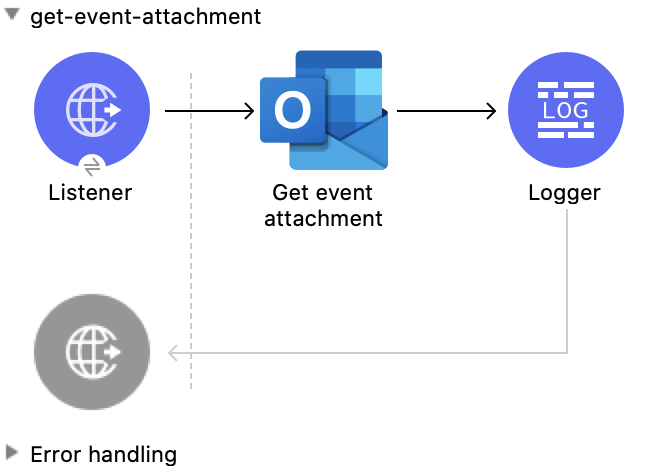
この Mule フローでは、既存のイベントから添付ファイルを取得します。
この例では、次の操作を使用します。
-
HTTP Listener
HTTP 要求からデータを受け取ります。 -
Get event attachment
イベントに添付された添付ファイルのプロパティおよびリレーションを読み取ります。 -
Logger
Get event attachment 操作からの HTTP 応答を表示します。
この例の XML
この例のフローをすばやく Mule アプリケーションに読み込むには、次のコードを Studio XML エディターに貼り付けます。
<?xml version="1.0" encoding="UTF-8"?>

<mule xmlns:tableau-specialist="http://www.mulesoft.org/schema/mule/tableau-specialist" xmlns:email="http://www.mulesoft.org/schema/mule/email"
	  xmlns:ee="http://www.mulesoft.org/schema/mule/ee/core"
	  xmlns:http="http://www.mulesoft.org/schema/mule/http" xmlns:outlook365="http://www.mulesoft.org/schema/mule/outlook365" xmlns:salesforce="http://www.mulesoft.org/schema/mule/salesforce" xmlns="http://www.mulesoft.org/schema/mule/core" xmlns:doc="http://www.mulesoft.org/schema/mule/documentation" xmlns:xsi="http://www.w3.org/2001/XMLSchema-instance" xsi:schemaLocation="http://www.mulesoft.org/schema/mule/core http://www.mulesoft.org/schema/mule/core/current/mule.xsd
http://www.mulesoft.org/schema/mule/outlook365 http://www.mulesoft.org/schema/mule/outlook365/current/mule-outlook365.xsd
http://www.mulesoft.org/schema/mule/http http://www.mulesoft.org/schema/mule/http/current/mule-http.xsd
http://www.mulesoft.org/schema/mule/ee/core http://www.mulesoft.org/schema/mule/ee/core/current/mule-ee.xsd
http://www.mulesoft.org/schema/mule/email http://www.mulesoft.org/schema/mule/email/current/mule-email.xsd
http://www.mulesoft.org/schema/mule/tableau-specialist http://www.mulesoft.org/schema/mule/tableau-specialist/current/mule-tableau-specialist.xsd">
	<http:listener-config name="HTTP_Listener_config" doc:name="HTTP Listener config" doc:id="7b5e348d-2f1c-4a09-b73a-7b1f84d89060" >
		<http:listener-connection host="0.0.0.0" port="8083" />
	</http:listener-config>

	<outlook365:outlook365-config name="outlook365_client_credentials" doc:name="Outlook365 Outlook365 Config" doc:id="ab1353ac-79b8-4718-a96c-a2c9e9d1d996" >
		<outlook365:oauth-client-credentials-connection >
			<outlook365:oauth-client-credentials clientId="${oauth-client-credentials.clientId}" clientSecret="${oauth-client-credentials.clientSecret}" tokenUrl="${oauth-client-credentials.tokenUrl}" scopes="${oauth-client-credentials.scopes}" />
		</outlook365:oauth-client-credentials-connection>
	</outlook365:outlook365-config>

	<flow name="get-event-attachment" doc:id="eabf42a3-5a13-4e62-8ac0-f42fe3af7b46" >
		<http:listener doc:name="Listener" doc:id="5a126e2a-4707-48da-a451-33d2102b9e14" config-ref="HTTP_Listener_config" path="/get-event-attachment"/>
		<outlook365:get-event-attachment doc:name="Get event attachment" doc:id="92b1c180-41e5-4306-8a9b-0d69dbf6f57e" userId="88f176b2-84ca-4cfe-828c-954db0096efa" eventId="AAMkADg5NjIxODNkLWRkNzAtNGFkNC04YjUwLWFjOTEyMzg0YzA5NgBGAAAAAADzzlN7RptORYu7QgvFkvQJBwCthX8I2XTFT5_USx5R95fIAAAAAAENAACthX8I2XTFT5_USx5R95fIAAE8i1INAAA=" attachmentId="AAMkADg5NjIxODNkLWRkNzAtNGFkNC04YjUwLWFjOTEyMzg0YzA5NgBGAAAAAADzzlN7RptORYu7QgvFkvQJBwCthX8I2XTFT5_USx5R95fIAAAAAAENAACthX8I2XTFT5_USx5R95fIAAE8i1INAAABEgAQACmxgKifl79Lvzb1cpzml1o=" config-ref="outlook365_client_credentials" getRawContent="true"/>
		<logger level="INFO" doc:name="Logger" doc:id="88a52a69-b04e-4b34-b976-8f80f291bbbb" message="#[payload]"/>
	</flow>
</mule>
この例の実行手順
-
コネクタが設定されていることを確認します。
-
プロジェクトを保存します。
-
Web ブラウザーから「
http://localhost:8083/get-event-attachment」と入力してアプリケーションをテストします。
Send Message
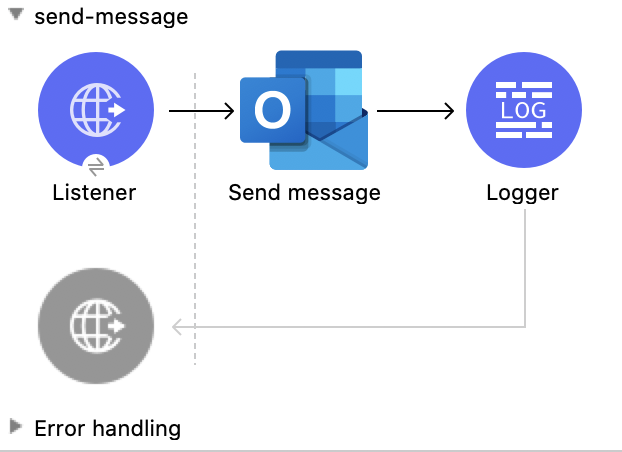
この Mule フローでは、下書きフォルダーからメッセージを送信します。このメッセージは、Create message 操作で以前に作成されたものです。
この例では、次の操作を使用します。
-
HTTP Listener
HTTP 要求からデータを受け取ります。 -
Send message
メッセージを下書きフォルダーから送信します。 -
Logger
Send message 操作からの HTTP 応答を表示します。
この例の XML
この例のフローをすばやく Mule アプリケーションに読み込むには、次のコードを Studio XML エディターに貼り付けます。
<?xml version="1.0" encoding="UTF-8"?>

<mule xmlns:tableau-specialist="http://www.mulesoft.org/schema/mule/tableau-specialist" xmlns:email="http://www.mulesoft.org/schema/mule/email"
	  xmlns:ee="http://www.mulesoft.org/schema/mule/ee/core"
	  xmlns:http="http://www.mulesoft.org/schema/mule/http" xmlns:outlook365="http://www.mulesoft.org/schema/mule/outlook365" xmlns:salesforce="http://www.mulesoft.org/schema/mule/salesforce" xmlns="http://www.mulesoft.org/schema/mule/core" xmlns:doc="http://www.mulesoft.org/schema/mule/documentation" xmlns:xsi="http://www.w3.org/2001/XMLSchema-instance" xsi:schemaLocation="http://www.mulesoft.org/schema/mule/core http://www.mulesoft.org/schema/mule/core/current/mule.xsd
http://www.mulesoft.org/schema/mule/outlook365 http://www.mulesoft.org/schema/mule/outlook365/current/mule-outlook365.xsd
http://www.mulesoft.org/schema/mule/http http://www.mulesoft.org/schema/mule/http/current/mule-http.xsd
http://www.mulesoft.org/schema/mule/ee/core http://www.mulesoft.org/schema/mule/ee/core/current/mule-ee.xsd
http://www.mulesoft.org/schema/mule/email http://www.mulesoft.org/schema/mule/email/current/mule-email.xsd
http://www.mulesoft.org/schema/mule/tableau-specialist http://www.mulesoft.org/schema/mule/tableau-specialist/current/mule-tableau-specialist.xsd">
	<http:listener-config name="HTTP_Listener_config" doc:name="HTTP Listener config" doc:id="7b5e348d-2f1c-4a09-b73a-7b1f84d89060" >
		<http:listener-connection host="0.0.0.0" port="8083" />
	</http:listener-config>

	<outlook365:outlook365-config name="outlook365_client_credentials" doc:name="Outlook365 Outlook365 Config" doc:id="ab1353ac-79b8-4718-a96c-a2c9e9d1d996" >
		<outlook365:oauth-client-credentials-connection >
			<outlook365:oauth-client-credentials clientId="${oauth-client-credentials.clientId}" clientSecret="${oauth-client-credentials.clientSecret}" tokenUrl="${oauth-client-credentials.tokenUrl}" scopes="${oauth-client-credentials.scopes}" />
		</outlook365:oauth-client-credentials-connection>
	</outlook365:outlook365-config>

	<flow name="send-message" doc:id="c664597a-6d88-4816-b502-f786a959d1f9" >
		<http:listener doc:name="Listener" doc:id="6fb79b3f-395a-4b9f-a702-ea7a127573f7" config-ref="HTTP_Listener_config" path="/send-msg"/>
		<outlook365:send-message doc:name="Send message" doc:id="71da69e5-6ec3-4fe1-beec-7ef4ce625527" config-ref="outlook365_client_credentials" userId="88f176b2-84ca-4cfe-828c-954db0096efa" messageId="AAMkADg5NjIxODNkLWRkNzAtNGFkNC04YjUwLWFjOTEyMzg0YzA5NgBGAAAAAADzzlN7RptORYu7QgvFkvQJBwCthX8I2XTFT5_USx5R95fIAAAAAAEPAACthX8I2XTFT5_USx5R95fIAAFXpn5uAAA="/>
		<logger level="INFO" doc:name="Logger" doc:id="f6f311e4-92e6-4eff-93b9-e3f0bd1d346c" message="#[payload]"/>
	</flow>
</mule>
この例の実行手順
-
コネクタが設定されていることを確認します。
-
プロジェクトを保存します。
-
Web ブラウザーから「
http://localhost:8083/send-message」と入力してアプリケーションをテストします。
Send Mail
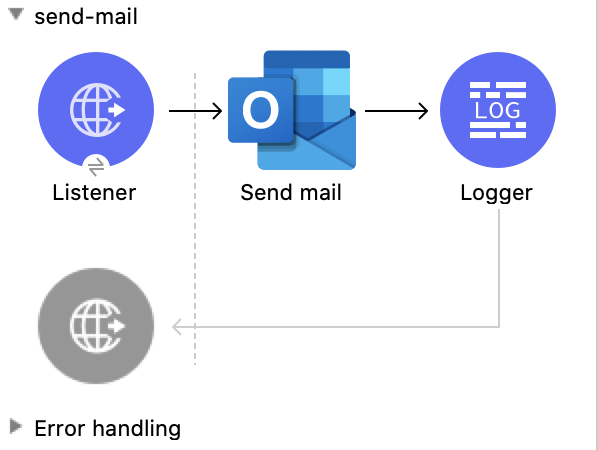
この Mule フローでは、最初に下書きメッセージを作成することなくメッセージを送信します。
この例では、次の操作を使用します。
-
HTTP Listener
HTTP 要求からデータを受け取ります。 -
Send mail
リクエストボディで指定されたメッセージを送信します。 -
Logger
Send mail 操作からの HTTP 応答を表示します。
この例の XML
この例のフローをすばやく Mule アプリケーションに読み込むには、次のコードを Studio XML エディターに貼り付けます。
<?xml version="1.0" encoding="UTF-8"?>

<mule xmlns:tableau-specialist="http://www.mulesoft.org/schema/mule/tableau-specialist" xmlns:email="http://www.mulesoft.org/schema/mule/email"
	  xmlns:ee="http://www.mulesoft.org/schema/mule/ee/core"
	  xmlns:http="http://www.mulesoft.org/schema/mule/http" xmlns:outlook365="http://www.mulesoft.org/schema/mule/outlook365" xmlns:salesforce="http://www.mulesoft.org/schema/mule/salesforce" xmlns="http://www.mulesoft.org/schema/mule/core" xmlns:doc="http://www.mulesoft.org/schema/mule/documentation" xmlns:xsi="http://www.w3.org/2001/XMLSchema-instance" xsi:schemaLocation="http://www.mulesoft.org/schema/mule/core http://www.mulesoft.org/schema/mule/core/current/mule.xsd
http://www.mulesoft.org/schema/mule/outlook365 http://www.mulesoft.org/schema/mule/outlook365/current/mule-outlook365.xsd
http://www.mulesoft.org/schema/mule/http http://www.mulesoft.org/schema/mule/http/current/mule-http.xsd
http://www.mulesoft.org/schema/mule/ee/core http://www.mulesoft.org/schema/mule/ee/core/current/mule-ee.xsd
http://www.mulesoft.org/schema/mule/email http://www.mulesoft.org/schema/mule/email/current/mule-email.xsd
http://www.mulesoft.org/schema/mule/tableau-specialist http://www.mulesoft.org/schema/mule/tableau-specialist/current/mule-tableau-specialist.xsd">
	<http:listener-config name="HTTP_Listener_config" doc:name="HTTP Listener config" doc:id="7b5e348d-2f1c-4a09-b73a-7b1f84d89060" >
		<http:listener-connection host="0.0.0.0" port="8083" />
	</http:listener-config>

	<outlook365:outlook365-config name="outlook365_client_credentials" doc:name="Outlook365 Outlook365 Config" doc:id="ab1353ac-79b8-4718-a96c-a2c9e9d1d996" >
		<outlook365:oauth-client-credentials-connection >
			<outlook365:oauth-client-credentials clientId="${oauth-client-credentials.clientId}" clientSecret="${oauth-client-credentials.clientSecret}" tokenUrl="${oauth-client-credentials.tokenUrl}" scopes="${oauth-client-credentials.scopes}" />
		</outlook365:oauth-client-credentials-connection>
	</outlook365:outlook365-config>

	<flow name="send-mail" doc:id="8c2eb7ec-b811-4598-bd84-8cdc5453563c" >
		<http:listener doc:name="Listener" doc:id="290e3637-9b48-421b-bfb1-2b6fd717bbf5" config-ref="HTTP_Listener_config" path="/send-mail"/>
		<outlook365:send-mail doc:name="Send mail" doc:id="1179a8b1-faca-42a1-8728-4398236f884e" config-ref="outlook365_client_credentials" userId="88f176b2-84ca-4cfe-828c-954db0096efa" requestBodyContentFormat="MIME">
			<outlook365:message ><![CDATA[RnJvbTogU2hhcmVwb2ludCBUZWFtcyA8c2hhcmVwb2ludC10ZWFtc0BtdWxlY29ubmVjdG9yLm9ubWljcm9zb2Z0LmNvbT4KVG86IE11bGUgVGVzdCA8bXVsZXRlc3RAbXVsZXNvZnQuY29tPgpTdWJqZWN0OiBUZXN0IE91dGxvb2szNjUgY29ubmVjdG9yIC0gcGxlYXNlIGlnbm9yZQpEYXRlOiBTdW4sIDI4IEZlYiAyMDIxIDA3OjE1OjAwICswMDAw]]></outlook365:message>
		</outlook365:send-mail>
		<logger level="INFO" doc:name="Logger" doc:id="ca16b61a-efda-45b6-aae9-f9cf0fc237eb" message="#[payload]"/>
	</flow>
</mule>
この例の実行手順
-
コネクタが設定されていることを確認します。
-
プロジェクトを保存します。
-
Web ブラウザーから「
http://localhost:8083/send-mail」と入力してアプリケーションをテストします。
Create Reply All to Message
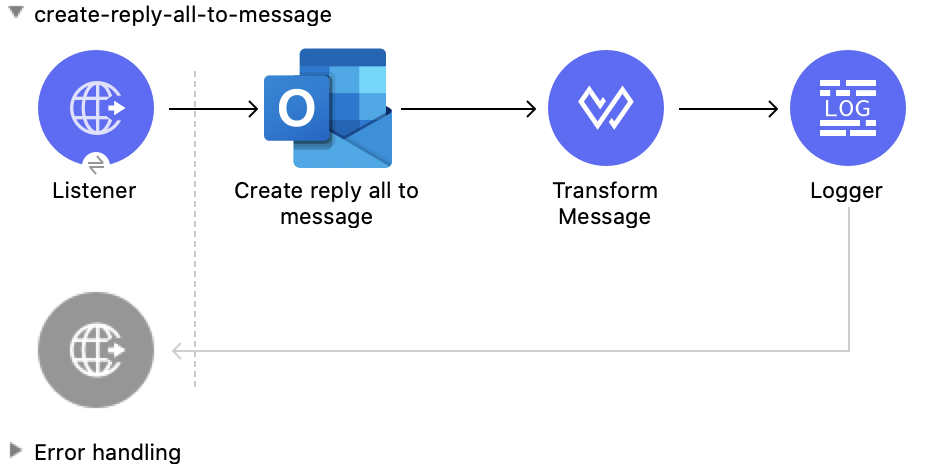
この Mule フローでは、下書きフォルダーに保存される全員に返信メッセージを作成します。その後、メッセージは Send message 操作を使用して送信できます。
この例では、次の操作を使用します。
-
HTTP Listener
HTTP 要求からデータを受け取ります。 -
Create reply all to message
送信者および指定されたメッセージのすべての受信者に返信する下書きを作成します。 -
Transform Message
Create reply all to message 操作の結果を JSON 形式で出力します。 -
Logger
Create reply all to message 操作からの HTTP 応答を表示します。
この例の XML
この例のフローをすばやく Mule アプリケーションに読み込むには、次のコードを Studio XML エディターに貼り付けます。
<?xml version="1.0" encoding="UTF-8"?>

<mule xmlns:tableau-specialist="http://www.mulesoft.org/schema/mule/tableau-specialist" xmlns:email="http://www.mulesoft.org/schema/mule/email"
	  xmlns:ee="http://www.mulesoft.org/schema/mule/ee/core"
	  xmlns:http="http://www.mulesoft.org/schema/mule/http" xmlns:outlook365="http://www.mulesoft.org/schema/mule/outlook365" xmlns:salesforce="http://www.mulesoft.org/schema/mule/salesforce" xmlns="http://www.mulesoft.org/schema/mule/core" xmlns:doc="http://www.mulesoft.org/schema/mule/documentation" xmlns:xsi="http://www.w3.org/2001/XMLSchema-instance" xsi:schemaLocation="http://www.mulesoft.org/schema/mule/core http://www.mulesoft.org/schema/mule/core/current/mule.xsd
http://www.mulesoft.org/schema/mule/outlook365 http://www.mulesoft.org/schema/mule/outlook365/current/mule-outlook365.xsd
http://www.mulesoft.org/schema/mule/http http://www.mulesoft.org/schema/mule/http/current/mule-http.xsd
http://www.mulesoft.org/schema/mule/ee/core http://www.mulesoft.org/schema/mule/ee/core/current/mule-ee.xsd
http://www.mulesoft.org/schema/mule/email http://www.mulesoft.org/schema/mule/email/current/mule-email.xsd
http://www.mulesoft.org/schema/mule/tableau-specialist http://www.mulesoft.org/schema/mule/tableau-specialist/current/mule-tableau-specialist.xsd">
	<http:listener-config name="HTTP_Listener_config" doc:name="HTTP Listener config" doc:id="98f35d79-9083-46d1-b1a5-27f954c8b437" >
		<http:listener-connection host="0.0.0.0" port="8083" />
	</http:listener-config>

	<outlook365:outlook365-config name="outlook365_client_credentials" doc:name="Outlook365 Outlook365 Config" doc:id="a5a23cc1-c8ec-400c-b2be-9590ebcf49ac" >
		<outlook365:oauth-client-credentials-connection >
			<outlook365:oauth-client-credentials clientId="${oauth-client-credentials.clientId}" clientSecret="${oauth-client-credentials.clientSecret}" tokenUrl="${oauth-client-credentials.tokenUrl}" scopes="${oauth-client-credentials.scopes}" />
		</outlook365:oauth-client-credentials-connection>
	</outlook365:outlook365-config>

	<flow name="create-reply-all-to-message" doc:id="2584d71b-c2fb-4a8d-8c79-957ca4900e06" >
		<http:listener doc:name="Listener" doc:id="02424960-2abd-4c16-8caa-5d9c233189d3" config-ref="HTTP_Listener_config" path="/create-reply-all"/>
		<outlook365:create-reply-all-to-message doc:name="Create reply all to message" doc:id="2cd08725-03a6-4945-98c0-3cfa559a16c8" config-ref="outlook365_client_credentials" userId="88f176b2-84ca-4cfe-828c-954db0096efa" messageId="AAMkADg5NjIxODNkLWRkNzAtNGFkNC04YjUwLWFjOTEyMzg0YzA5NgBGAAAAAADzzlN7RptORYu7QgvFkvQJBwCthX8I2XTFT5_USx5R95fIAAAAAAEJAACthX8I2XTFT5_USx5R95fIAAFD3jMsAAA=">
			<outlook365:reply ><![CDATA[#[%dw 2.0
output application/json
---
{
  "blabla": "sssscomment-value"
}]]]></outlook365:reply>
		</outlook365:create-reply-all-to-message>
		<ee:transform doc:name="Transform Message" doc:id="43f037d7-2d48-42e1-b504-9ffda49b3175" >
			<ee:message >
				<ee:set-payload ><![CDATA[%dw 2.0
output application/json
---
payload]]></ee:set-payload>
			</ee:message>
		</ee:transform>
		<logger level="INFO" doc:name="Logger" doc:id="3bdce785-d6d3-496b-8f8c-b2c7460293a0" message="#[payload]"/>
	</flow>
</mule>
この例の実行手順
-
コネクタが設定されていることを確認します。
-
プロジェクトを保存します。
-
Web ブラウザーから「
http://localhost:8083/create-reply-all-to-message」と入力してアプリケーションをテストします。
Reply All to Message
この Mule フローでは、全員に返信メッセージを作成します。このメッセージは、Create message 操作を使用して最初に下書きフォルダーで作成することなく送信されます。
この例では、次の操作を使用します。
-
HTTP Listener
HTTP 要求からデータを受け取ります。 -
Reply all to message
メッセージのすべての受信者に返信します。 -
Logger
Reply all to message 操作からの HTTP 応答を表示します。
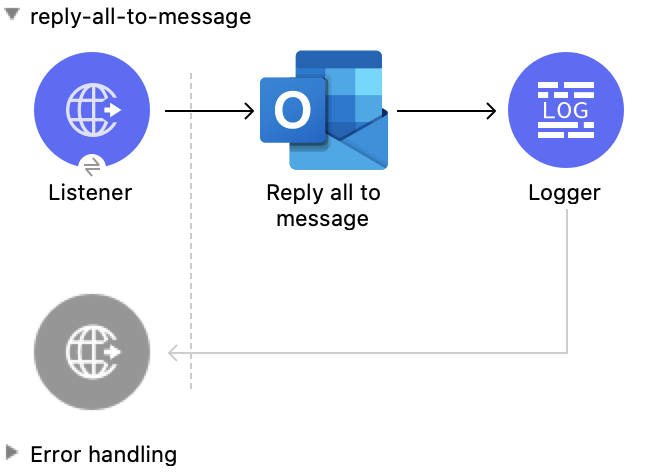
この例の XML
この例のフローをすばやく Mule アプリケーションに読み込むには、次のコードを Studio XML エディターに貼り付けます。
<?xml version="1.0" encoding="UTF-8"?>

<mule xmlns:tableau-specialist="http://www.mulesoft.org/schema/mule/tableau-specialist" xmlns:email="http://www.mulesoft.org/schema/mule/email"
	  xmlns:ee="http://www.mulesoft.org/schema/mule/ee/core"
	  xmlns:http="http://www.mulesoft.org/schema/mule/http" xmlns:outlook365="http://www.mulesoft.org/schema/mule/outlook365" xmlns:salesforce="http://www.mulesoft.org/schema/mule/salesforce" xmlns="http://www.mulesoft.org/schema/mule/core" xmlns:doc="http://www.mulesoft.org/schema/mule/documentation" xmlns:xsi="http://www.w3.org/2001/XMLSchema-instance" xsi:schemaLocation="http://www.mulesoft.org/schema/mule/core http://www.mulesoft.org/schema/mule/core/current/mule.xsd
http://www.mulesoft.org/schema/mule/outlook365 http://www.mulesoft.org/schema/mule/outlook365/current/mule-outlook365.xsd
http://www.mulesoft.org/schema/mule/http http://www.mulesoft.org/schema/mule/http/current/mule-http.xsd
http://www.mulesoft.org/schema/mule/ee/core http://www.mulesoft.org/schema/mule/ee/core/current/mule-ee.xsd
http://www.mulesoft.org/schema/mule/email http://www.mulesoft.org/schema/mule/email/current/mule-email.xsd
http://www.mulesoft.org/schema/mule/tableau-specialist http://www.mulesoft.org/schema/mule/tableau-specialist/current/mule-tableau-specialist.xsd">
	<http:listener-config name="HTTP_Listener_config" doc:name="HTTP Listener config" doc:id="98f35d79-9083-46d1-b1a5-27f954c8b437" >
		<http:listener-connection host="0.0.0.0" port="8083" />
	</http:listener-config>

	<outlook365:outlook365-config name="outlook365_client_credentials" doc:name="Outlook365 Outlook365 Config" doc:id="a5a23cc1-c8ec-400c-b2be-9590ebcf49ac" >
		<outlook365:oauth-client-credentials-connection >
			<outlook365:oauth-client-credentials clientId="${oauth-client-credentials.clientId}" clientSecret="${oauth-client-credentials.clientSecret}" tokenUrl="${oauth-client-credentials.tokenUrl}" scopes="${oauth-client-credentials.scopes}" />
		</outlook365:oauth-client-credentials-connection>
	</outlook365:outlook365-config>

	<flow name="reply-all-to-message" doc:id="74d00afa-c238-4a4a-90d8-c7639dd1bb2b" >
		<http:listener doc:name="Listener" doc:id="545d0bae-9e20-48f6-9dd5-4a36ecade538" config-ref="HTTP_Listener_config" path="/reply-all"/>
		<outlook365:reply-all-to-message doc:name="Reply all to message" doc:id="44693b84-7bba-4f61-a5f2-481c05d8a3d8" config-ref="outlook365_client_credentials" userId="88f176b2-84ca-4cfe-828c-954db0096efa" messageId="AAMkADg5NjIxODNkLWRkNzAtNGFkNC04YjUwLWFjOTEyMzg0YzA5NgBGAAAAAADzzlN7RptORYu7QgvFkvQJBwCthX8I2XTFT5_USx5R95fIAAAAAAEJAACthX8I2XTFT5_USx5R95fIAAFD3jMsAAA="/>
		<logger level="INFO" doc:name="Logger" doc:id="e2e303d6-d17d-4940-910d-e9a95a2728b0" message="#[payload]"/>
	</flow>
</mule>
この例の実行手順
-
コネクタが設定されていることを確認します。
-
プロジェクトを保存します。
-
Web ブラウザーから「
http://localhost:8083/reply-all-to-message」と入力してアプリケーションをテストします。