
Anypoint Platform コントロールプレーンから Flex Gateway のポリシー、ログ、メトリクスを活用するには、Flex Gateway を Istio サービスメッシュに統合します。Flex Gateway をイングレスゲートウェイとしてデプロイし、イングレス north-south クラスタートラフィックとクラスター内の内部 east-west トラフィックを管理します。
Flex Gateway を統合するには、次のアーキテクチャ図とチュートリアルを使用します。Flex Gateway は、 Istio Bookinfo サンプルアプリケーションの変更バージョンを使用して統合されます。Flex Gateway インテグレーションでは、次のようになります。
-
Istio 仮想サービスがすべてのイングレス north-south トラフィックを Flex Gateway に転送します。
-
bookinfo 名前空間への直接アクセスは制限されます。bookinfo 名前空間へのすべての外部トラフィックは、flex 名前空間から送信されている必要があります。Istio は bookinfo と flex 間の mTLS 設定を自動的に定義します。 -
Flex Gateway は、API インスタンスを使用して、公開された商品ページサービスをイングレストラフィックから保護し、監視します。
-
Istio サイドカーが商品ページサービスとレビューサービス間の east-west トラフィックを捕捉します。Flex Gateway は、レビューサービスへの受信トラフィックを管理するイングレスゲートウェイとして機能します。
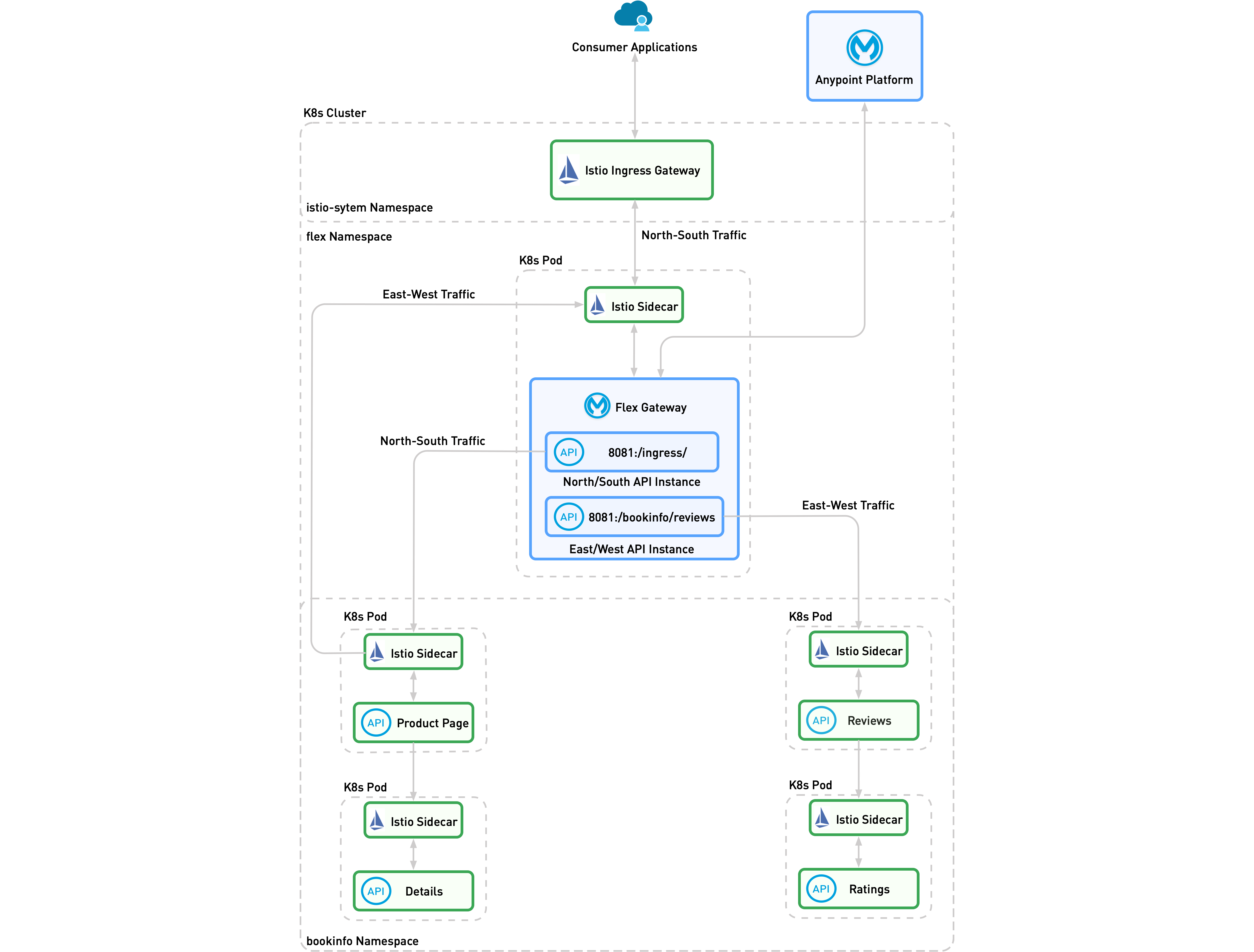
| この図では、Flex Gateway は接続モードで実行されています。Flex Gateway がローカルモードで実行されている場合、Anypoint Platform コントロールプレーンはありません。 |
このアーキテクチャを設定する手順は、次のとおりです。
始める前に
環境のセットアップ
-
このデモ用の Kubernetes クラスターを作成するか、使用するクラスターがすでにある場合はこのステップをスキップします。
k3d cluster create demo-istio --k3s-arg "--disable=traefik@server:0" --port '80:80@server:0' --port '443:443@server:0' -
Flex Gateway と Istio の Helm リポジトリを追加します。
helm repo add istio https://istio-release.storage.googleapis.com/charts \ && helm repo add flex-gateway https://flex-packages.anypoint.mulesoft.com/helm \ && helm repo up -
Istio をインストールします。
-
Istio コントロールプレーンをデプロイする前にインストールする必要があるクラスター全体のカスタムリソース定義 (CRD) が含まれている Istio ベースチャートをインストールします。
helm upgrade -i --wait --create-namespace -n istio-system istio-base istio/base --version 1.21.2 --set defaultRevision=default -
istiod サービスをデプロイする Istio 検出チャートをインストールします。helm upgrade -i --wait --create-namespace -n istio-system istiod istio/istiod --version 1.21.2 -
Istio イングレスゲートウェイをインストールします。
helm upgrade -i --wait --create-namespace -n istio-system istio-ingress istio/gateway --version 1.21.2
-
-
Flex Gateway をインストールします。
-
名前空間を作成し、表示ラベルをセットアップして、サイドカーの挿入を有効にします。
kubectl create ns flex && kubectl label ns flex istio-injection=enabled --overwrite -
Flex Gateway をインストールします。
helm upgrade -i --wait -n flex --version 1.7.0 flex flex-gateway/flex-gateway \ --set gateway.scope=Namespace \ --set gateway.mode=connected \ --set service.type=ClusterIP \ --set service.http.port=8081 \ --set service.https.enabled=false \ --set-file registration.content=registration.yaml -
以前に作成したすべてのサービスと API インスタンスをリストします。
kubectl -n flex get svc
-
-
bookinfo アプリケーションをインストールします。-
デフォルトの名前空間で Istio 表示ラベルの挿入を有効にして、
bookinfo アプリケーションをインストールします。kubectl create ns bookinfo \ && kubectl label ns bookinfo istio-injection=enabled --overwrite \ && kubectl -n bookinfo apply -l version!=v2,version!=v3 -f https://raw.githubusercontent.com/istio/istio/release-1.20/samples/bookinfo/platform/kube/bookinfo.yaml -
ポッドの状況を確認します。
kubectl -n bookinfo get pods
-
-
トラフィックをテストする
sleep アプリケーションをインストールします。-
test 名前空間を作成し、sleep アプリケーションをインストールします。kubectl create ns test \ && kubectl label ns test istio-injection=enabled --overwrite \ && kubectl -n test apply -f https://raw.githubusercontent.com/istio/istio/release-1.20/samples/sleep/sleep.yaml -
ポッドの状況を確認します。
kubectl -n test get pods
-
イングレス North-South トラフィックを捕捉します
イングレス north-south トラフィックを捕捉して、サービスを外部トラフィックから保護します。
イングレス north-south トラフィックを捕捉する手順は、次のとおりです。
-
bookinfo 名前空間のすべてのイングレス north-south トラフィックを productpage サービスに転送する Flex Gateway イングレス API インスタンスを作成します。-
ローカルモード:
cat <<EOF | kubectl apply -f - --- apiVersion: gateway.mulesoft.com/v1alpha1 kind: ApiInstance metadata: name: ingress namespace: flex spec: address: http://0.0.0.0:8081/ingress/ services: productpage: address: http://productpage.bookinfo.svc:9080 EOF -
接続モード:
接続モードで API インスタンスを追加するには、Flex Gateway API インスタンスの追加を参照してください。
次のダウンストリームパラメーターを使用して、API インスタンスを設定します。
-
Protocol (プロトコル): HTTP
-
Port (ポート):
8081 -
Base Path (ベースパス):
/ingress/次のアップストリームパラメーターを使用して、API インスタンスを設定します。
-
Route label (ルートの表示ラベル):
productpage -
Upstream URL (アップストリーム URL):
http://productpage.bookinfo.svc:9080
-
-
-
Istio 仮想サービスを使用してイングレストラフィックを Flex Gateway に転送する
flex Istio イングレスゲートウェイを作成します。-
Flex Gateway を作成します。
cat <<EOF | kubectl apply -f - --- apiVersion: networking.istio.io/v1alpha3 kind: Gateway metadata: name: flex namespace: flex spec: selector: app: istio-ingress servers: - port: number: 80 name: http protocol: HTTP hosts: - "*" --- apiVersion: networking.istio.io/v1alpha3 kind: VirtualService metadata: name: flex namespace: flex spec: hosts: - "*" gateways: - flex http: - route: - destination: host: flex port: number: 8081 rewrite: uri: /ingress/ EOF -
数秒 (約 10 秒) 待ってから、テスト要求を
/api/v1/products/1 ページに送信します。curl -v http://localhost/api/v1/products/1 -
次の出力を受信したことを確認します。
< HTTP/1.1 200 OK
< server: istio-envoy
< date: Tue, 27 Feb 2024 22:06:33 GMT
< content-type: application/json
< content-length: 195
< x-envoy-upstream-service-time: 8
<
* Connection #0 to host localhost left intact
{"id": 2, "author": "William Shakespeare", "year": 1595, "type": "paperback", "pages": 200, "publisher": "PublisherA", "language": "English", "ISBN-10": "1234567890", "ISBN-13": "123-1234567890"}
-
-
基本認証ポリシーを適用して、Flex Gateway API インスタンスを保護します。
-
ポリシーを追加します。
cat <<EOF | kubectl apply -f - --- apiVersion: gateway.mulesoft.com/v1alpha1 kind: ApiInstance metadata: name: ingress namespace: flex spec: address: http://0.0.0.0:8081/ingress/ services: productpage: address: http://productpage.bookinfo.svc:9080 policies: - policyRef: name: http-basic-authentication-flex config: username: user1 password: password1 EOF -
数秒 (約 10 秒) 待ってから、テスト要求を送信します。
curl -v http://localhost/ -
「401」応答を受信したことを確認します。
-
-
トラフィックを記録するメッセージログポリシーを追加します。
cat <<EOF | kubectl apply -f -
---
apiVersion: gateway.mulesoft.com/v1alpha1
kind: ApiInstance
metadata:
  name: ingress
  namespace: flex
spec:
  address: http://0.0.0.0:8081/ingress/
  services:
    productpage:
      address: http://productpage.bookinfo.svc:9080
  policies:
  - policyRef:
      name: http-basic-authentication-flex
    config:
      username: user1
      password: password1
  - policyRef:
      name: message-logging-flex
    config:
      loggingConfiguration:
      - itemName: "Request"
        itemData:
          message: "#['> ' ++ attributes.version ++ ' ' ++  attributes.method ++ ' ' ++ attributes.headers.host ++ attributes.requestUri]"
          level: "INFO"
          firstSection: true
      - itemName: "Response"
        itemData:
          message: "#['< Status=' ++ attributes.statusCode ++ ' Length=' ++ (attributes.headers['content-length'] default 'none') ++ ' Time=' ++ (attributes.headers['x-envoy-upstream-service-time'] default 'none')]"
          level: "INFO"
          secondSection: true
    order: 0
EOF
サービス間の East-West トラフィックの捕捉
Flex Gateway を使用して、サービス間の east-west トラフィックを捕捉し、ポリシーを使用してサービスを保護します。
east-west トラフィックを捕捉する手順は、次のとおりです。
-
east-west トラフィックを
reviews サービスに転送する bookinfo-reviews API インスタンスを作成します。-
ローカルモード:
cat <<EOF | kubectl apply -f - --- apiVersion: gateway.mulesoft.com/v1alpha1 kind: ApiInstance metadata: name: bookinfo-reviews namespace: flex spec: address: http://0.0.0.0:8081/bookinfo/reviews/ services: upstream: address: http://reviews.bookinfo.svc:9080 policies: - policyRef: name: message-logging-flex config: loggingConfiguration: - itemName: "Request" itemData: message: "#['> ' ++ attributes.version ++ ' ' ++ attributes.method ++ ' ' ++ attributes.headers.host ++ attributes.requestUri]" level: "INFO" firstSection: true - itemName: "Response" itemData: message: "#['< Status=' ++ attributes.statusCode ++ ' Length=' ++ (attributes.headers['content-length'] default 'none') ++ ' Time=' ++ (attributes.headers['x-envoy-upstream-service-time'] default 'none')]" level: "INFO" secondSection: true EOF -
接続モード:
接続モードで API インスタンスを追加するには、Flex Gateway API インスタンスの追加を参照してください。
次のダウンストリームパラメーターを使用して、API インスタンスを設定します。
-
Protocol (プロトコル): HTTP
-
Port (ポート):
8081 -
Base Path (ベースパス):
/bookinfo/reviews/次のアップストリームパラメーターを使用して、API インスタンスを設定します。
-
Route label (ルートの表示ラベル):
reviews -
Upstream URL (アップストリーム URL):
http://reviews.bookinfo.svc:9080
-
-
-
productpage サービスと reviews サービス間のトラフィックを捕捉して、flex サービスに転送します。-
Istio API インスタンスを作成します。
cat <<EOF | kubectl apply -f - --- apiVersion: networking.istio.io/v1alpha3 kind: VirtualService metadata: name: bookinfo-reviews namespace: istio-system spec: hosts: - reviews.bookinfo.svc.cluster.local http: - match: - sourceLabels: app: flex route: - destination: host: reviews.bookinfo.svc.cluster.local port: number: 9080 - route: - destination: host: flex.flex.svc.cluster.local port: number: 8081 rewrite: uri: /bookinfo/reviews/ EOF -
ユーザー名
user1 とパスワード password1 を使用してテスト要求を /productpage に送信します。curl -v -u user1:password1 http://localhost/productpage -
Flex Gateway ログを参照し、
productpage サービスから reviews サービスに送信された要求が Flex Gateway を通過したことを確認します。ログは次のように表示されます。[flex-gateway-envoy][info] wasm log productpage-message-logging-flex-2.flex.productpage.flex.svc main: [policy: productpage-message-logging-flex-2.flex][api: productpage.flex.svc][req: 6e1f7c32-918d-4b6a-af3f-36a4430f80ae] [accessLog] > HTTP/1.1 GET localhost/ingress/productpage [flex-gateway-envoy][info] wasm log bookinfo-reviews-message-logging-flex-1.flex.bookinfo-reviews.flex.svc main: [policy: bookinfo-reviews-message-logging-flex-1.flex][api: bookinfo-reviews.flex.svc][req: b23e9c64-a2aa-4464-8984-d1dd6c18f7ea] [accessLog] > HTTP/1.1 GET reviews:9080/bookinfo/reviews/reviews/0ログをすばやく確認するには、標準出力ログを使用します。標準出力ログの表示方法は、標準出力ログの表示を参照してください。 -
レート制限ポリシーを
bookinfo-reviews API インスタンスに適用して、reviews サービスを保護します。cat <<EOF | kubectl apply -f - --- apiVersion: gateway.mulesoft.com/v1alpha1 kind: ApiInstance metadata: name: bookinfo-reviews namespace: flex spec: address: http://0.0.0.0:8081/bookinfo/reviews/ services: upstream: address: http://reviews.bookinfo.svc:9080 policies: - policyRef: name: message-logging-flex config: loggingConfiguration: - itemName: "Request" itemData: message: "#['> ' ++ attributes.version ++ ' ' ++ attributes.method ++ ' ' ++ attributes.headers.host ++ attributes.requestUri]" level: "INFO" firstSection: true - itemName: "Response" itemData: message: "#['< Status=' ++ attributes.statusCode ++ ' Length=' ++ (attributes.headers['content-length'] default 'none') ++ ' Time=' ++ (attributes.headers['x-envoy-upstream-service-time'] default 'none')]" level: "INFO" secondSection: true order: 0 - policyRef: name: rate-limiting-flex config: rateLimits: - timePeriodInMilliseconds: 60000 maximumRequests: 2 exposeHeaders: true EOF
-
-
bookinfo サービスへの直接アクセスを制限します。-
アクセスを制限します。
cat <<EOF | kubectl apply -f - --- apiVersion: security.istio.io/v1 kind: AuthorizationPolicy metadata: name: flex-allow namespace: bookinfo spec: action: ALLOW rules: - from: - source: namespaces: - flex - bookinfo EOF -
test 名前空間から
details サービスにテスト要求を送信します。kubectl -n test exec -ti -c sleep $(kubectl -n test get pod --no-headers -o=name) -- curl -v details.bookinfo:9080/details/0 -
この
「403 forbidden」応答を受信したことを確認します。< HTTP/1.1 403 Forbidden < content-length: 19 < content-type: text/plain < date: Thu, 09 May 2024 15:51:11 GMT < server: envoy < x-envoy-upstream-service-time: 0 < * Connection #0 to host details.bookinfo left intact RBAC: access denied -
この要求を
details サービスに送信して、flex 名前空間から bookinfo サービスにアクセスする方法を見つけます。kubectl -n flex exec -ti -c app $(kubectl -n flex get pod --no-headers -o=name) -- flexctl check http http://details.bookinfo:9080/details/0 -
この応答を受信したことを確認します。
[flexctl][info] Access to http address 'http://details.bookinfo:9080/details/0': ok
-