
次の例は、URL から Amazon S3 に画像を保存し、画像を取得して表示する方法を示しています。
始める前に
Anypoint Studio でこのサンプルが機能するように、Amazon Web Services ログイン情報を提供する必要があります。次のいずれかを実行できます。
-
コード内で変数を値に置き換える。
-
src/main/resources/mule-artifact.properties ファイルで各変数の値を指定する。
手順の例
![「Studio 7 Visual Studio アイコンフロー。フローには、[Listener]、[Create bucket (バケットを作成)]、[Get MuleSoft logo (MuleSoft ロゴを取得)]、[Create logo object in S3 bucket (ロゴオブジェクトを S3 バケットに作成)]、[Get Image (画像を取得)]、[Delete S3 bucket (S3 バケットを削除)] が表示されています。」](_images/amazon-s3-02.png)
-
Studio で新しい Mule プロジェクトを作成します。
-
[HTTP] > [Listener] をキャンバスにドラッグし、それを選択してプロパティエディターを開きます。
-
新しい HTTP リスナー設定グローバル要素を追加します。
-
[General Settings (一般設定)] で、[+] ボタンをクリックします。
-
次の HTTP パラメーターを設定します。その他の項目はデフォルト値のままにし、[OK] をクリックします。
項目 値 Name (名前)
HTTP_Listener_Configuration
Host (ホスト)
127.0.0.1
Port (ポート)
8081
-
HTTP リスナーの設定グローバル要素を参照します。[General (一般)] タブで、
/ パスを指定します。
-
-
Amazon S3 Connector をフローにドラッグし、コネクタをダブルクリックしてそのプロパティエディターを開きます。
-
選択する既存の Amazon S3 Connector グローバル要素がない場合、[Extension Configuration (拡張機能設定)] 項目の横にある [+] 記号をクリックします。
-
グローバル要素のプロパティを設定し、[OK] をクリックします。
-
コネクタのパラメーターを設定します。
![コネクタプロパティ - [General (一般)] タブ](_images/amazon-s3-03.png)
項目 値 Display Name (表示名)
コネクタインスタンスの名前 (
Create bucket など)。Extension Configuration (拡張機能設定)
コネクタのグローバル設定。
Bucket Name (バケット名)
${config.bucket}リージョン
US_STANDARD (デフォルト) などのリージョン。
Canned ACL (既定 ACL)
PRIVATE (デフォルト) アクセス制御リスト。既定 ACL は定義済みの許可です。
-
MuleSoft に MuleSoft ロゴを要求する [HTTP] > [Connector (コネクタ)] を追加します。
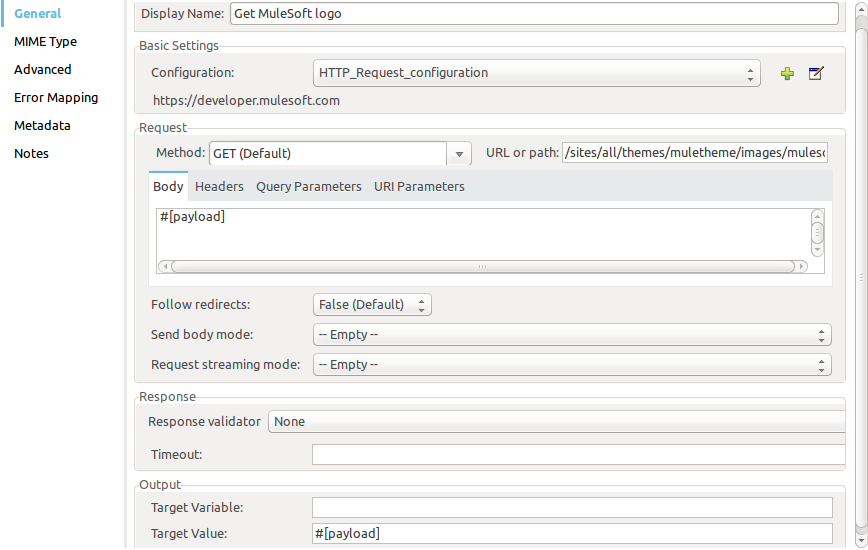
項目 値 Display Name (表示名)
コネクタインスタンスの名前。この例では、[HTTP] > [Connector (コネクタ)] の名前は「
Get MuleSoft logo」となっています。Configuration (設定)
[Host (ホスト)] が「
developer.mulesoft.com」、[Protocol (プロトコル)] が「HTTPS」、[Port (ポート)] が「80」の設定。[URL or Path (URL またはパス)]
/sites/all/themes/muletheme/images/mulesoft_dev_logo_v2.svg。Body (本文)
#[payload]Target Value (対象値)
#[payload] -
要求された MuleSoft ロゴを選択された Amazon S3 バケットに作成する別の Amazon S3 Connector をドラッグします。
![S3 Connector 「Create Logo Object in S3 Bucket (ロゴオブジェクトを S3 バケットに作成)」の [General (一般)] タブ](_images/amazon-s3-05.png)
項目 値 Display Name (表示名)
任意の名前。この例では、S3 Connector の名前は「
Create logo object in S3 bucket」となっています。Extension Configuration (拡張機能設定)
作成したグローバル設定。
Bucket Name (バケット名)
${config.bucket}Key (キー)
muledevlogo
Content (コンテンツ)
#[payload]Canned ACL (既定 ACL)
PRIVATE (デフォルト)
Storage Class (ストレージクラス)
STANDARD (デフォルト)
-
新規作成された MuleSoft ロゴ画像オブジェクトをバケットから取得する別の Amazon S3 Connector を追加します。
![S3 Connector 「Get Image (画像を取得)」の [General (一般)] タブ](_images/amazon-s3-06.png)
項目 値 Display Name (表示名)
コネクタインスタンスの名前。この例では、S3 Connector の名前は
Get Image となっています。Extension Configuration (拡張機能設定)
作成するグローバル設定。
Bucket Name (バケット名)
${config.bucket}Key (キー)
muledevlogo
-
バケットを削除する別の Amazon S3 Connector を追加します。delete bucket 操作の戻り値のデータ型は void であるため、ペイロードには
get image 操作で返されるオブジェクトが含まれます。![S3 Connector 「Delete S3 Bucket (S3 バケットを削除)」の [General (一般)] タブ](_images/amazon-s3-07.png)
項目 値 Bucket Name (バケット名)
${config.bucket}Force (強制)
True
例の XML
この例のフローをすばやく Mule アプリケーションに読み込むには、次のコードを Studio XML エディターに貼り付けます。
<?xml version="1.0" encoding="UTF-8"?>
<mule xmlns:s3="http://www.mulesoft.org/schema/mule/s3"
xmlns:http="http://www.mulesoft.org/schema/mule/http"
xmlns="http://www.mulesoft.org/schema/mule/core"
xmlns:doc="http://www.mulesoft.org/schema/mule/documentation"
xmlns:xsi="http://www.w3.org/2001/XMLSchema-instance"
xsi:schemaLocation="http://www.mulesoft.org/schema/mule/core
http://www.mulesoft.org/schema/mule/core/current/mule.xsd
http://www.mulesoft.org/schema/mule/http
http://www.mulesoft.org/schema/mule/http/current/mule-http.xsd
http://www.mulesoft.org/schema/mule/s3
http://www.mulesoft.org/schema/mule/s3/current/mule-s3.xsd">
  <configuration-properties file="mule-artifact.properties"/>
  <http:listener-config name="HTTP_Listener_config" doc:name="HTTP Listener config" doc:id="DOC_ID">
    <http:listener-connection host="127.0.0.1" port="8081"/>
  </http:listener-config>
  <s3:config name="Amazon_S3_Configuration" doc:name="Amazon S3 Configuration" doc:id="DOC_ID">
    <s3:basic-connection accessKey="${config.accessKey}" secretKey="${config.secretKey"/>
  </s3:config>
  <http:request-config name="HTTPS_Request_Configuration" doc:name="HTTP Request configuration" doc:id="DOC_ID">
    <http:request-connection protocol="HTTPS" host="www.mulesoft.com"/>
  </http:request-config>
  <flow name="s3docuFlow" doc:id="DOC_ID">
    <http:listener config-ref="HTTP_Listener_config" path="/" doc:name="Listener" doc:id="DOC_ID"/>
    <s3:create-bucket config-ref="Amazon_S3_Configuration" bucketName="${config.bucket}"
    doc:name="Create bucket" doc:id="DOC_ID"/>
    <http:request method="GET" path="/sites/default/files/new-application_network_diagram-01.svg"
    doc:name="Request" doc:id="DOC_ID" config-ref="HTTPS_Request_Configuration"/>
    <s3:create-object config-ref="Amazon_S3_Configuration" bucketName="${config.bucket}" key="muledevlogo"
    doc:name="Create object" doc:id="DOC_ID"/>
    <s3:get-object config-ref="Amazon_S3_Configuration" bucketName="${config.bucket}" key="muledevlogo"
    doc:name="Get object" doc:id="DOC_ID"/>
    <s3:delete-bucket config-ref="Amazon_S3_Configuration" bucketName="${config.bucket}"
    doc:name="Delete bucket" doc:id="DOC_ID" force="true"/>
  </flow>
</mule>