
OpenID Connect dynamic client registration lets OAuth 2.0 clients—connected apps—directly register connected apps with Salesforce. To authenticate these client registration requests, Salesforce requires an initial access token.
Required Editions
| Available in: both Salesforce Classic and Lightning Experience |
| Available in: All Editions |
| User Permissions Needed | |
|---|---|
| To manage, create, edit, and delete OAuth apps: | Manage Connected Apps |
Before generating an initial access token, create a connected app to integrate the OAuth 2.0 client with the Salesforce API. See Create a Connected App.
To use dynamic client registration, the registering connected app must provide the initial access token in its request to the dynamic client registration endpoint. With a successful authentication, Salesforce registers a new OAuth 2.0 connected app.
- From Setup, enter Apps in the Quick Find box, then select App Manager.
- Locate the OAuth connected app in the apps list, click
 , and select View.
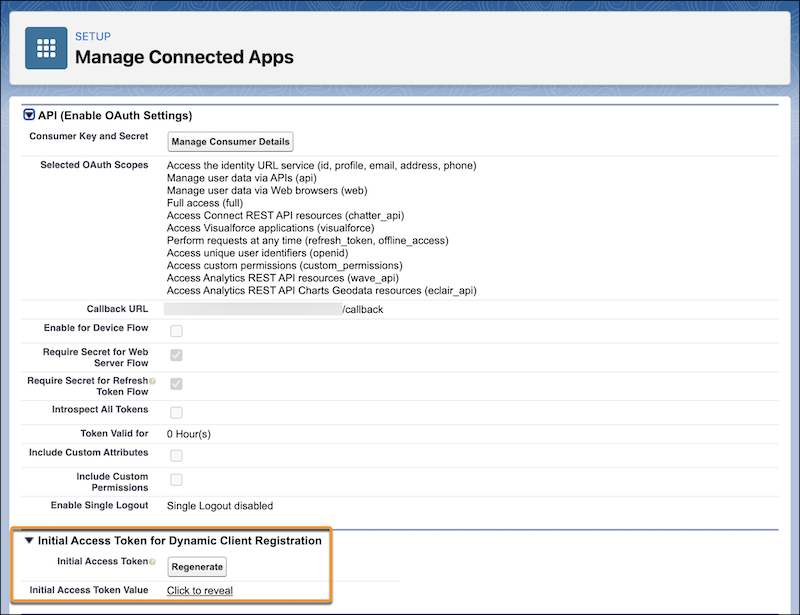
 - In the Initial Access Token for Dynamic Client Registration section, click
Generate if an initial access token hasn’t been created for the
connected app. If a token has already been created for the app, but you require a new token,
click Regenerate.
Regenerating the initial access token invalidates the previous one that your OAuth clients use. Update your OAuth clients to use the new token.
- Click Click to reveal, and copy the token for registration with the
app’s OAuth 2.0 client.
After generating the initial access token, register it with your external API gateway.