---
schema_version: "1"
id: ca3941fca863a24ea606a6c082c487147c194a664b57e71cadce42bb599ee5fc
title: Generate an Initial Access Token
collection: admin
version: current
locale: en-us
portal_url: https://docs.salesforce.com/admin/current/en-us/xcloud/264-0-0/remoteaccess_oidc_initial_access_token.md
canonical_url: https://help.salesforce.com/s/articleView?id=xcloud.remoteaccess_oidc_initial_access_token.htm&release=264.0.0&type=5
source_site: help.salesforce.com
content_type: documentation
content_hash: df40b9b351719c1aa2a1abe19168120f93b04e85180298abe434847c91a79681
description: OpenID Connect dynamic client registration lets OAuth 2.0 clients—connected apps—directly register connected apps with Salesforce. To authenticate these client registration requests, Salesforce requires an initial access token.
products:
- Security
- Cross Cloud
release: "264"
---
# Generate an Initial Access Token
OpenID Connect dynamic client registration lets OAuth 2.0 clients—connected apps—directly register connected apps with Salesforce. To authenticate these client registration requests, Salesforce requires an initial access token.
### Required Editions
Available in: both Salesforce Classic and Lightning Experience
Available in: All Editions
User Permissions Needed
To manage, create, edit, and delete OAuth apps:
Manage Connected Apps
Before generating an initial access token, create a connected app to integrate the OAuth 2.0 client with the Salesforce API. See [Create a Connected App](https://help.salesforce.com/articleView?id=connected_app_create.htm&language=en_US).
To use dynamic client registration, the registering connected app must provide the initial access token in its request to the dynamic client registration endpoint. With a successful authentication, Salesforce registers a new OAuth 2.0 connected app.
1. From Setup, enter Apps in the Quick Find box, then select **App Manager**.
2. Locate the OAuth connected app in the apps list, click , and select **View**.
3. In the Initial Access Token for Dynamic Client Registration section, click **Generate** if an initial access token hasn’t been created for the connected app. If a token has already been created for the app, but you require a new token, click **Regenerate**.
Regenerating the initial access token invalidates the previous one that your OAuth clients use. Update your OAuth clients to use the new token.
4. Click **Click to reveal**, and copy the token for registration with the app’s OAuth 2.0 client. 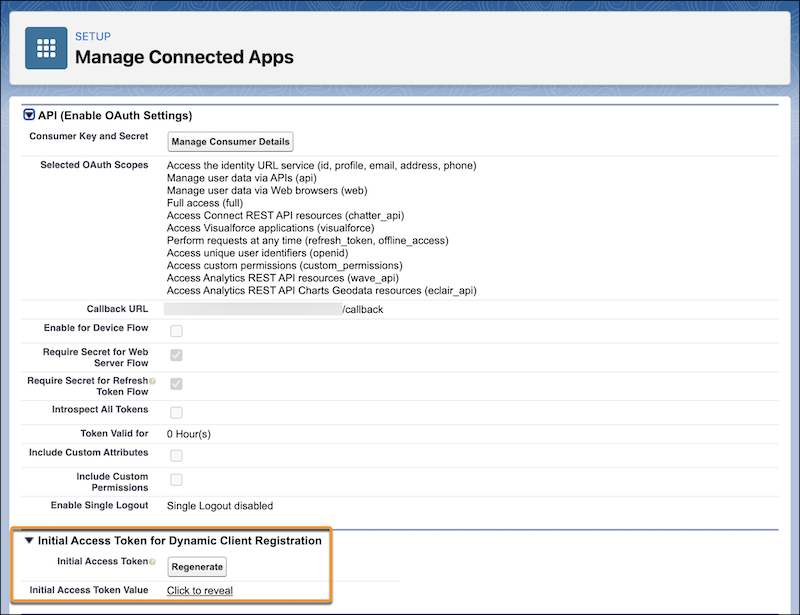
After generating the initial access token, register it with your external API gateway.