
Surface documents embedded in Salesforce records from the Template Manager. Open a preview of the document in Quip and mark it as a template.
Required Editions
| Available in: Lightning Experience |
| User Permissions Needed | |
|---|---|
| To manage templates in Salesforce: | Customize Application |
See the documents and templates embedded in Salesforce objects that you have access to. You can mark as templates only the documents that you have full access to.
- From Setup, in the Quick Find box, enter Quip, and then select Quip.
-
From the Template Manager, select a Salesforce object, and click See Object
Templates.
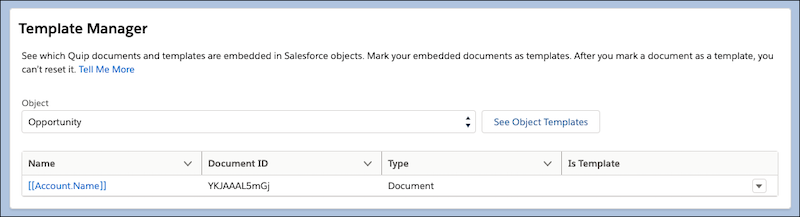
- To preview an object’s embedded documents, click the document title. The document opens in Quip.
-
To mark an embedded document as a template, click
 and select Mark as Template. The Template Manager
redirects you to Quip where you can mark the document as
a template. After you convert a document to a template, you can’t reset it.
and select Mark as Template. The Template Manager
redirects you to Quip where you can mark the document as
a template. After you convert a document to a template, you can’t reset it.
 Note You can mark as templates only the embedded documents with a blank Is Template status.
 - To refresh the Template Manager and update the Is Template status after you mark a document as a template, click See Object Templates.