
Use Synced Sharing to set access to documents linked to Salesforce records at the org level. Set Synced Sharing to Comment Access so that your users can comment on a Mutual Close Plan linked to an Opportunity and close deals as a team.
Required Editions
| Available in: Lightning Experience |
| User Permissions Needed | |
|---|---|
| To manage document access: | Customize Application |
Grant users with access to a Salesforce record Comment Access to documents linked to it. Easily set access to documents at the org level to streamline team collaboration. After a user creates a Mutual Close Plan from a template, teammates with access to the Opportunity jump into the document to comment and help. In this workflow, it is assumed that:
- The Quip Document component is set up on an Opportunity page.
- A Mutual Close Plan is added to the Quip Document component.
- The Quip Associated Documents component is set up on the Opportunity page.
- The Quip site admin that enables Synced Sharing for a Salesforce org must also be the Salesforce admin for that particular Salesforce org.
- Go to https://admin.quip.com.
- Log in using your Quip admin email and password.
- From Settings, select Salesforce.
-
In the Connected Salesforce Organizations section, click
 next to the org
that you want to manage access to.
next to the org
that you want to manage access to.
-
Click Edit Access Level from the dropdown and select
Comment Access.
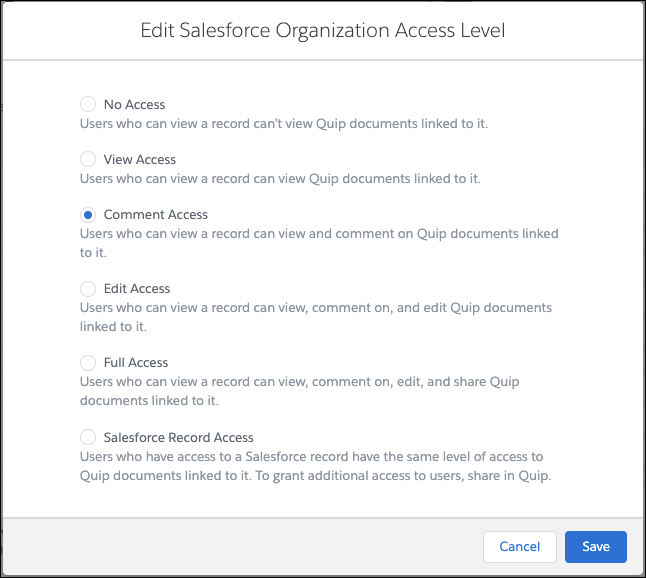
- Click Save.
After a user creates a Mutual Close Plan from the template, the document is linked to the Opportunity from the Quip Associated Documents component. With Synced Sharing Comment Access enabled, other users with access to the Opportunity can easily find, open, and comment on the document. Data stays secure in Salesforce without hindering team collaboration.