
Add your sandbox orgs to the Quip Admin Console so that your sandbox users can automatically use Salesforce Single Sign-On to log in to Quip.
Required Editions
| Available in: Lightning Experience |
| User Permissions Needed | |
|---|---|
| To add a Salesforce sandbox in Quip: | Manage Dev Sandboxes (Developer or Developer Pro only) or Manage Sandboxes (all sandbox types) |
To let your Salesforce sandbox users log in to Quip with SSO, connect your sandbox to Salesforce.
- Go the Quip Admin Console and log in with your Quip admin credentials.
- Under Settings, click Accounts & Access.
-
Under the Salesforce Org Member Policy section, click the dropdown next to Add
Salesforce Org. Select Add Salesforce Sandbox Org.
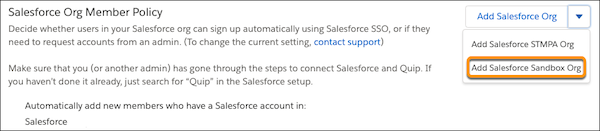
- Log in to your Salesforce sandbox and click Add Salesforce Org.
Users from your Salesforce sandbox org can now automatically log in to Quip using SSO without requesting access.