---
schema_version: "1"
id: f230beed1d5c0ca96fad5dc05d498234312359d77f8bbd999e540517e7bcd4c6
title: Let Sandbox Users Log In to Quip with SSO
collection: admin
version: current
locale: en-us
portal_url: https://docs.salesforce.com/admin/current/en-us/xcloud/264-0-0/quip_sandbox_org_members.md
canonical_url: https://help.salesforce.com/s/articleView?id=xcloud.quip_sandbox_org_members.htm&release=264.0.0&type=5
source_site: help.salesforce.com
content_type: documentation
content_hash: c2cf4300d44add70ee4f3935c72230c66afd72fff50e2d42a82133396e836f86
description: Add your sandbox orgs to the Quip Admin Console so that your sandbox users can automatically use Salesforce Single Sign-On to log in to Quip.
products:
- Quip
- Cross Cloud
release: "264"
---
# Let Sandbox Users Log In to Quip with SSO
Add your sandbox orgs to the Quip Admin Console so that your sandbox users can automatically use Salesforce Single Sign-On to log in to Quip.
### Required Editions
Available in: Lightning Experience
User Permissions Needed
To add a Salesforce sandbox in Quip:
Manage Dev Sandboxes (Developer or Developer Pro only) or Manage Sandboxes (all
sandbox types)
To let your Salesforce sandbox users log in to Quip with SSO, [connect your sandbox to Salesforce](https://help.salesforce.com/s/articleView?id=xcloud.anywhere_add_sandbox_org.htm&release=264.0.0&type=5 "Use Quip Advanced and Quip (previously Quip for Customer 360) features in a Salesforce sandbox.").
1. Go the Quip Admin Console and log in with your Quip admin credentials.
2. Under Settings, click **Accounts & Access**.
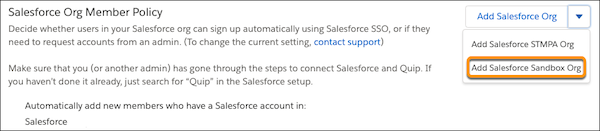
3. Under the Salesforce Org Member Policy section, click the dropdown next to **Add Salesforce Org**. Select **Add Salesforce Sandbox Org**.
4. Log in to your Salesforce sandbox and click **Add Salesforce Org**.
Users from your Salesforce sandbox org can now automatically log in to Quip using SSO without requesting access.