
Enable key business stakeholders to create company galleries and publish templates from the Quip Admin Console.
Required Editions
| Available in: Lightning Experience |
Give your template stakeholders publishing access to templates in the Quip Admin Console. You can choose whether to give them admin access, or just to give them access to the Templates section of the Quip Admin Console. Users with Templates access only can’t see other parts of the Quip Admin Console.
- Quip Site Admins and Super Admins have Edit Templates access enabled by default.
- Only Quip Site Admins with Edit access to Admin Roles and Site Settings can create a Template admin role.
- Go to https://admin.quip.com.
- Log in using your Quip admin email and password.
- Click Settings and then Site Settings.
-
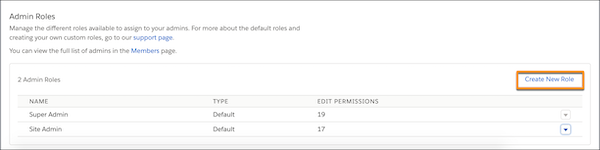
Under Admin Roles, click Create New Role.
-
Under Templates, select the level of access you want to assign the role, and click
Confirm.
Category Edit Permission View Permission Hidden Permission Templates User can create, edit, and remove galleries, and publish templates and unpublish templates. User can only see the Template Library section in the Quip Admin Console. User can’t see the Template Library section in the Quip Admin Console. 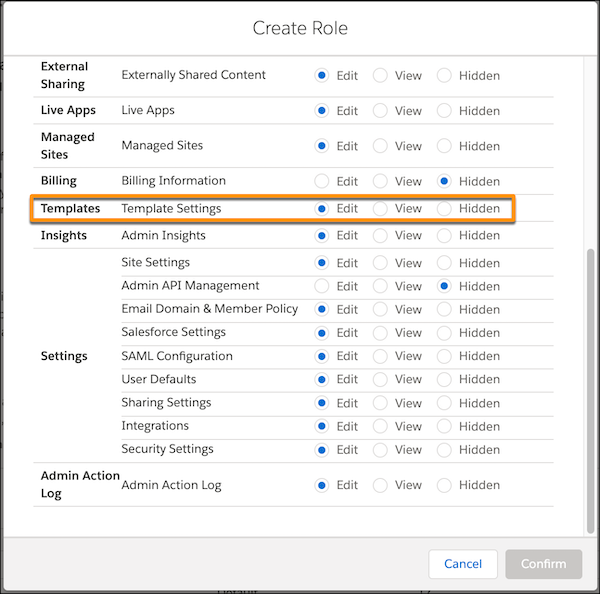
- To assign the new Templates role to a user, click Site Members, find the user, and modify the existing admin role or assign the new one.