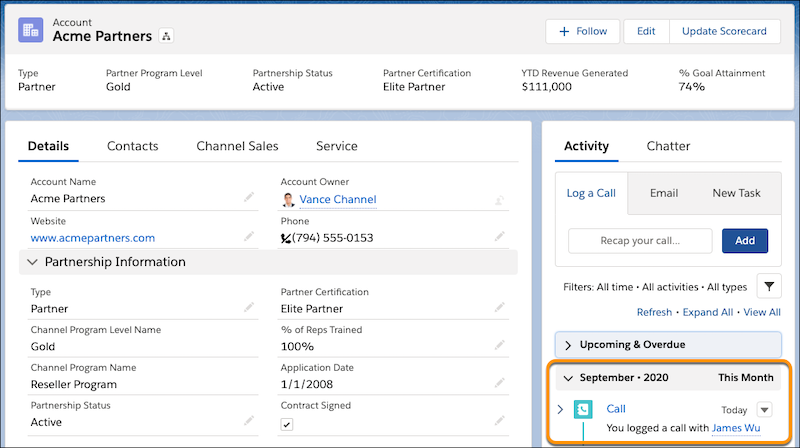
Use the Log a Call, New Task, and New Event Salesforce activities on standard and custom objects without leaving your document.
Required Editions
| Available in: Lightning Experience |
| User Permissions Needed | |
|---|---|
| To log an activity in Salesforce | Access Activities |

Tip To use text from your document in the Log a Call comments section without
copying and pasting, highlight the text before you click Log an Activity.
The highlighted text automatically appears in the Comments field.
-
In a document, click the Salesforce Actions cloud.
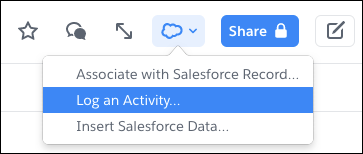
- Select Log an Activity.
-
Select an object type. Object types are listed by the Object API name.
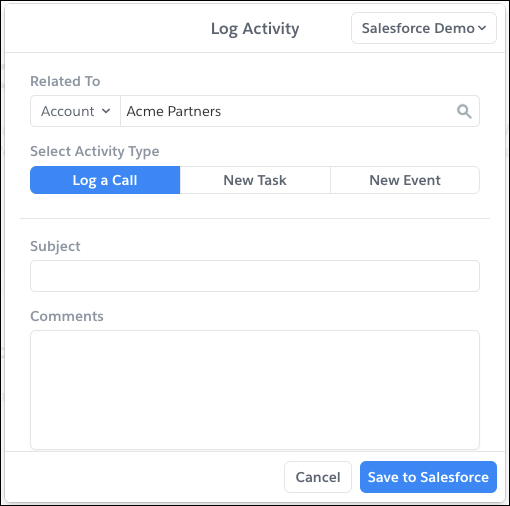
- To log activity related to a record, enter a record name.
- Select the activity type you want to track in Salesforce. Log a Call, New Task, and New Event are available only if they’re enabled for the object type.
- Complete the remaining activity fields.
- Save the action.
Your activity now appears in the related record’s Activity Timeline.