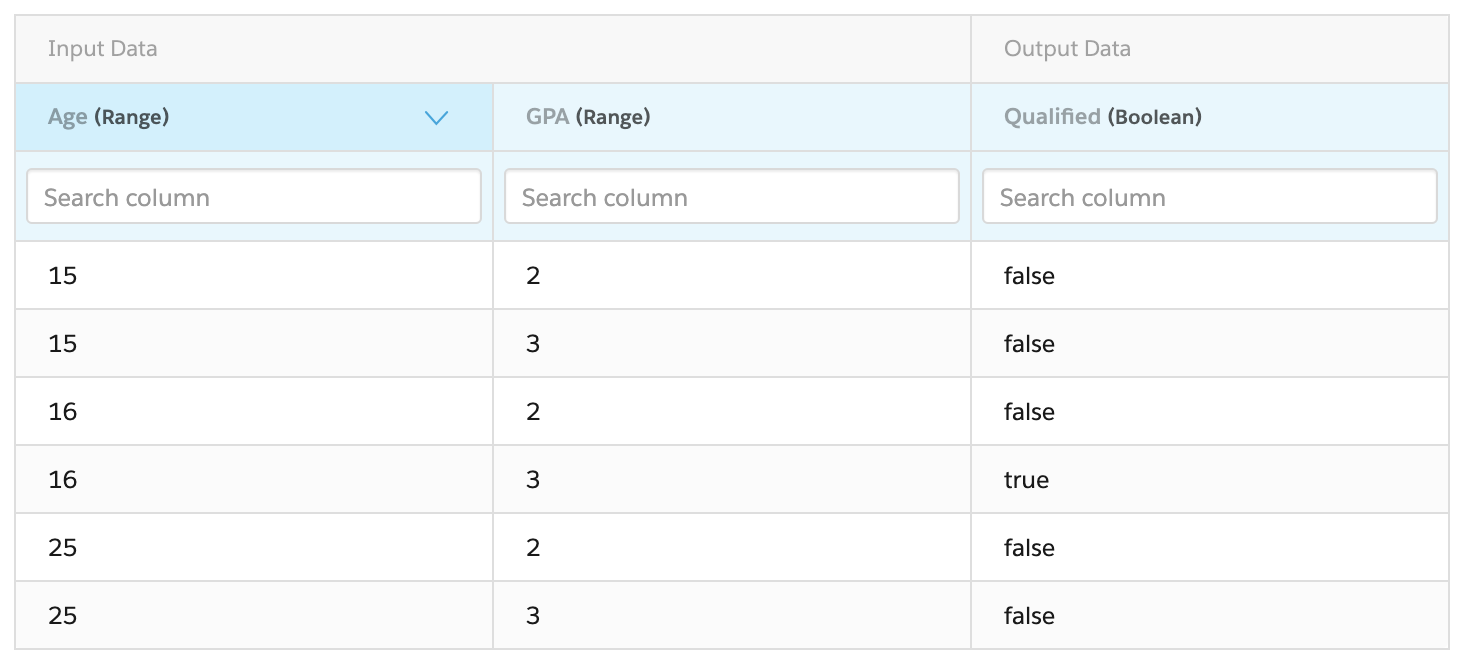
For the managed package runtime, before you can create the Integration Procedure example with a Matrix Action, you must create the GoodStudentDiscountEligibility calculation matrix that it calls. This matrix returns a Qualified value of true for an Age between 16 and 24 and a GPA of 3.0 or greater.
 This information is for Omnistudio for Managed Packages. For Omnistudio on standard runtime, see Omnistudio Help.
- From the Vlocity Calculation Matrices tab, click New.
-
In the New Vlocity Calculation Matrices window,
choose Standard.
Some Vlocity versions don't present this choice.
- In the Calculation Matrix Name box, type GoodStudentDiscountEligibility.
- Click Save. The record page for the new matrix opens.
- On the record page, click the Related tab.
- Click the GoodStudentDiscountEligibility V1 link. This is version 1 of the matrix.
-
In the Table section, click Add Header three times. Enter
the following information for each header:
Header Name
Header Type
Data Type
Matrix Display Order
Age
Input
Number Range
1
GPA
Input
Number Range
2
Qualified
Output
Boolean
3
- Click Save Data, then click Edit Data.
-
In the resulting table, enter the following values:
Age
GPA
Qualified
15
2
false
15
3
false
16
2
false
16
3
true
25
2
false
25
3
false
For details about how number ranges work, see Numeric Ranges in Calculation Matrices (Managed Package).
- Click Save Data again.
- Click the pencil icon to the right of the Enabled checkbox and check the box.
- If the Priority setting has no value, enter a value of 1.
-
Click Save. The finished matrix version looks like this: