
For the managed package runtime, cards have states. Each state displays a list of fields from either the layout or the individual card data source, plus a list of Vlocity Actions. You can also associate each state with a flyout, an extended version of a card with supplemental data displayed in a larger area.
 This information is for Omnistudio for Managed Packages. For Omnistudio on standard runtime, see Omnistudio Help.
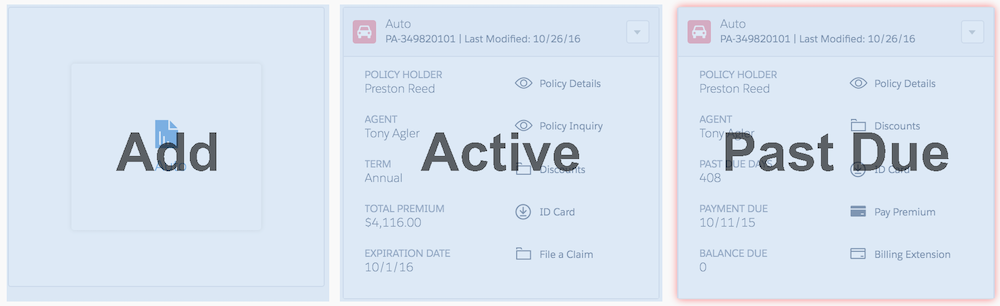
Cards states enable presentation of different CRM interactions per state. For example, when a customer adds an auto insurance policy, the policy becomes active, but when a customer misses a payment the policy state becomes past due. Cards with different states present different data.
You can customize each card via its state to display various clickable actions, information, and optional visual cues. For example:
- If an Automobile policy remains unpurchased, the policy card (via its state) likely offers a single action, specifically, "Add [a New Policy]".
- A card for an active Automobile policy could display information such as the policy holder's name plus relevant actions, such as "File a Claim".
- If an Automobile policy falls past due, a card can include a red border, a balance due amount, and Actions such as, "Pay [the] Premium", "[Request a] Billing Extension", and so on.
You can enable a Blank Card State to display information when no data is returned from the configured data source.
In the Cards Framework, an object returns only one state and creates one card, by default. However, if you apply multiple state filters to the parent field, there’s a possibility of getting a card for each filter state, as the filter is applied to all objects.