Create a single phone number that connects your customers to
your team. Your team can take and make calls from Salesforce. Personalize conversations based on
past call history, take notes, and finalize a deal or case details all within Salesforce. Align
your customers’ phone experience with your company by uploading your own recorded messages and
wait music.
Required Editions
| Essentials is available in: Lightning Experience |
| Available in: Essentials Edition |
Dialer for Essentials consolidates your company’s phone calls to one phone number, so incoming
calls have a better chance of connecting to someone on your team. Your team takes the calls from
either the Sales app or Service console app, where they can view and update related records like
contacts or leads, see call history, take notes, and log calls.
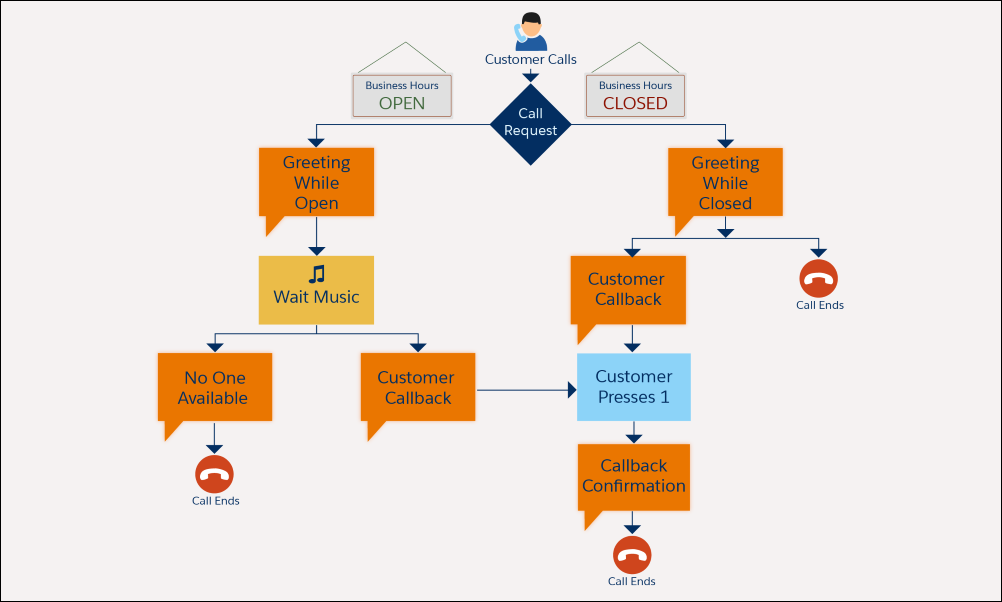
When you’re open and available, the customer hears your Greeting While Open message and Wait
Music. When you’re closed, they hear the Greeting While Closed message.
If your team doesn’t pick up the call, the customer hears either the No One Available message
or the Customer Callback message depending on your settings. If the customer requests a callback,
they hear the Callback Confirmation message.
Want to see it in action? Our 1-mnute feature
tour will show you how it all works. Watch the tour:  Use a Phone in Salesforce with Dialer for
Essentials
(1 minute)
Use a Phone in Salesforce with Dialer for
Essentials
(1 minute)