Use Einstein Data Exploration Consent to manage project and object permissions for
Salesforce data scientists. With this access, Salesforce can develop and improve your Einstein
features. For example, you can see the content that your customers pay attention to and find
patterns to best advertise your products or services.
Required Editions
| Available in: Lightning Experience in Professional, Enterprise,
Performance, Unlimited, and Developer Editions.
|
| User Permissions Needed |
| To grant access to apps and objects in Einstein Data Exploration Consent: |
Data Exploration |
To grant project and object permissions in Salesforce requires a pilot program agreement with
Salesforce. To participate in a pilot program, contact your Salesforce Account Executive.
To grant access to projects and objects:
- From Setup, in the Quick Find box, enter Einstein Data Exploration
Consent, and then select Einstein Data Exploration
Consent.
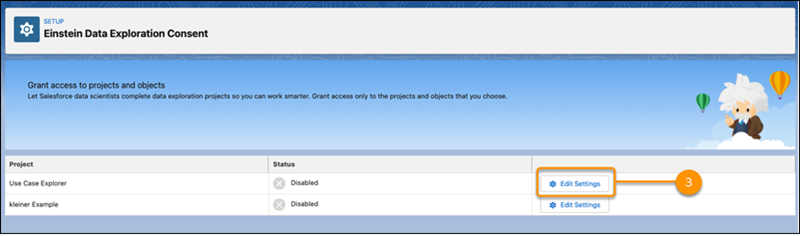
- Find the project that you want Salesforce data scientists to access. In this example, the
project is Use Case Explorer.
- Select Edit Settings.
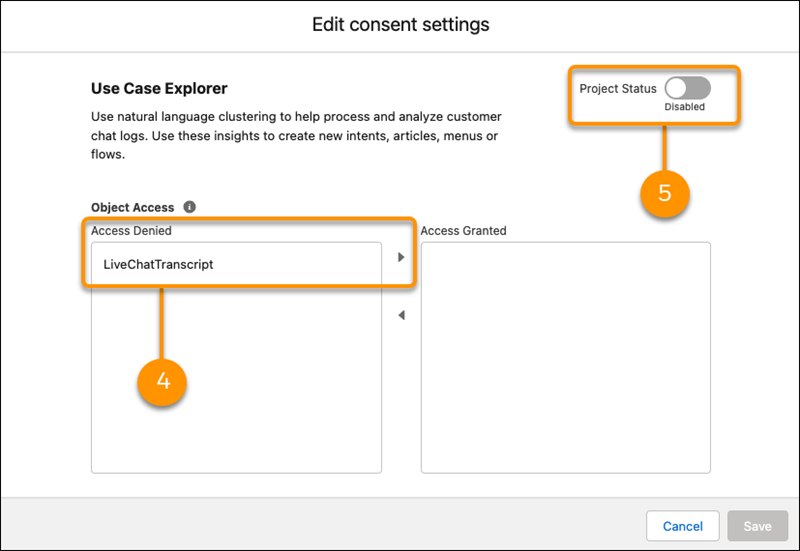
- Under Access Denied, select the objects that you want to grant access to and use the arrow
to move them to the Access Granted column.
- Enable Project Status.
- Save your changes.
- Tell your Salesforce pilot program contact that you granted project and object permissions.