
Use the custom reports created with the Survey Question Score report type to view responses for every type of question except for short text and long text questions. The report can track responses by survey invitation or by survey version.
| Available in: both Salesforce Classic and Lightning Experience |
| Available in: Enterprise, Unlimited, and Developer Editions |
| Available with the Survey Response Pack, Feedback Management - Starter, and Feedback Management - Growth licenses |
The question type determines the column interpretation. Questions can be categorized by:
- Score: Net Promoter Score (NPS), rating, score, and slider
- Answer choice: Multiple selection, single selection, and picklist
- Ranking
- Date
The sample reports represent responses from two participants.
The Survey Invitation: Name column displays the invitation name for which response is recorded. If there are multiple invitations for a survey, results are aggregated as a single value in the column name.
Score
Here's a survey invitation report with NPS, rating, score, and slider questions.
| Question Name | Question Type |
|---|---|
| How likely are you to recommend our service to a friend or colleague? | NPS |
| How would you rate our service? | Rating |
| How would you score our customer support agent's knowledge about your case? | Score |
| What overall score would you give our customer support process? | Slider |
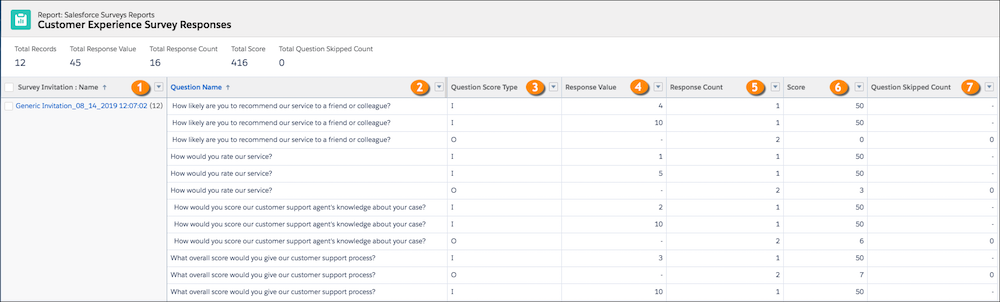
| Field Name | Description |
|---|---|
| Survey Invitation: Name (1) |
The name of the invitation for which responses are recorded. |
| Question Name (2) |
The name of the question for which responses are recorded. |
| Question Score Type (3) |
The value is either I (individual) or O (overall).
|
| Response Value (4) |
I – The score that one or more participants select for a question. |
| Response Count (5) |
The value is either I (individual) or O (overall).
|
| Score (6) |
The value is either I (individual) or O (overall). For rating, score, and slider questions:
For NPS questions:
|
| Question Skipped Count (7) |
O – The number of participants who skip a question. |
Answer Choice
Here's a survey invitation report with multiple selection, picklist, and single selection questions.
| Question Name | Question Type |
|---|---|
| Why did you raise the customer support case? | Multiple Selection |
| How did our customer support agent contact you? | Picklist |
| How many days did it take to resolve your case? | Single Selection |
The report has multiple fields with inputs about the survey question scores.
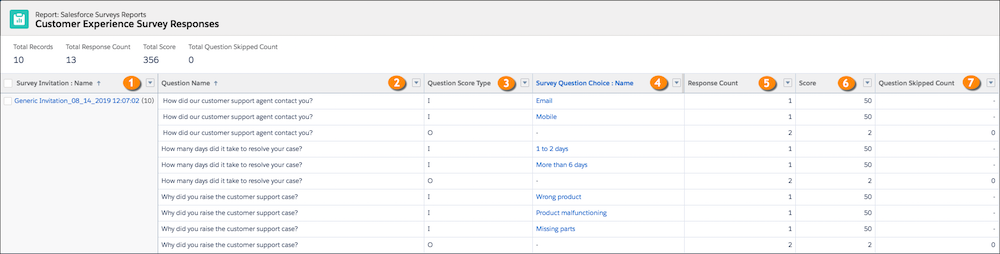
| Field Name | Description |
|---|---|
| Survey Invitation: Name (1) |
The name of the invitation for which responses are recorded. |
| Question Name (2) |
The name of the question for which responses are recorded. |
| Question Score Type (3) |
The value is either I (individual) or O (overall).
|
| Survey Question Choice: Name (4) |
I – The answer choice that one or more participants select for a question. In this report, the multiple selection question has three I rows because one participant can select two answer choices. |
| Response Count (5) |
|
| Score (6) |
|
| Question Skipped Count (7) |
O – The number of participants who skip a question. |
Ranking
This survey invitation report contains a ranking question.
| Question Name | Answer Choices |
|---|---|
| Rank what you liked about our customer support agent. |
|
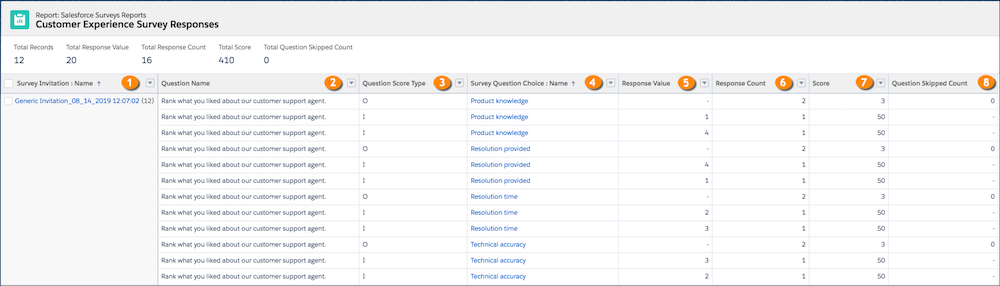
| Field Name | Description |
|---|---|
| Survey Invitation: Name (1) |
The name of the invitation for which responses are recorded. |
| Question Name (2) |
The name of the question for which responses are recorded. |
| Question Score Type (3) |
The value is either I (individual) or O (overall).
|
| Survey Question Choice: Name (4) |
I – The ranking item of a question. |
| Response Value (5) |
I – The rank that one or more participants select for a ranking item. |
| Response Count (6) |
|
| Score (7) |
|
| Question Skipped Count (8) |
O – The number of participants who skip a question. |
Date
This survey invitation report contains a date question.
| Question Name | Question Type |
|---|---|
| When did our customer support agent first contact you? | Date |

| Field Name | Description |
|---|---|
| Survey Invitation: Name (1) |
The name of the invitation for which responses are recorded. |
| Question Name (2) |
The name of the question for which response is recorded. |
| Question Score Type (3) |
The value is either I (individual) or O (overall).
|
| Date Response (4) |
I – The date selected in a question. |
| Response Count (5) |
|
| Score (7) |
|
| Question Skipped Count (8) |
O – The number of participants who skip a question. |